Knowledge base
1000 FAQs, 500 tutorials and instructional videos. Here, there are only solutions!
Troubleshooting the "Faceted Search" module in Prestashop
This guide helps you troubleshoot an issue with the CMS Prestashop, specifically with its “Faceted search” module, which manages filters on product category pages.
The problem
This specific Prestashop search module creates a database cache to speed up searches, however, the corresponding table is never cleared, which poses a problem for the hosting infrastructure.
First solution
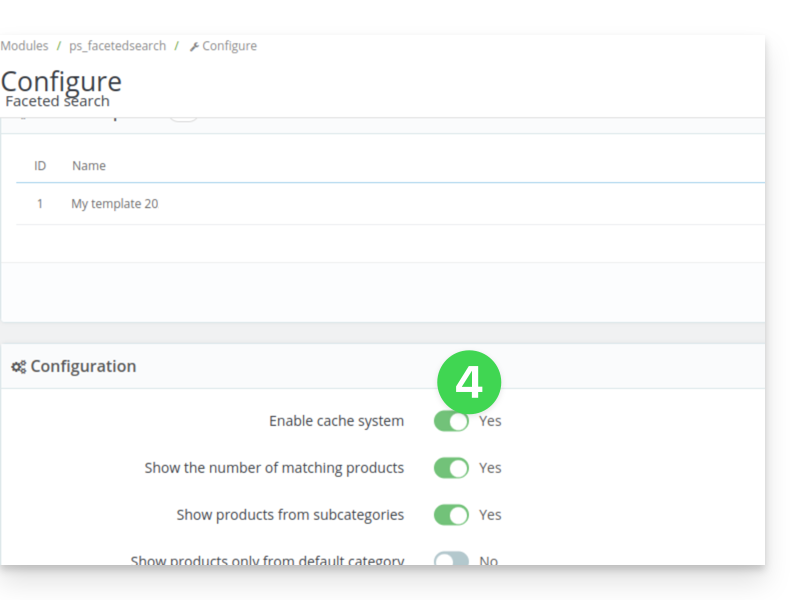
The first solution is to disable the caching feature.
If you have a caching module, such as Ultimate Cache, there will be no negative impact.
To do this:
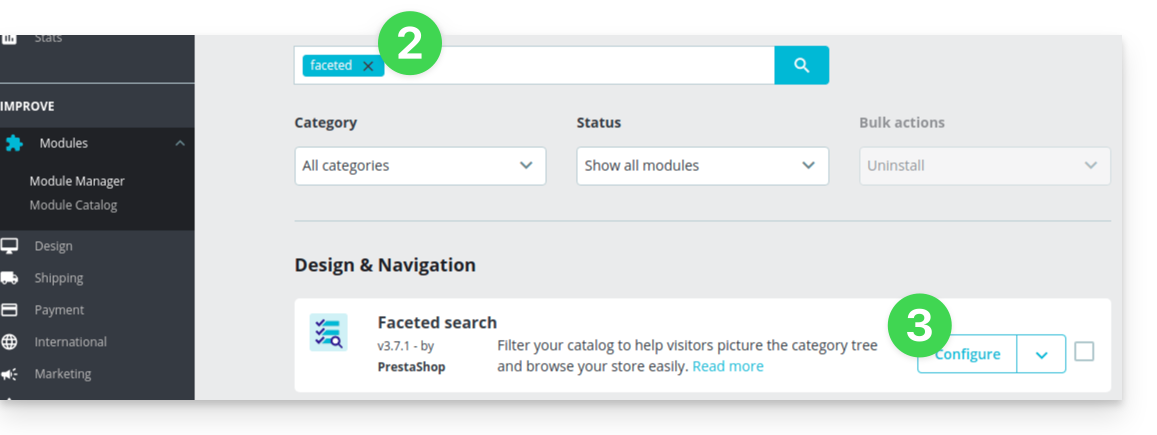
- In the PrestaShop administration panel, go to Modules → Module Manager.
- Select Modules and use the search field to find “facet”.
- Click on Configure next to the module found:
- Disable this button:
Second solution
The second solution is to set up a cron job to clean the table, for example, every evening:
- From the module settings, copy the existing URL from the
Clear cachebutton:
Then, from the Infomaniak Manager, create a webcron (refer to this other guide for more information) to execute the URL copied in step 1 above, for example once a day and at night.
Link to this FAQ: https://faq.infomaniak.com/2521
Has this FAQ been helpful?