Knowledge base
1000 FAQs, 500 tutorials and instructional videos. Here, there are only solutions!
Getting Started Guide: Newsletter
This guide shows you how to use the Newsletter tool offered by Infomaniak to create and send newsletters, i.e., recurring messages to multiple recipients.
Why use Newsletter instead of a Mail Service
A newsletter is a periodic communication tool sent by email to a specific group of subscribers. It generally aims to inform, share news, updates, or relevant content on a specific topic, and to maintain a relationship with a targeted audience.
Newsletters can contain articles, announcements, promotions, links to recent content, upcoming events, and sometimes exclusive offers for subscribers. The main objective is to provide interesting and relevant content to encourage engagement and maintain subscriber interest.
Infomaniak Newsletter allows you to schedule and send newsletters to a list of email recipients who are waiting for your messages. This allows you to effectively and personally distribute email marketing campaigns and maintain regular and relevant communication with your customers and subscribers.
The features include creating templates, managing the subscriber list, and analyzing performance, all of which are not directly possible with a traditional Mail service. Furthermore,the tool has its own interface, independent within your browser, and completely separate fromMailInfomaniak does not require a messaging application. Cela signifie que si vous possédez déjà des contacts à qui vous souhaitez écrire avec leur accord, il faudra au préalable les importer sur l'outil.
Prerequisites
- You must own a domain name on which you will activate the Newsletter:
- Access to its DNS zone if the domain name is not hosted with Infomaniak.
- Create a new domain name if necessary.
- Have credits for the Newsletter service to enable sending (1 credit = 1 newsletter sent to 1 subscriber).
You must have the explicit consent of your recipients via the double opt-in model. Sending spam and using purchased/rented address lists is prohibited. The owners of the domain name used for sending newsletters are legally responsible, and violation of the terms and conditions may result in account suspension.
Enable the Newsletter tool
To enable the Newsletter tool for the first time:
- Click here to access your product management in the Infomaniak Manager (need help?).
- Click on START FOR FREE to subscribe to the Newsletter offer.
- Enter the domain name that will be used (and which you must own - see prerequisites).
- Click the blue button to Confirm.
- Start using the tool - or consult this other guide if you encounter any issues or if the screen prompts you to configure additional settings.
Accessing the Newsletter Tool
To access the Newsletter once it has been activated:
- Click here to access the management interface for your product in the Infomaniak Manager (need help?).
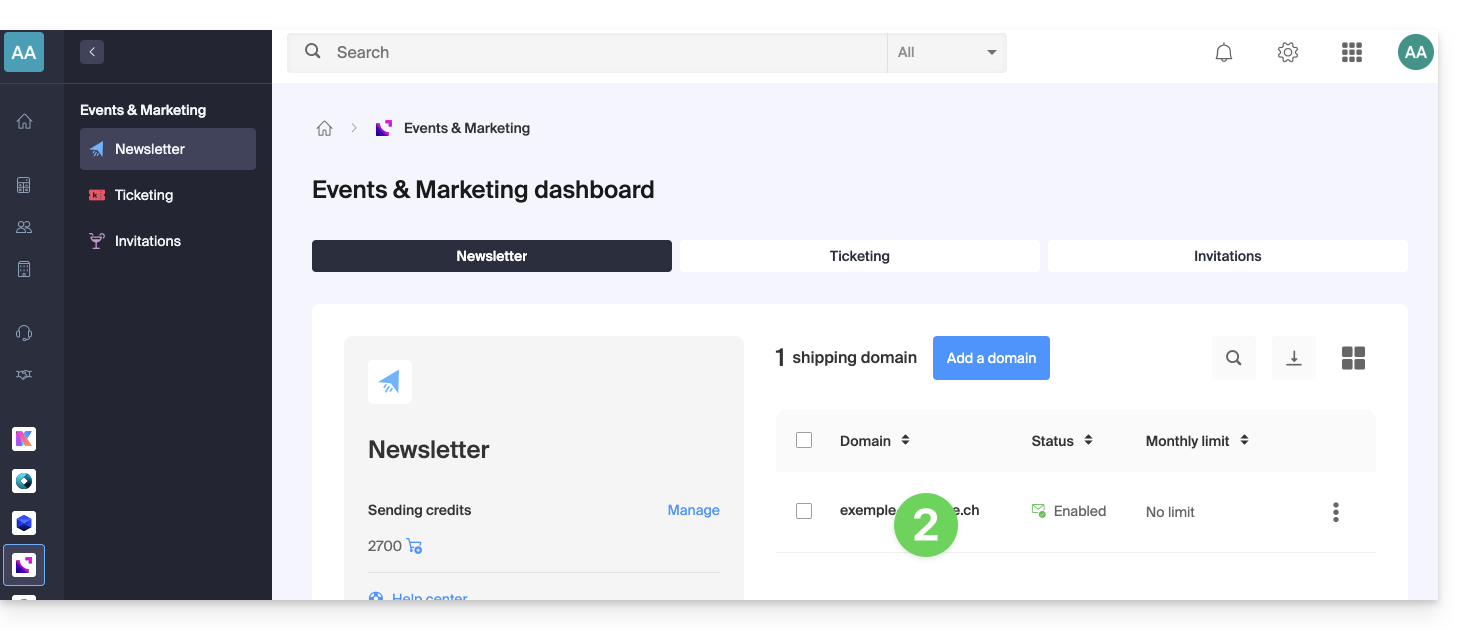
- Click on the domain name in question in the table that appears:
Learn more about the tool
- Import contacts
- Create and send a newsletter
- Newsletter credits
- Newsletter subscription form
- Double opt-in to avoid being flagged as a spammer
- Resend a newsletter to specific types of subscribers
- Variables to personalize your content
- Use the Newsletter API
See all Newsletter FAQs; click here to share feedback or suggestions about an Infomaniak product.
Link to this FAQ: https://faq.infomaniak.com/2163
Has this FAQ been helpful?