Knowledge base
1000 FAQs, 500 tutorials and instructional videos. Here, there are only solutions!
Link an Infomaniak domain name to an external service
Update 10/05/2026
This guide explains how to connect a domain name managed with Infomaniak to an external service.
Specific guides
Click on the link corresponding to the external service you wish to connect to your domain name registered with Infomaniak:
- Wix
- Shopify
- Google Sites
- dynamic devices such as a NAS, an Internet box, or a smart home hub, etc.
Guide for any other external service
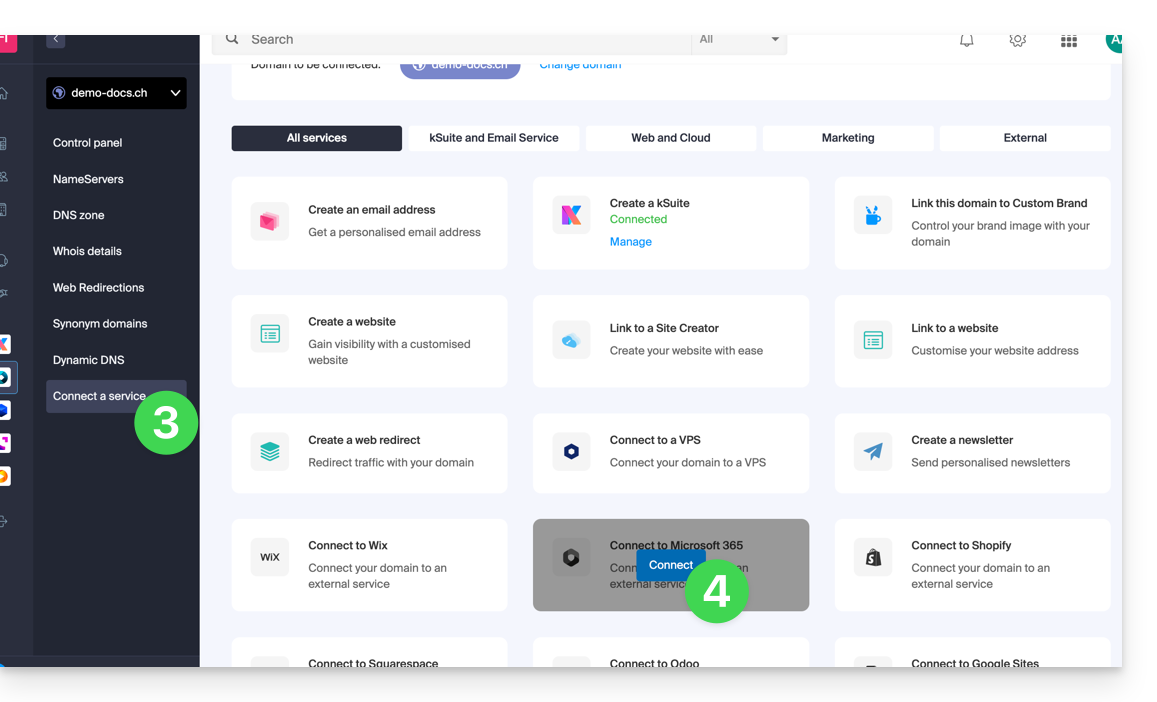
To connect your domain name to any other external service such as Odoo, Microsoft 365, or Squarespace, follow the procedures below:
- Click here to access the domain management section in your Infomaniak Manager (❓: help).
- Click on the name of the domain in question.
- Click on Connect a service in the left-hand menu.
- Click the blue Connect button on the tile corresponding to your external service and follow the procedure:
If the external service you want to connect is not in the list, you will need to manually change some of the technical information for your domain name:
- Refer to this other guide to modify all DNS records if that is what you were asked to do…
- … or this other guide if you only need to modify specific DNS records (for example, the MX record if you need to link your domain to an external email service).
Link to this FAQ: https://faq.infomaniak.com/718
Has this FAQ been helpful?