Knowledge base
1000 FAQs, 500 tutorials and instructional videos. Here, there are only solutions!
Manage ads within a video streaming player
Update 10/06/2026
This guide explains how to integrate advertisements into Infomaniak video streaming feeds.
Introduction
- Advertisements are integrated via links/tags provided by your advertising network (Google Marketing Platform, OpenX, Oath, Tremor Video DSP, etc.).
- Advertising can be configured as:
- Pre-roll: loaded at the beginning of video playback.
- Mid-roll: triggered at a specific time (minute:second) during playback.
- All URLs provided must necessarily use the secure HTTPS protocol.
Configure the video streaming player's advertising
Prerequisites
- Create a Player (❓: help).
Once you are in your Player configuration:
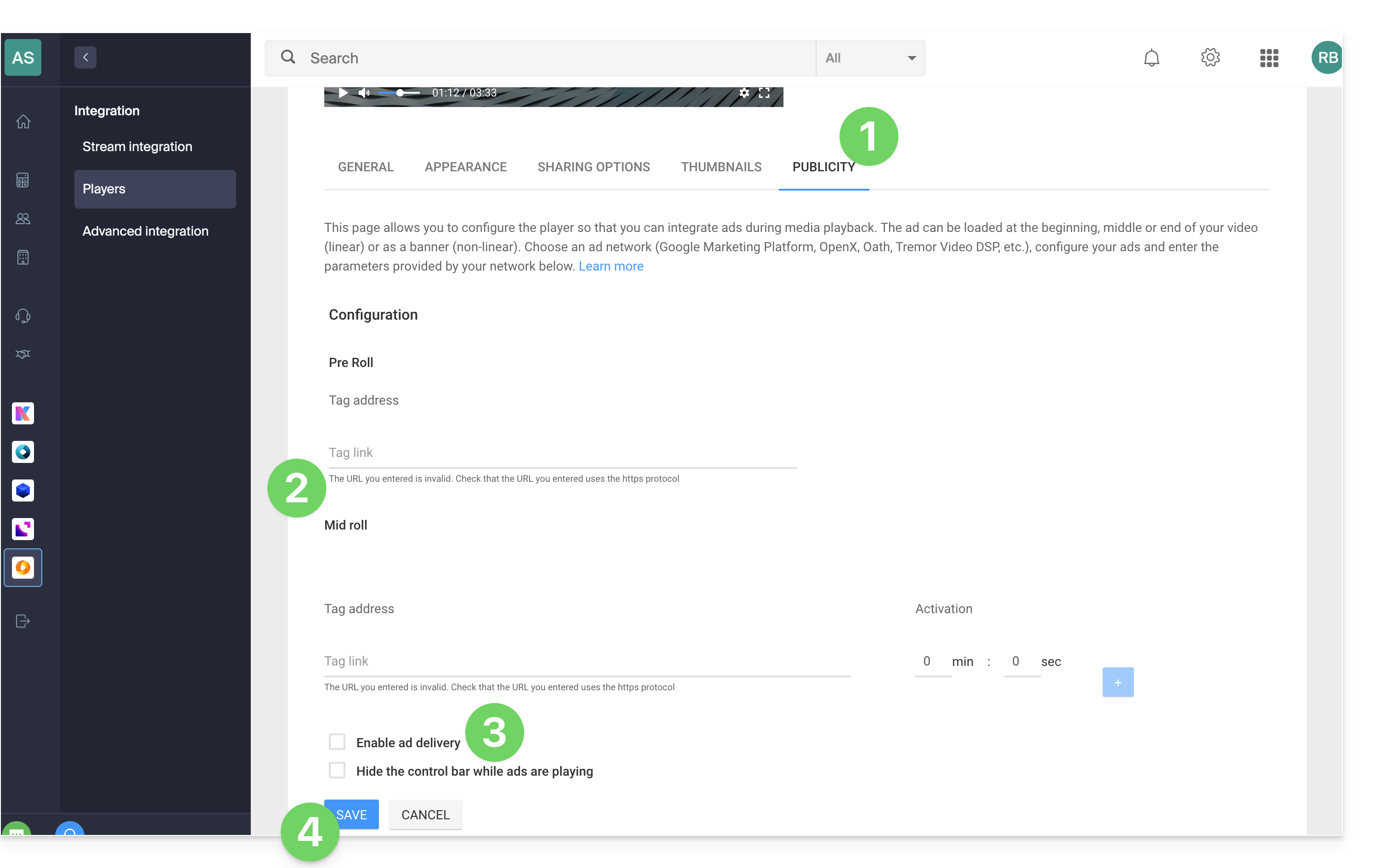
- Click on the Advertising tab.
- Enter the information provided by your advertising agency:
- Pre-roll: enter the HTTPS URL of your ad tag in the field.
- Mid-roll: enter the HTTPS URL of your tag, set the activation time (minutes:seconds) from which the advertisement should appear, then click the + button.
- Check the desired additional options:
- Enable ad broadcasting
- Hide the control bar during ad playback
- Click on the Save button:
Link to this FAQ: https://faq.infomaniak.com/2841
Has this FAQ been helpful?