Knowledge base
1000 FAQs, 500 tutorials and instructional videos. Here, there are only solutions!
Chat with Euria via kChat
This guide will quickly introduce you to the essential functions of Euria, the artificial intelligence available to you within kSuite, which is particularly effective as a conversational agent on the kChat app.
Introduction
- Euria can help you perform all kinds of calculations, translations, provide information on various topics, and answer your questions.
- Please read this other guide about the model used and the responsibilities of each party.
- When a new user is added, they receive a message from Euria welcoming them.
- Please read this other guide about the possibilities of AI-powered summaries on kChat.
Add Euria to your kChat contacts
The bots currently available on kChat are already part of your contacts.
If you don't see them yet, click in the left-hand menu of kChat…
- … on the channel search (bots also appear as channels)
- … or on the + icon next to Direct Messages to search for the bot
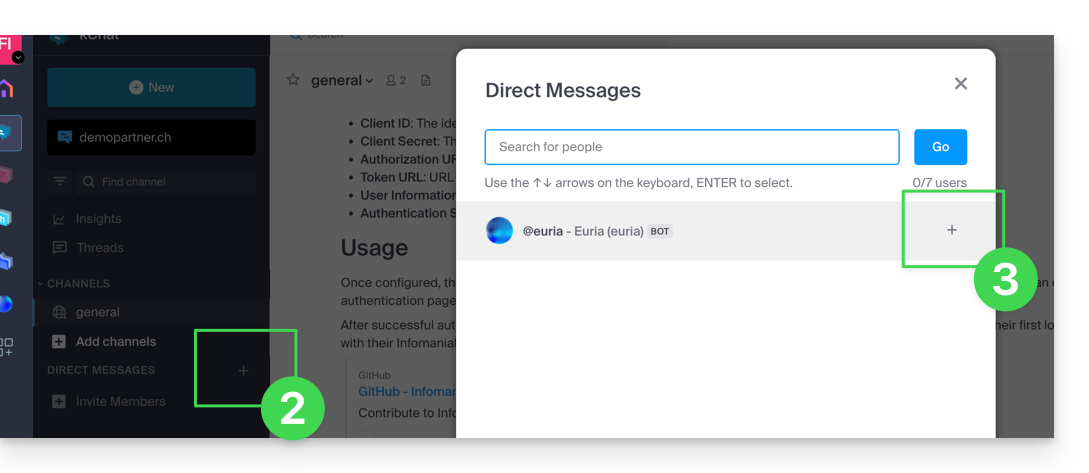
- Add the bots that are identified as such with the [bot] label, or search for the term bot or chat.
Do not create a group conversation between the bots and yourself, as this will not work. You need to create a private chat channel between each bot individually and yourself.
Simply write to it as if you were conversing with an acquaintance: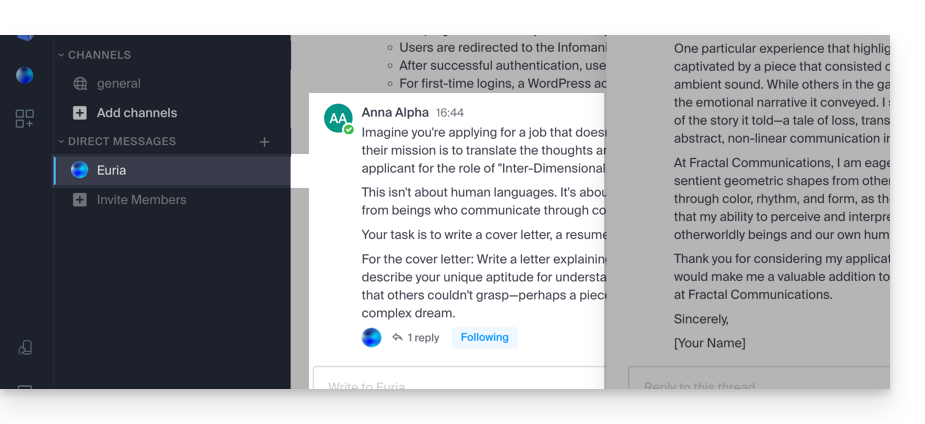
Link to this FAQ: https://faq.infomaniak.com/2840
Has this FAQ been helpful?