Knowledge base
1000 FAQs, 500 tutorials and instructional videos. Here, there are only solutions!
Modify an existing Cloud Server offer
This guide explains how to benefit from new versions of PHP, MySQL, and many other packages by migrating a Cloud Server to a new Infomaniak infrastructure.
Introduction
- The migration is free and takes place in 3 steps:
- Infomaniak provides a next-generation Cloud Server with the same features as the current one, at the same price and with the same commitment period.
- You have one month to move your hosting to the new Cloud Server provided (see below).
- Once your hosting has been moved to the new server, cancel the old Cloud Server.
- FTP access and databases remain unchanged.
- Only the supported versions of PHP and MariaDB, as well as the server's IPv4 and IPv6 addresses, will change for hosting.
- The hostnames will not change and are automatically updated to point to the new IP addresses.
- During this operation, the statistics are reset.
Migration procedure
By migrating your data to the new Cloud infrastructure, you increase the performance and reliability of your websites, which will have access to the latest technologies:
- Click here to access the management of your product on the Infomaniak Manager (need help?).
- Click directly on the name assigned to the product in question.
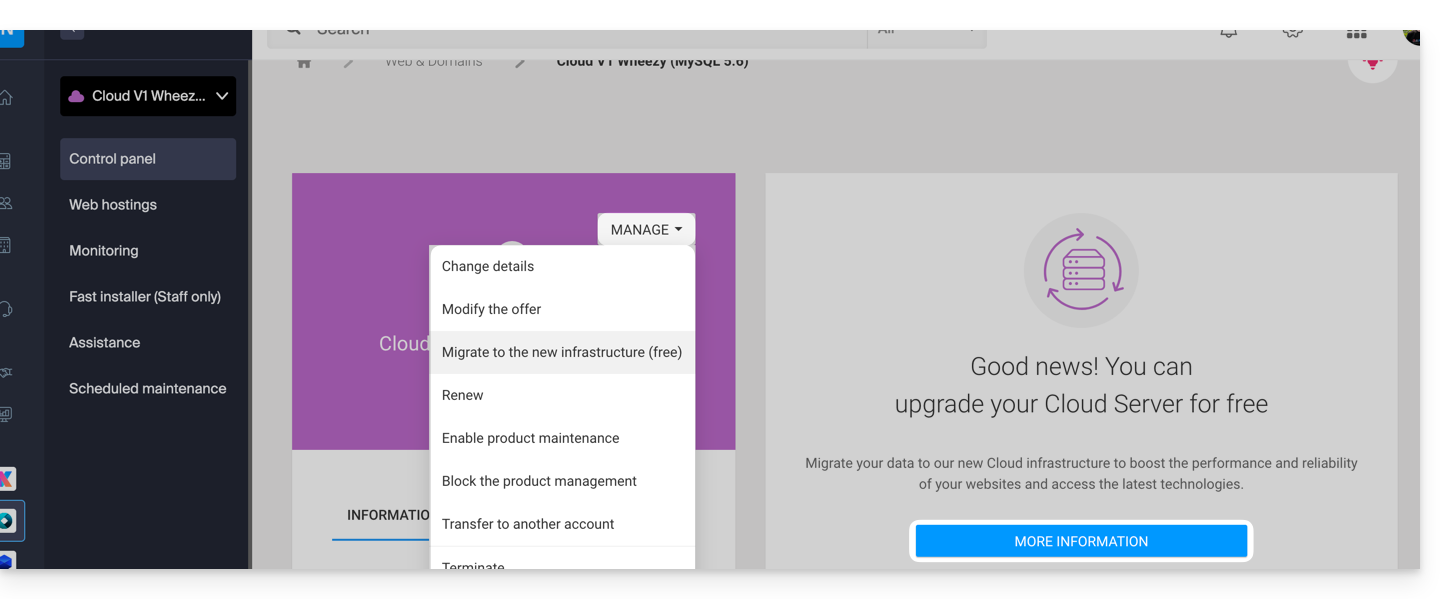
- Click on the blue button in the "Upgrade your Cloud Server" box (or on Manage):
Link to this FAQ: https://faq.infomaniak.com/2813
Has this FAQ been helpful?