Knowledge base
1000 FAQs, 500 tutorials and instructional videos. Here, there are only solutions!
Modify PHP_CLI variables for the Cloud Server
This guide explains how to modify the variables of the PHP-CLI extension, which is available by default on Infomaniak's Cloud Server.
Modifying PHP_CLI variables
To access the PHP extensions for your Cloud Server:
- Click here to access the management of your Cloud Server in the Infomaniak Manager (need help?).
- Click directly on the name assigned to the Cloud Server in question.
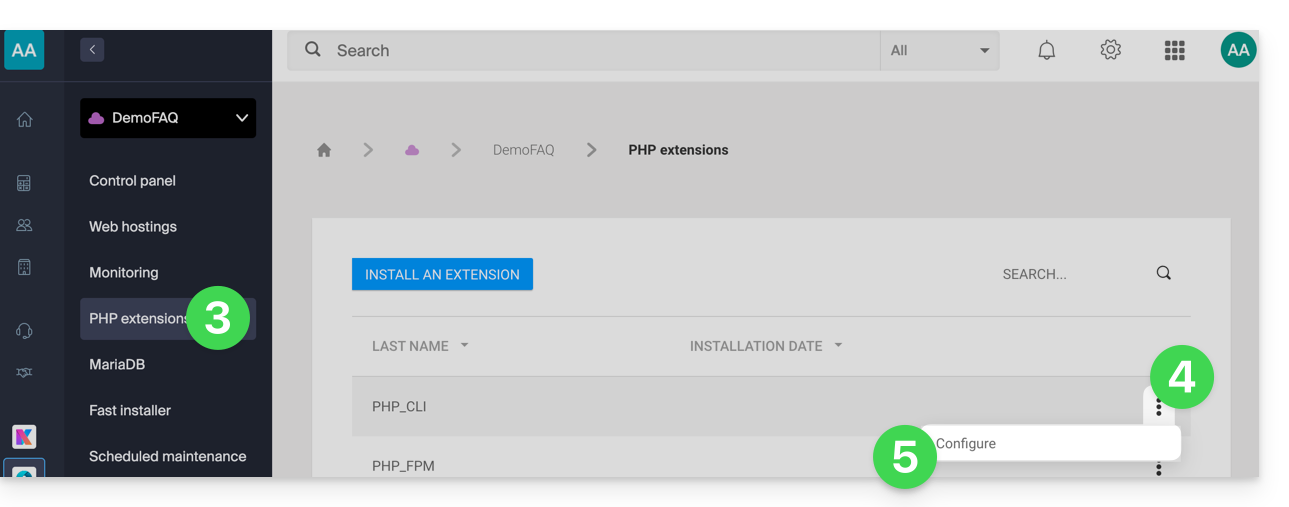
- Click on PHP Extensions in the left-hand menu.
- Click on the action menu ⋮ to the right of PHP-CLI in the table that appears.
- Click on Configure:
- Modify the following variables:
allow_url_fopen,allow_url_include,memory_limit,max_execution_time,short_open_tag,allow_local_infile - Click the blue Save button.
Link to this FAQ: https://faq.infomaniak.com/2576
Has this FAQ been helpful?