Knowledge base
1000 FAQs, 500 tutorials and instructional videos. Here, there are only solutions!
Summarize a kChat discussion using Euria
This guide will quickly introduce you to the essential functions of Euria, the artificial intelligence available within kSuite, which is particularly effective for summarizing discussions on the kChat app.
Introduction
- Euria can help you perform all kinds of calculations, translations, provide information on various topics, and answer your questions.
- Please read this other guide about the model used and the responsibilities of each party.
- When a new user is added, they receive a welcome message from Euria.
- Please read this other guide about the possibilities for discussing with the AI in kChat.
Automatically summarize a kChat message
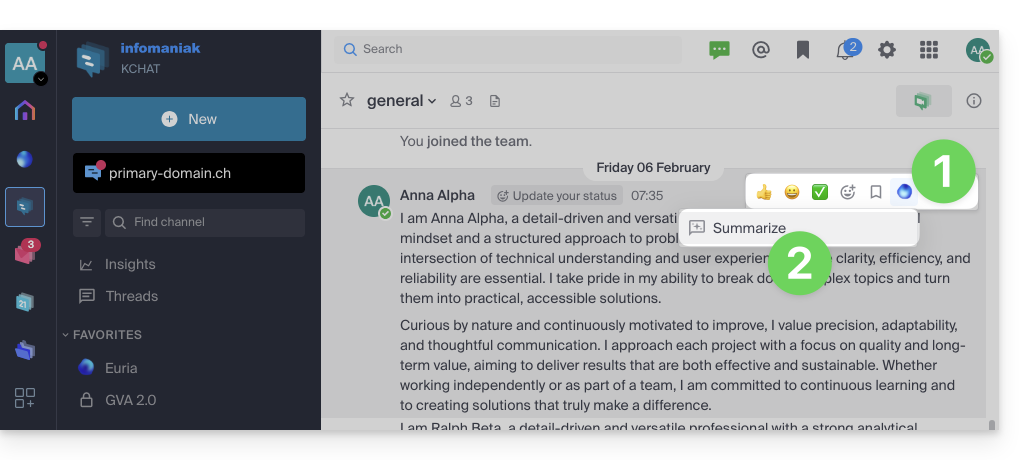
To obtain a summary of a kChat message:
- Hover over the message and select the Euria actions icon in the upper right corner.
- Click on Summarize the conversation:
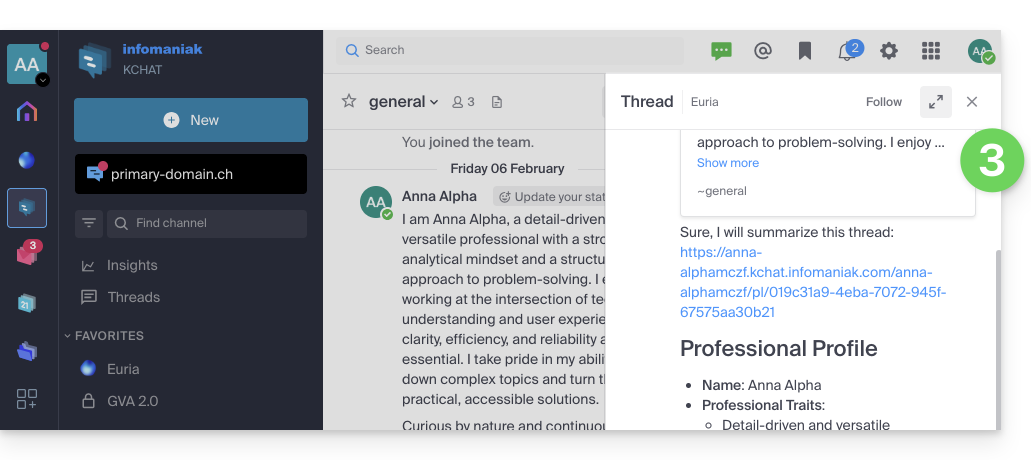
- Get the summary, generated by Euria in the right sidebar:
Link to this FAQ: https://faq.infomaniak.com/2480
Has this FAQ been helpful?