Knowledge base
1000 FAQs, 500 tutorials and instructional videos. Here, there are only solutions!
Using Infomaniak DynDNS and FritzBox
Update 10/05/2026
This guide explains how to access a Fritzbox connected to the internet with a dynamic IP address via a domain name.
Prerequisites
- Have a device that allows you to configure a custom dynamic DNS provider.
- A dynamic DNS must have been created for the domain in question via the Infomaniak Manager (❓: help).
Connecting a Fritz!Box to a domain name
To do this:
- Open the Fritzbox management interface by enabling Advanced mode if necessary.
- Go to Internet then Access Authorization.
- Click on the Dynamic DNS tab:
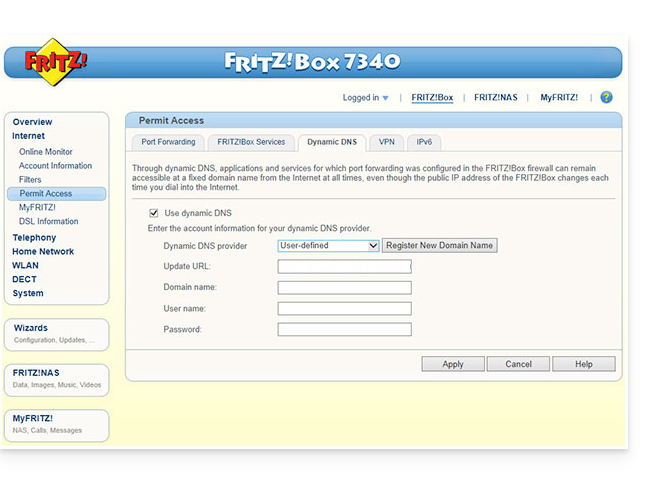
- Choose the provider: “Custom”.
- Fill in the following fields:
- Update URL (as displayed below, or replace
ipaddrwithip6addrif you want Fritzbox to replace the "placeholder" with the IPv6 address instead of the IPv4 address):https://infomaniak.com/nic/update?system=dyndns&hostname=<domain>&myip=<ipaddr> - Domain name:
the URLconfigured in the Manager when adding the Dynamic DNS (❓: help). - Username:
the IDdefined in the Manager when adding the Dynamic DNS (❓: help). - Password:
the passworddefined in the Manager when adding the Dynamic DNS (❓: help).
- Update URL (as displayed below, or replace
- Click Apply to finish.
Link to this FAQ: https://faq.infomaniak.com/2400
Has this FAQ been helpful?