Knowledge base
1000 FAQs, 500 tutorials and instructional videos. Here, there are only solutions!
Import photos to the kDrive mobile app (iOS)
This guide explains how to automatically transfer photos from your mobile device (iOS) to kDrive Infomaniak.
Introduction
- Once this feature is enabled, photos from your mobile device will be saved to the kDrive folder of your choice.
- Foreground mode:
- Synchronization works optimally when the kDrive application is active and in the foreground.
- Background mode
- iOS limits the operation of closed applications.
- kDrive will still be able to perform uploads in short sessions (approximately every 15 minutes) or during the night if the device is charging and connected to Wi-Fi.
- File naming: automatic backup may rename your files to avoid collision errors or duplicates (see below).
Enable sending to kDrive on iOS (iPhone, iPad)
Prerequisites
To configure automatic backup:
- Open the kDrive mobile app.
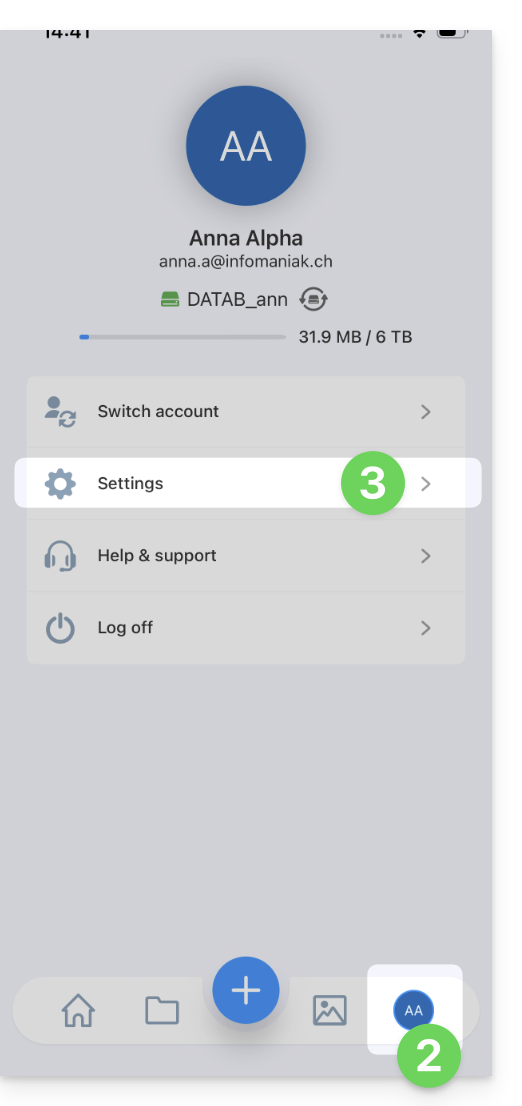
- Tap on your initials or avatar (bottom right).
- Go to Settings:
- Select Photo Backup:
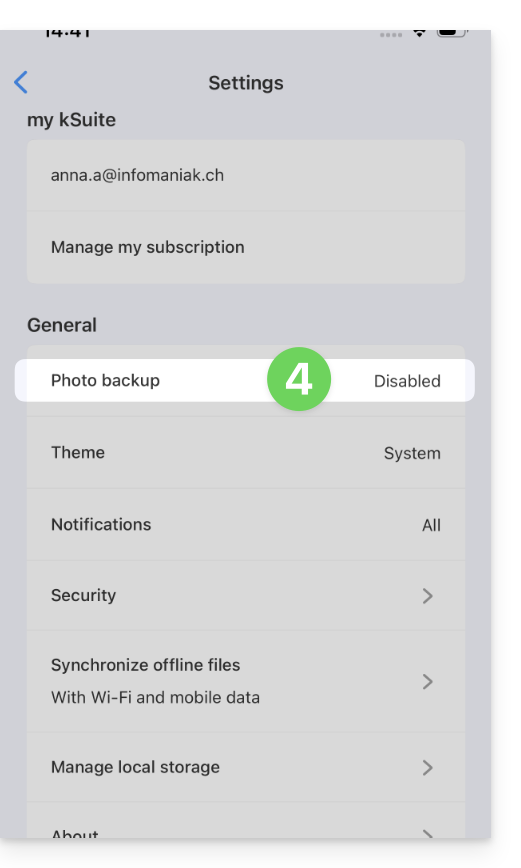
- Enable Automatic Backup.
- Allow access to your photos according to the options provided by iOS.
- Choose the destination kDrive and the target folder.
- Adjust your preferences (videos, screenshots, deletion after sending, etc.) then tap Save.
Keep the original name of the photos
By default, automatic backup renames your files (e.g., 20260101_101000_1234.jpg) to avoid collision errors or duplicates.
If you want your photos to retain their original name (e.g., IMG_3006.jpg) instead of being renamed by date, you should use the iOS sharing function instead of automatic backup:
- Open the Photos app on iOS.
- Select the desired photo(s).
- Tap the Share icon (square with an upward-pointing arrow).
- Select kDrive from the list of applications.
- Choose the location and send.
Manual export via the Share button is not recommended for transferring large numbers of photos, but it guarantees the integrity of the original file name.
Link to this FAQ: https://faq.infomaniak.com/2394
Has this FAQ been helpful?