Knowledge base
1000 FAQs, 500 tutorials and instructional videos. Here, there are only solutions!
Manage the DNS Fast Anycast option
Update 10/13/2026
DNS Fast Anycast replicates the DNS of your domain worldwide to reduce latency and increase the availability of your websites.
Introduction
- Thanks to DNS Fast Anycast, your domain's DNS servers are replicated across multiple Points of Presence (PoPs) worldwide (list below).
- Regardless of where your visitors are located, they are redirected to the DNS server closest to them, which on average speeds up access to your site by 34% (DNS resolution).
- Furthermore, if one of your DNS servers were to become unavailable, the closest server will automatically take over, and your visitors will continue to be able to access your site.
- DNS replication for your domain is automatic, and no changes to your code are required.
Manage Fast Anycast DNS
Prerequisites
- DNS Fast Anycast is compatible with all websites, regardless of your hosting provider.
- All you need is a domain name managed with Infomaniak.
- Transfer the management of your domain to Infomaniak if necessary.
- Consult this other guide for managing external domains.
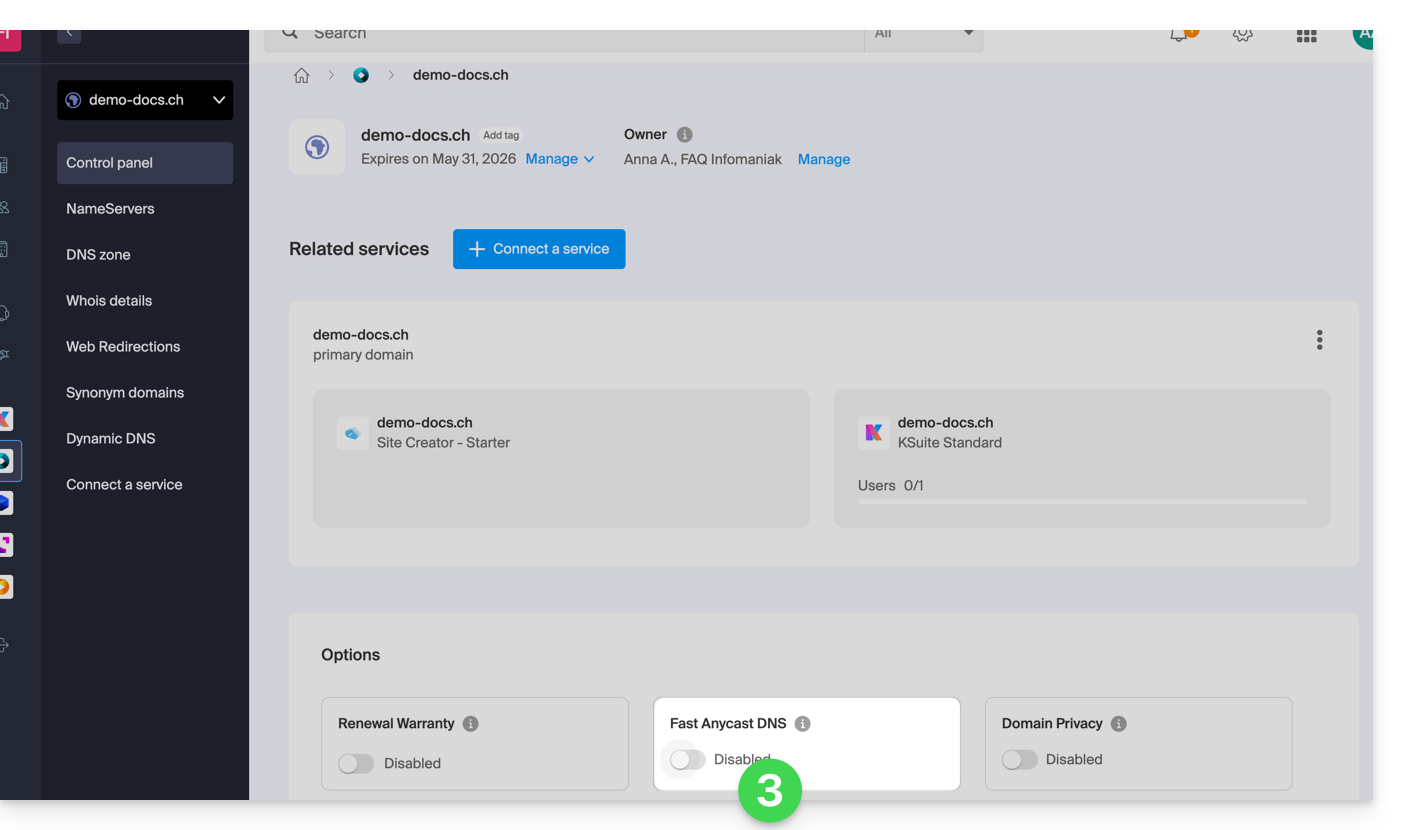
To access the DNS Fast Anycast option:
- Click here to access your product management interface in the Infomaniak Manager (need help?).
- Click directly on the name assigned to the product in question.
- Enable or disable the DNS Fast Anycast toggle switch on the dashboard:
POP - 'Point of Presence'
By enabling DNS Fast Anycast on your domain, your DNS records will be automatically replicated in the following points of presence:
Network 1
New York, USA (2x)
Paris, France (2x)
Warsaw, Poland (2x)
Dublin, Ireland (2x)
Singapore (2x)
Johannesburg, South Africa
Stockholm, Sweden
Vienna, Austria (2x)
Frankfurt, Germany (2x)
London, United Kingdom
Dallas, USA
Los Angeles, USA (3x)
Amsterdam, Netherlands
Sydney, Australia
São Paulo, Brazil
Miami, USA (2x)
Network 2
Hong Kong, China
San Jose, USA
Dallas, USA
Reston, USA
Chicago, USA
Seattle, USA
London, United Kingdom
Frankfurt, Germany
Amsterdam, Netherlands
Vienna, Austria
Toronto, Canada
Sydney, Australia
São Paulo, Brazil
Johannesburg, South Africa
Miami, USA
The points of presence are distributed across two networks, which are used randomly when one of your visitors accesses your website.
Link to this FAQ: https://faq.infomaniak.com/2323
Has this FAQ been helpful?