Knowledge base
1000 FAQs, 500 tutorials and instructional videos. Here, there are only solutions!
Configure an encoder for Infomaniak video streaming
This guide will help you configure your encoder with the Infomaniak Video Streaming service.
Introduction
- The structure of this guide is based on the encoding quality you choose for your stream:
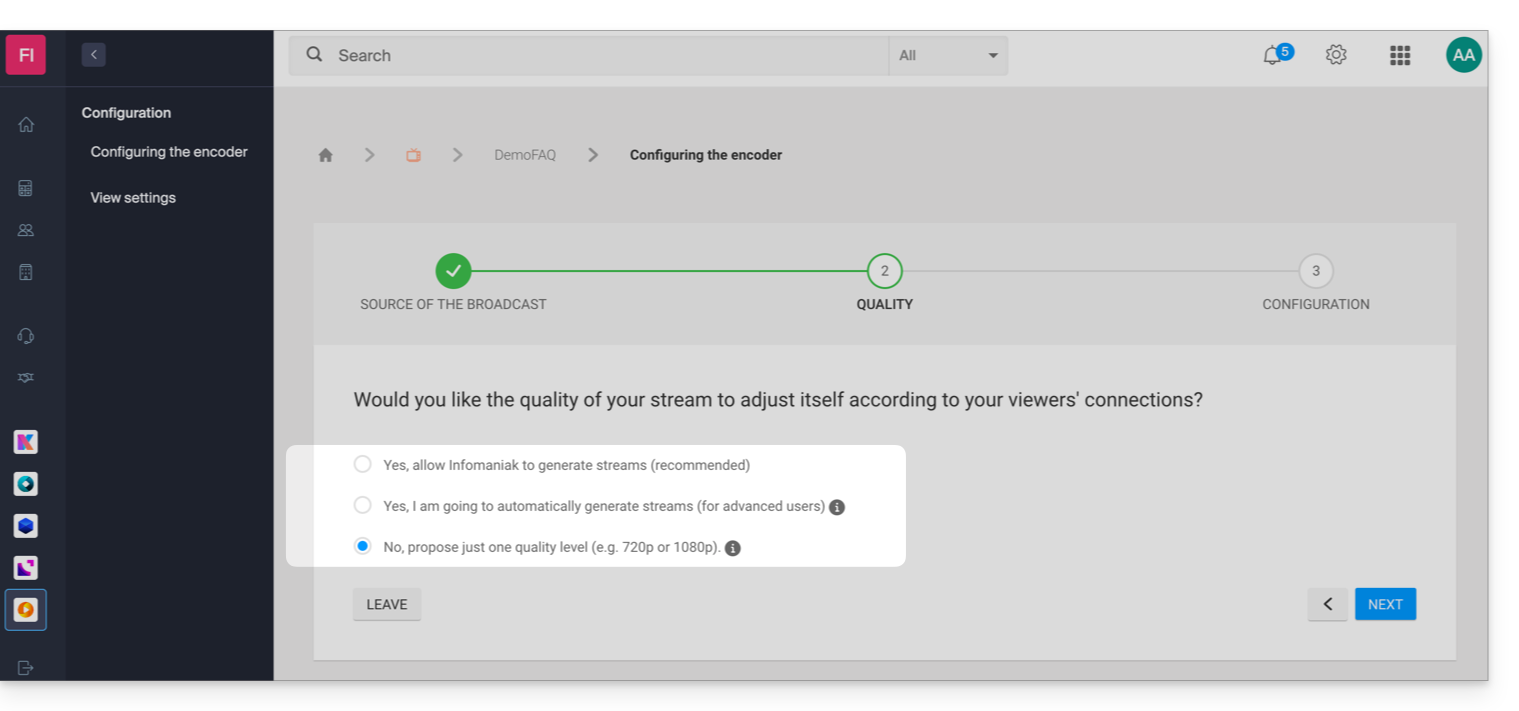
- The URL-based authentication system offered by Infomaniak differs from the default authentication offered by some encoders.
- This information is provided for guidance onlyand the configuration of your encoder may vary depending on your device, your software, and the options of your product (e.g., Infomaniak hardware).
- Specific guide for OBS Studio (Open Broadcaster Software).
Encoder requirements
Here's how to access the configuration information required by your encoder:
- Click here to access the management interface for your product in the Infomaniak Manager (need help?).
- Click on the action menu ⋮ to the right of the item in question in the table that appears.
- Click on Configure the encoder:
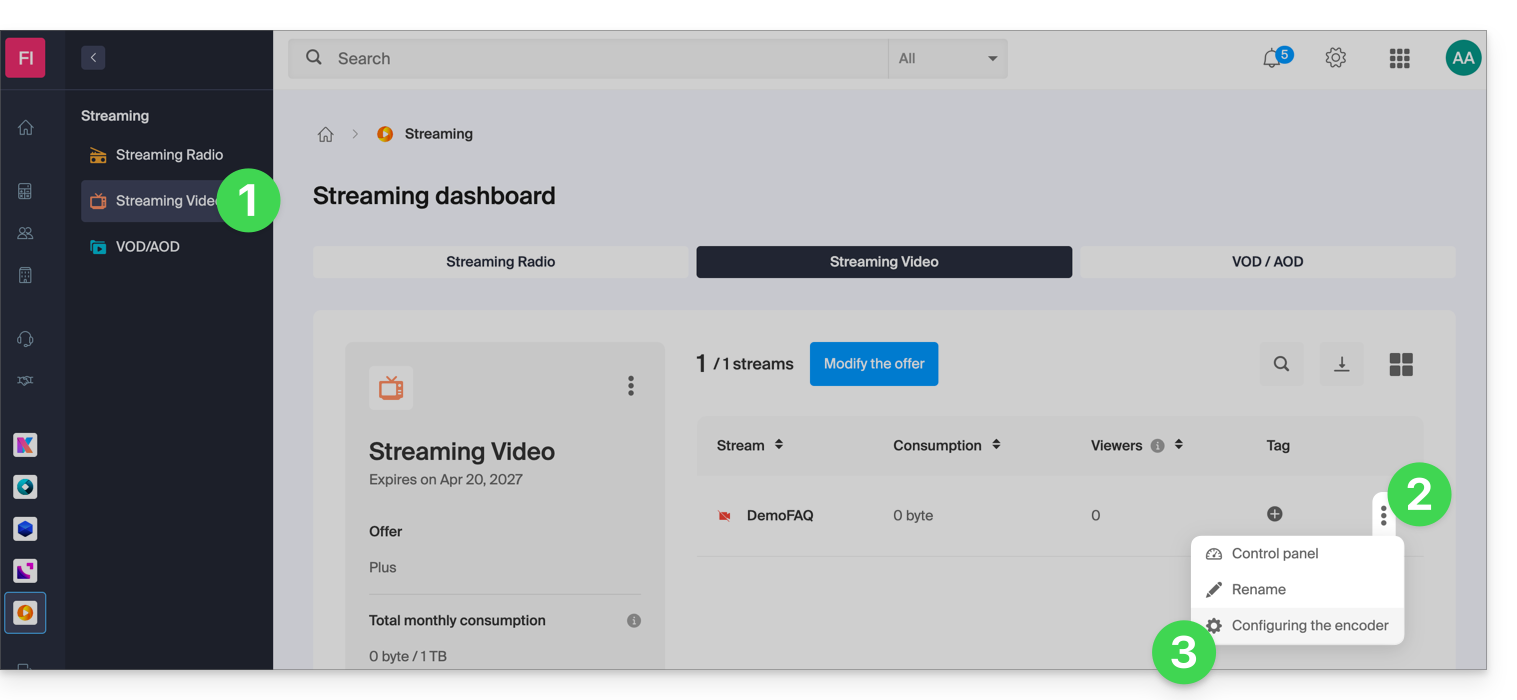
- Follow the instructions that apply to your situation.
1. Automatic multi-bitrate management by Infomaniak
If you chose to let Infomaniak automatically manage the quality of your stream:
- With this scenario, the following configuration information is available:
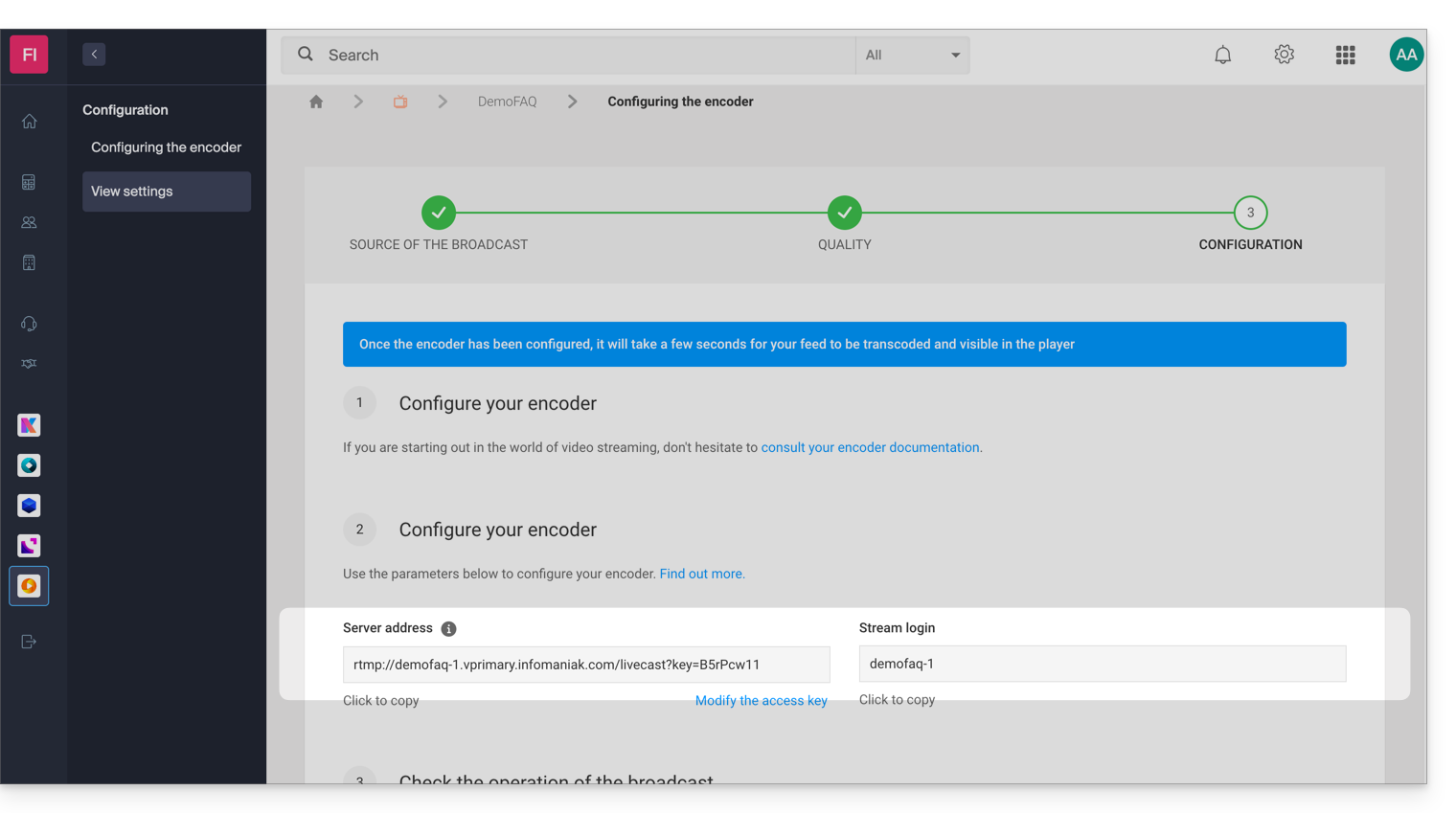
- In this example, the stream is named "DemoFAQ" and its authentication key is "B5rPcw11":
- Server address:
rtmp://demofaq-1.vprimary.infomaniak.com/livecast?key=B5rPcw11 - Stream ID:
demofaq-1
- Server address:
1.1 Configuring the source quality
The quality of the streams generated by Infomaniak will depend on the quality of your source (bitrate). As a guide, here is a list of the qualities that may be generated when your encoder connects:
- 1080p with a bitrate of 3 Mbps
- 720p with a bitrate of 1.8 Mbps
- 480p with a bitrate of 0.8 Mbps
- 360p with a bitrate of 0.5 Mbps
- 240p with a bitrate of 0.3 Mbps*
* 240p will only be offered if your source bitrate is less than 0.8 Mbps.
Ideally, it is recommended to define a source with 1080p and a bitrate of 3.2 Mbps in order to generate all available qualities. If the bitrate of your source is limited to 1 Mbps, only the following resolutions will be generated: 480p, 360p, and 240p.
Important: ensure that the bitrate control is set to CBR (constant bitrate) mode in your encoder. ABR (adaptive bitrate) mode can distort the detection of your source's bitrate.
1.2 Your encoder requires a connection address and a stream ID
If your encoder requires a connection address and a stream ID, simply enter the server address and the stream ID in your encoder.
In this example, the following information would be used:
- Server address:
rtmp://demofaq-1.vprimary.infomaniak.com/livecast?key=B5rPcw11 - Stream ID:
demofaq-1
1.3 Your encoder only requires a URL
If your encoder only requires a URL, you need to combine the server address and the connection ID; in this example, this would be the following URL:
rtmp://demofaq-1.vprimary.infomaniak.com/livecast?key=B5rPcw11/demofaq-1
1.4 Your encoder offers advanced configuration options
If your encoder offers a wide range of settings, follow the instructions below, which are always based on the same example:
- RTMP server address:
demofaq-1.vprimary.infomaniak.com - RTMP server port:
1935 - RTMP username: leave this field blank (authentication is done via key with a key on the stream ID)
- RTMP password: leave this field blank (authentication is done via key with a key on the stream ID)
- RTMP Application Name:
livecast?key=B5rPcw11 - RTMP Stream Name:
demofaq-1
2. Manual multi-bitrate management
If you have decided to manually manage the quality settings of your stream:
- If you are using the Cloud Transcoding option, please refer to section 3. Single bitrate below.
In this case, you will find a table containing the different qualities (bitrate/resolutions) that you defined when configuring your encoder: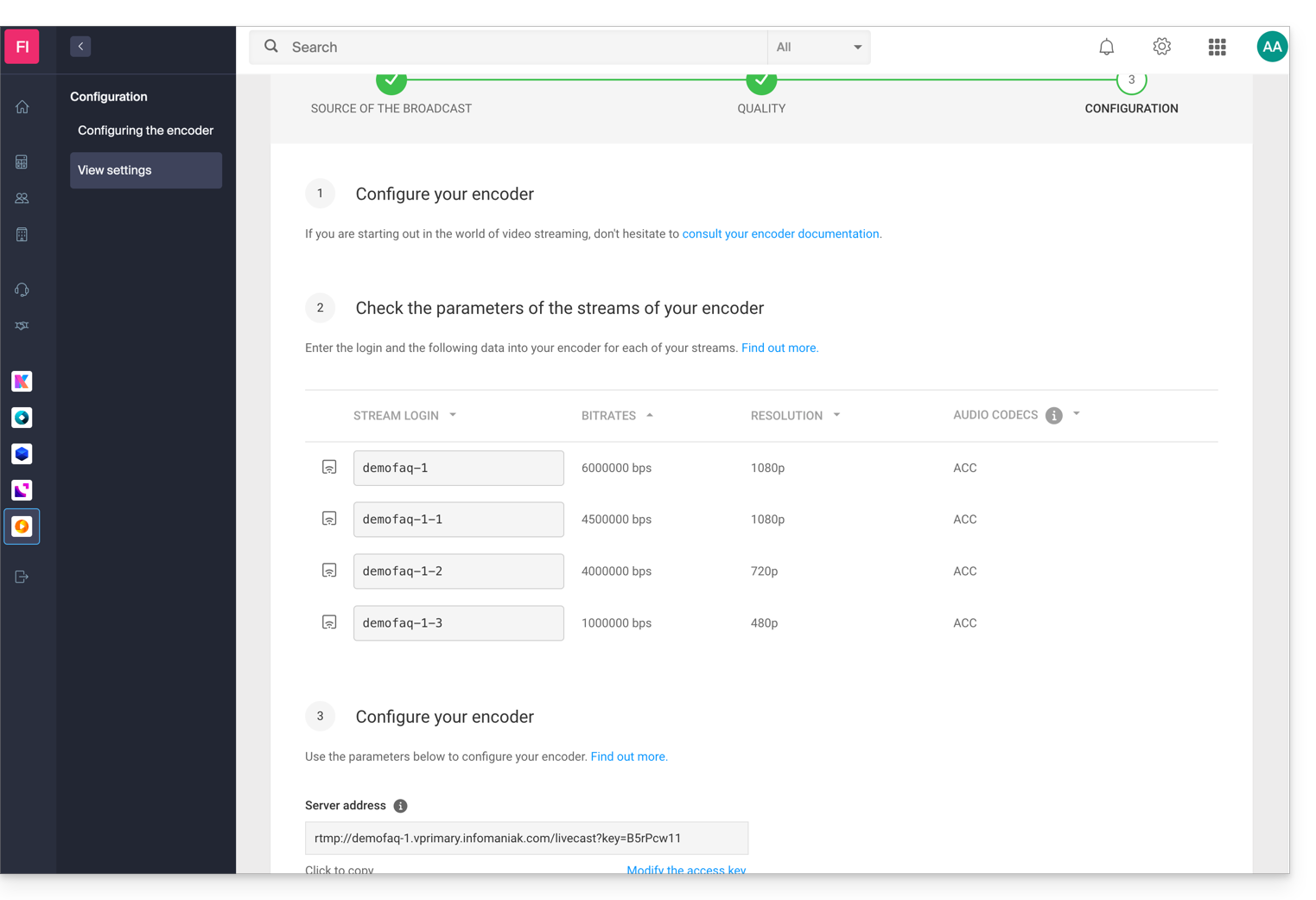
In this example, the following information would be used:
- Server address:
rtmp://demofaq-1.vprimary.infomaniak.com/livecast?key=B5rPcw11 - Stream ID:
demofaq-1
2.1 Your encoder requires a login address and a stream ID
If your encoder requires a connection address and a stream ID, simply enter the server address and the ID for each stream in your encoder.
2.2 Your encoder requires a URL per stream
If your encoder requires specific configurations per URL, it is necessary to group the server address and the connection identifier for each bitrate. In this example, the URLs would be as follows:
- Bitrate 6000000:
rtmp://demofaq-1.vprimary.infomaniak.com/livecast?key=B5rPcw11/demofaq-1 - Bitrate 4500000:
rtmp://demofaq-1.vprimary.infomaniak.com/livecast?key=B5rPcw11/demofaq-1-1 - Bitrate 4000000:
rtmp://demofaq-1.vprimary.infomaniak.com/livecast?key=B5rPcw11/demofaq-1-2 - Bitrate 1000000:
rtmp://demofaq-1.vprimary.infomaniak.com/livecast?key=B5rPcw11/demofaq-1-3
3. Single bitrate (one quality)
Please refer to the instructions provided in section 1. Automatic multi-bitrate management by Infomaniak ignoring point 1.1.
Link to this FAQ: https://faq.infomaniak.com/2266
Has this FAQ been helpful?