Knowledge base
1000 FAQs, 500 tutorials and instructional videos. Here, there are only solutions!
Configure a video streaming encoder
This guide helps you configure your encoder with the Infomaniak Video Streaming service.
Preamble
- The structure of this guide is organized based on the encoding quality chosen for your stream:
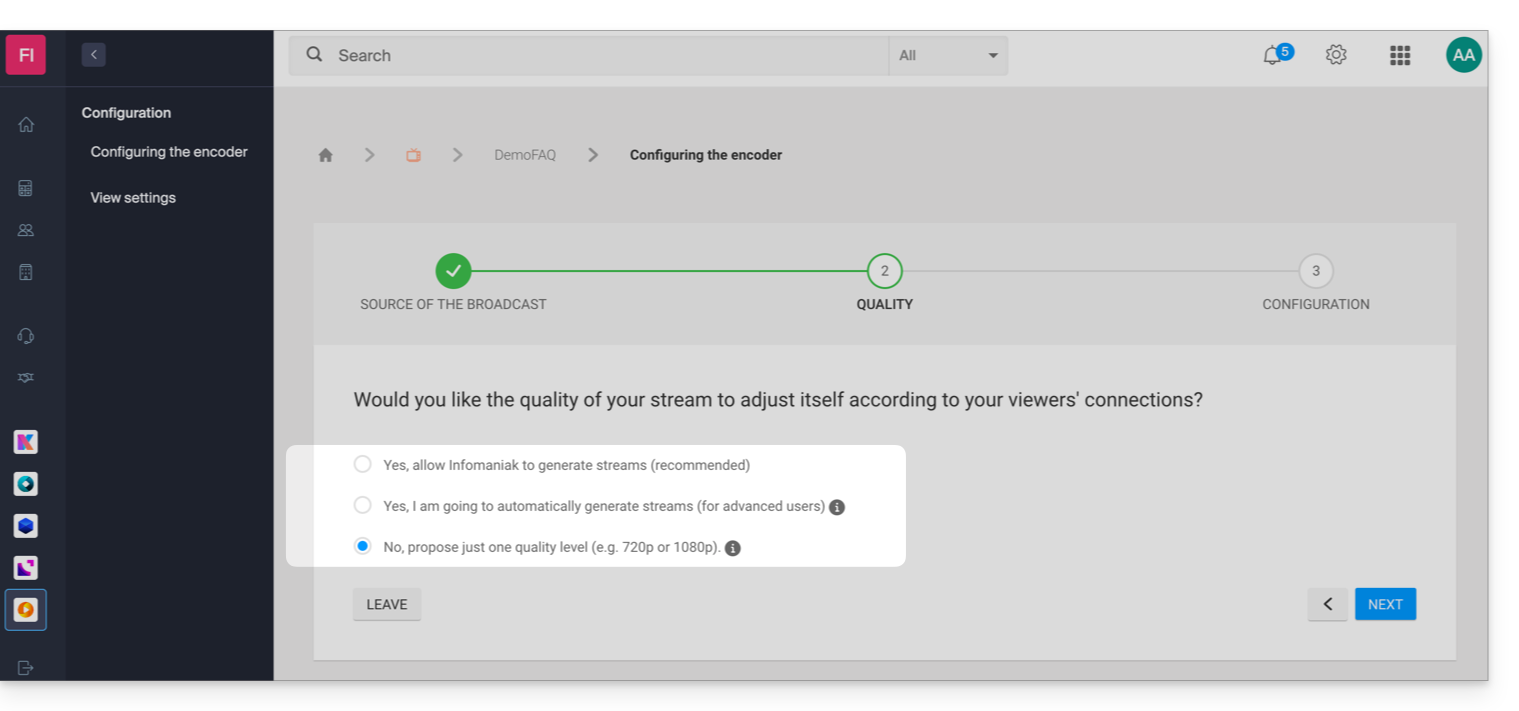
- The URL authentication system offered by Infomaniak differs from the authentication offered by default by some encoders.
- This information is provided for informational purposes only and the configuration of your encoder may vary depending on your device, your software, and the options of your product (e.g., Infomaniak hardware).
- Specific guide for OBS Studio (Open Broadcaster Software).
Configuration required by the encoder
Here's how to access the configuration information required by your encoder:
- Click here to access the management of your product on the Infomaniak Manager (need help?).
- Click on the action menu ⋮ to the right of the item concerned in the table that appears.
- Click on Configure the encoder:
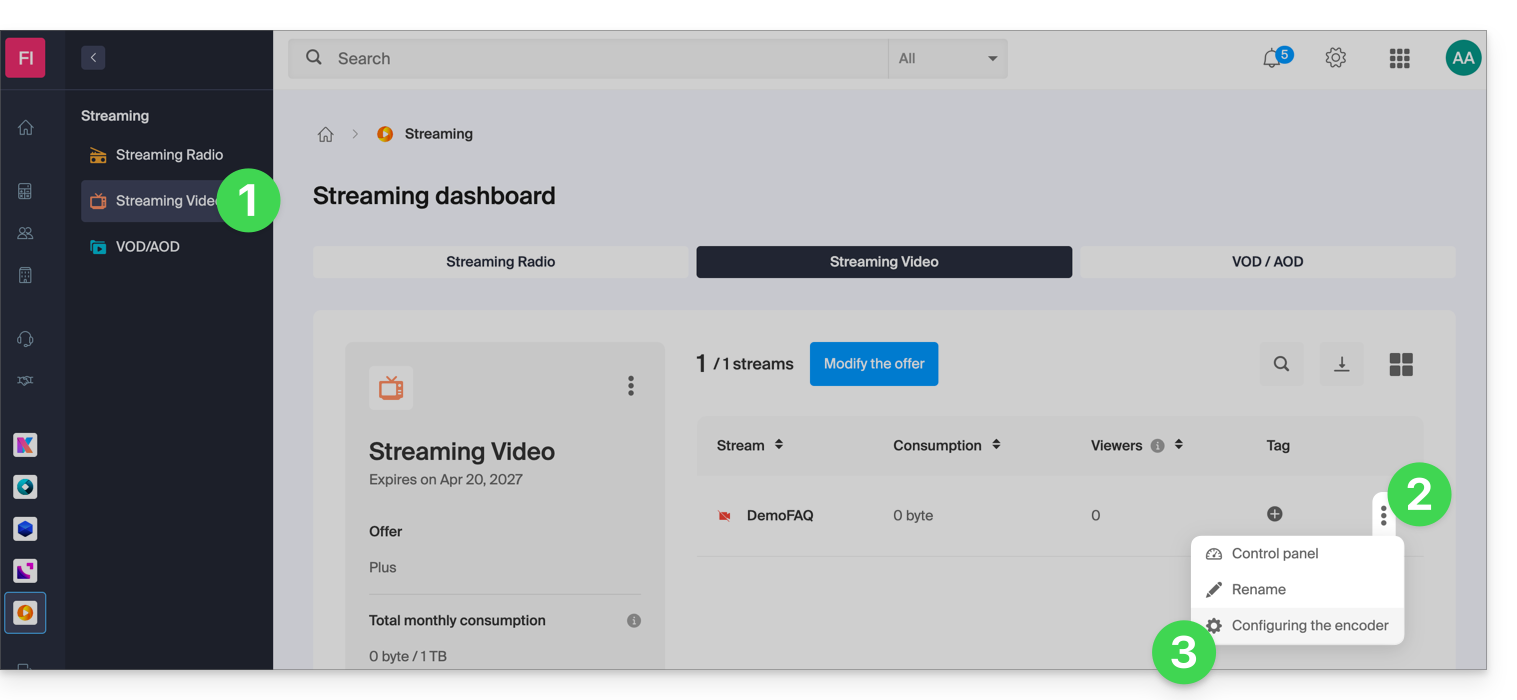
- Follow the instructions adapted to your situation.
1. Automatic multi-bitrate management by Infomaniak
If you have chosen to let Infomaniak automatically manage the quality of your stream:
- In this case, the following configuration information is available:
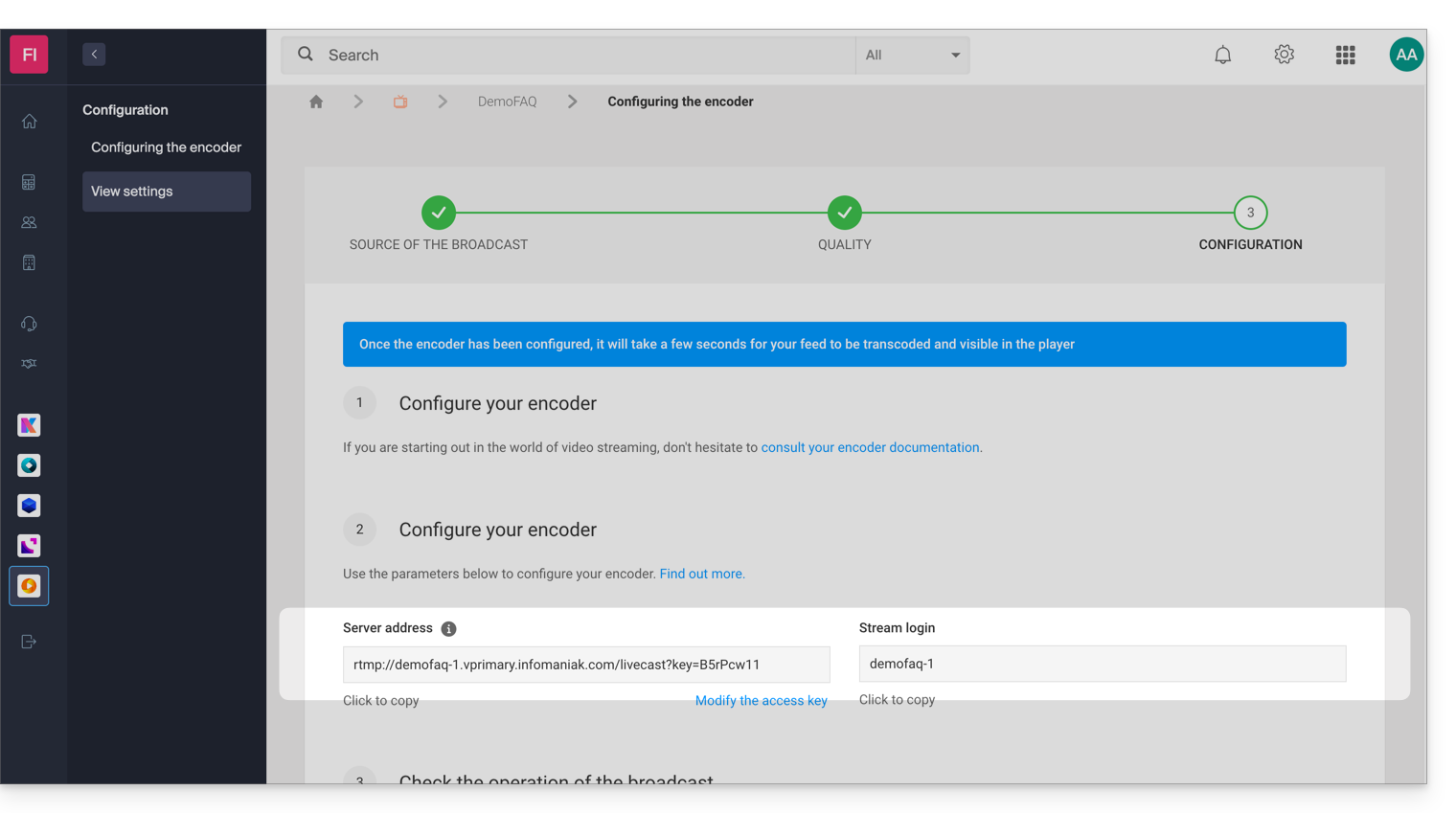
- In this example, the stream is named "DemoFAQ" and its authentication key is "B5rPcw11" :
- Server address:
rtmp://demofaq-1.vprimary.infomaniak.com/livecast?key=B5rPcw11 - Stream ID:
demofaq-1
- Server address:
1.1 Configuration of the source quality
The stream qualities generated by Infomaniak will depend on the quality of your source (bitrate). For reference, here is the list of qualities that could be generated when connecting your encoder:
- 1080p with a bitrate of 3 Mbps
- 720p with a bitrate of 1.8 Mbps
- 480p with a bitrate of 0.8 Mbps
- 360p with a bitrate of 0.5 Mbps
- 240p with a bitrate of 0.3 Mbps*
* 240p will only be offered if your source bitrate is less than 0.8 Mbps.
It is ideally recommended to set a 1080p source with a bitrate of 3.2 Mbps to generate all available qualities. If the bitrate of your source is limited to 1 Mbps, only the following resolutions will be generated: 480p, 360p, and 240p.
Important: check that the bitrate control is set to CBR (constant bitrate) mode on your encoder. The ABR (adaptive bitrate) mode can indeed distort the detection of your source bitrate.
1.2 Your encoder requires a connection address and a stream identifier
If your encoder requires a connection address and a stream identifier, simply enter the server address and the stream identifier in your encoder.
In this example, the following information would be:
- Server address:
rtmp://demofaq-1.vprimary.infomaniak.com/livecast?key=B5rPcw11 - Stream identifier:
demofaq-1
1.3 Your encoder requires only a URL
If your encoder requires only a URL, it is necessary to group the server address and the connection identifier; in this example, it would therefore be the following URL:
rtmp://demofaq-1.vprimary.infomaniak.com/livecast?key=B5rPcw11/demofaq-1
1.4 Your encoder offers advanced configuration
If your encoder offers a wide range of parameters, follow the following instructions which are always based on the same example:
- RTMP Server Address:
demofaq-1.vprimary.infomaniak.com - RTMP Server Port:
1935 - RTMP Username: leave this field blank (authentication is done by key with a key on the stream identifier)
- RTMP Password: leave this field blank (authentication is done by key with a key on the stream identifier)
- RTMP Application Name:
livecast?key=B5rPcw11 - RTMP Stream Name:
demofaq-1
2. Manual multi-bitrate management
If you have decided to manually manage the qualities of your stream:
- If you are using the Cloud Transcoding option, refer to the 3. Single bitrate point below.
In this scenario, you will find a table containing the different qualities (bitrate/resolutions) that you defined during the configuration of your encoder: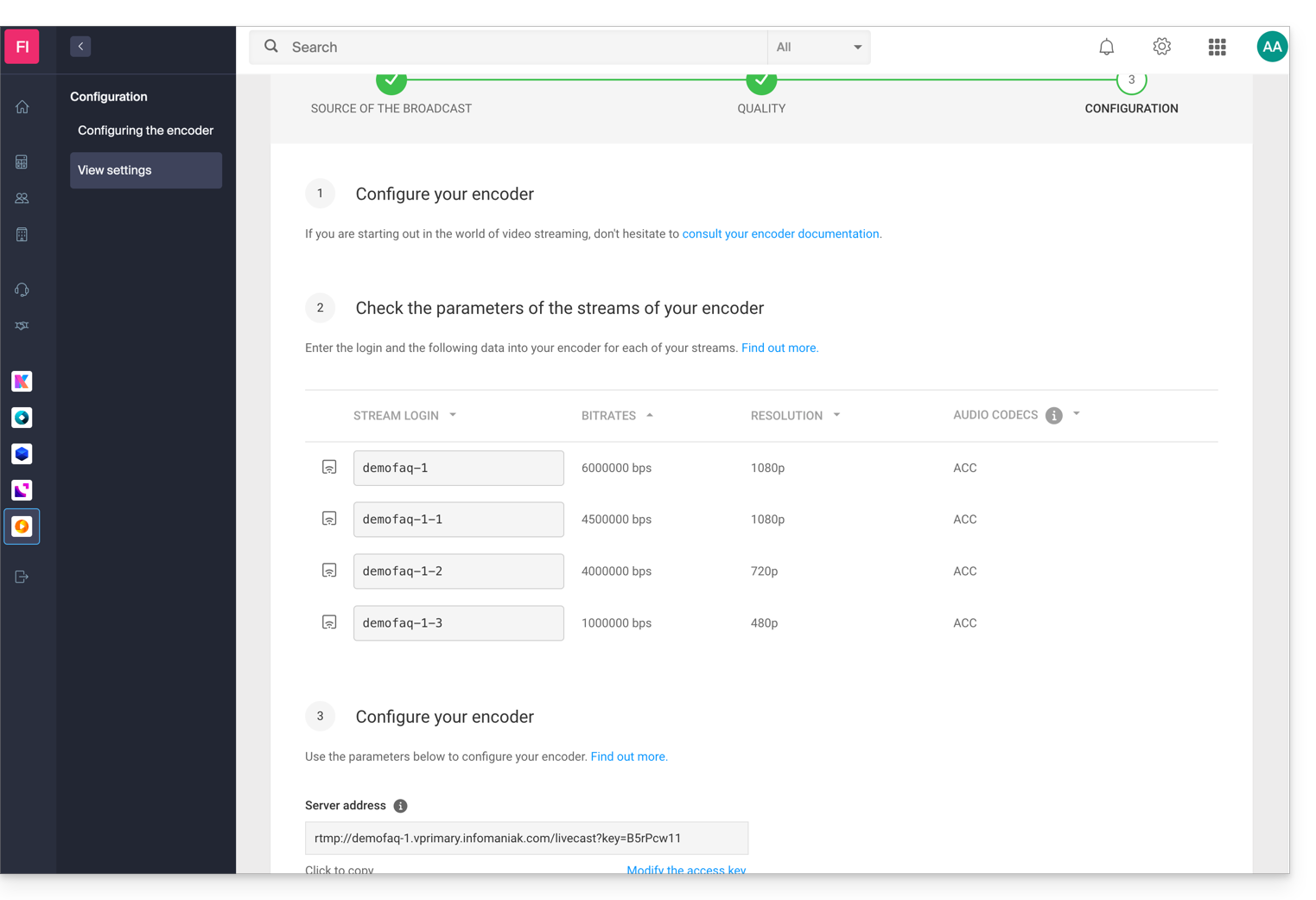
In this example, the following information would be:
- Server address:
rtmp://demofaq-1.vprimary.infomaniak.com/livecast?key=B5rPcw11 - Stream identifier:
demofaq-1
2.1 Your encoder requires a connection address and a stream identifier
If your encoder requires a connection address and a stream identifier, simply enter the server address and the identifier for each stream in your encoder.
2.2 Your encoder requires a URL per stream
If your encoder requires specific configurations per URL, it is necessary to group the server address and the connection identifier for each bitrate. In this example, the URLs would therefore be:
- Bitrate 6000000:
rtmp://demofaq-1.vprimary.infomaniak.com/livecast?key=B5rPcw11/demofaq-1 - Bitrate 4500000:
rtmp://demofaq-1.vprimary.infomaniak.com/livecast?key=B5rPcw11/demofaq-1-1 - Bitrate 4000000:
rtmp://demofaq-1.vprimary.infomaniak.com/livecast?key=B5rPcw11/demofaq-1-2 - Bitrate 1000000:
rtmp://demofaq-1.vprimary.infomaniak.com/livecast?key=B5rPcw11/demofaq-1-3
3. Single bitrate (single quality)
Refer to the information provided in 1. Automatic multi-bitrate management by Infomaniak ignoring point 1.1.
Link to this FAQ: https://faq.infomaniak.com/2266
Has this FAQ been helpful?