Knowledge base
1000 FAQs, 500 tutorials and instructional videos. Here, there are only solutions!
Export subscribers / contacts from a discussion list
This guide shows you how to export and save the contacts from the "Discussion List" tool into a CSV file (.csv) format.
The Discussion List tool is currently available only to users who have activated it in the past. Discover a simpler and more powerful emailing solution (Newsletter). You will be able to easily import your existing contacts.
Export contacts to a file
The discussion list tool is accessible within your Mail Service:
- Click here to access the management of your Mail Service on the Infomaniak Manager (need help?).
- Click directly on the domain name assigned to the product concerned.
- Click on Discussion List in the left sidebar.
- Click on the name of your list.
- Click on the Subscribers tab.
- Click on Download the list in CSV format:
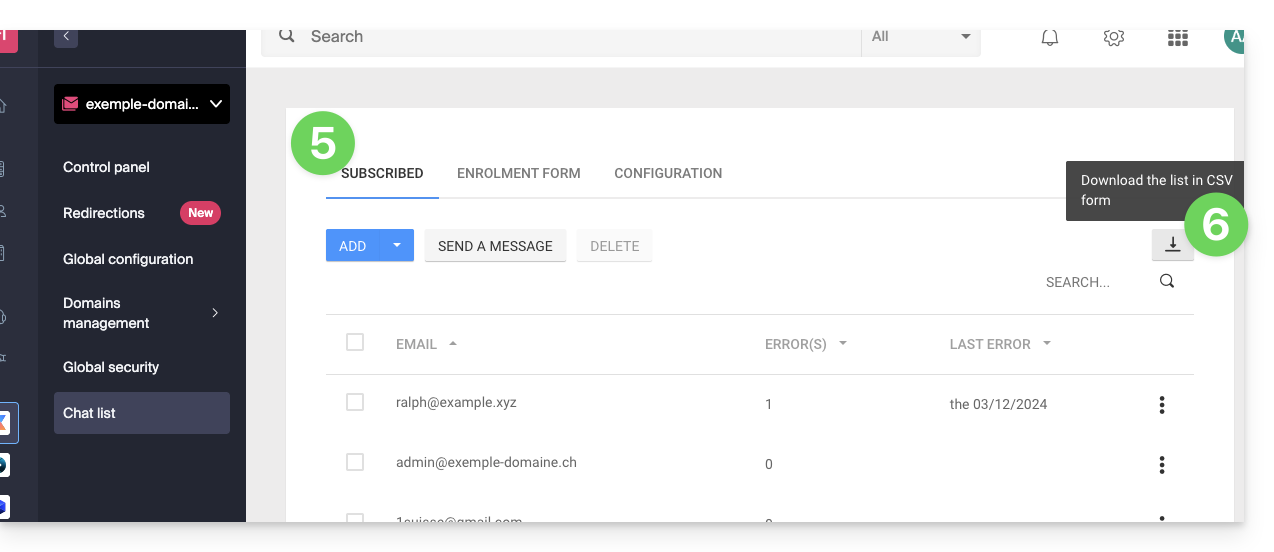
The CSV file will be downloaded to your computer's hard drive.
To import these contacts into the Newsletter tool:
- Change the possible
.txtfile extension to.csv. - Refer to this other guide.
Link to this FAQ: https://faq.infomaniak.com/2166
Has this FAQ been helpful?