Knowledge base
1000 FAQs, 500 tutorials and instructional videos. Here, there are only solutions!
Export the subscribers/contacts from a mailing list
Update 10/12/2026
This guide shows how to export and save the contacts from the "Mailing list" tool into a CSV file (.csv format).
The Mailing list tool is currently offered available only to users who have activated it in the past. Discover a simpler and more powerful email marketing solution (Newsletter). You can easily import your existing contacts.
Export contacts to a file
The mailing list tool is available within your Mail Service:
- Click here to access the Mail Service management in your Infomaniak Manager (❓: help).
- Click on the name of the Mail Service in question.
- Click on Mailing list in the left-hand menu.
- Click on the name of your list.
- Click on the Subscribers tab.
- Click on Download the list in CSV format:
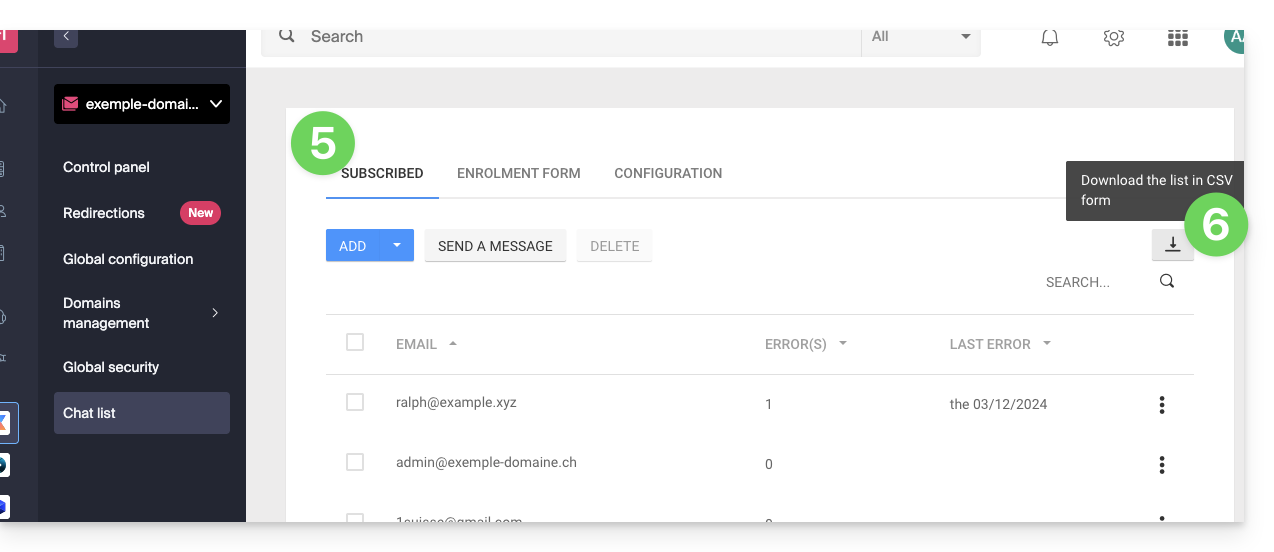
The CSV file will be downloaded to your computer's hard drive.
To import these contacts into the Newsletter tool:
- Modify the file extension from
.txtto.csv. - Refer to this other guide.
Link to this FAQ: https://faq.infomaniak.com/2166
Has this FAQ been helpful?