Knowledge base
1000 FAQs, 500 tutorials and instructional videos. Here, there are only solutions!
Connect a domain name to Shopify
Update 09/22/2026
This guide explains how to link a domain name managed by Infomaniak to a Shopify hosting plan.
Introduction
- A website created on Shopify cannot be exported to be hosted on third-party servers, such as those of Infomaniak.
- It is therefore recommended to create the website directly with Infomaniak using Site Creator or WordPress.
Connect Shopify to your domain name with Infomaniak
To connect a Shopify site with a domain name hosted with Infomaniak:
- Click here to access your domain management in the Infomaniak Manager (❓: help).
- Click directly on the name assigned to the domain in question.
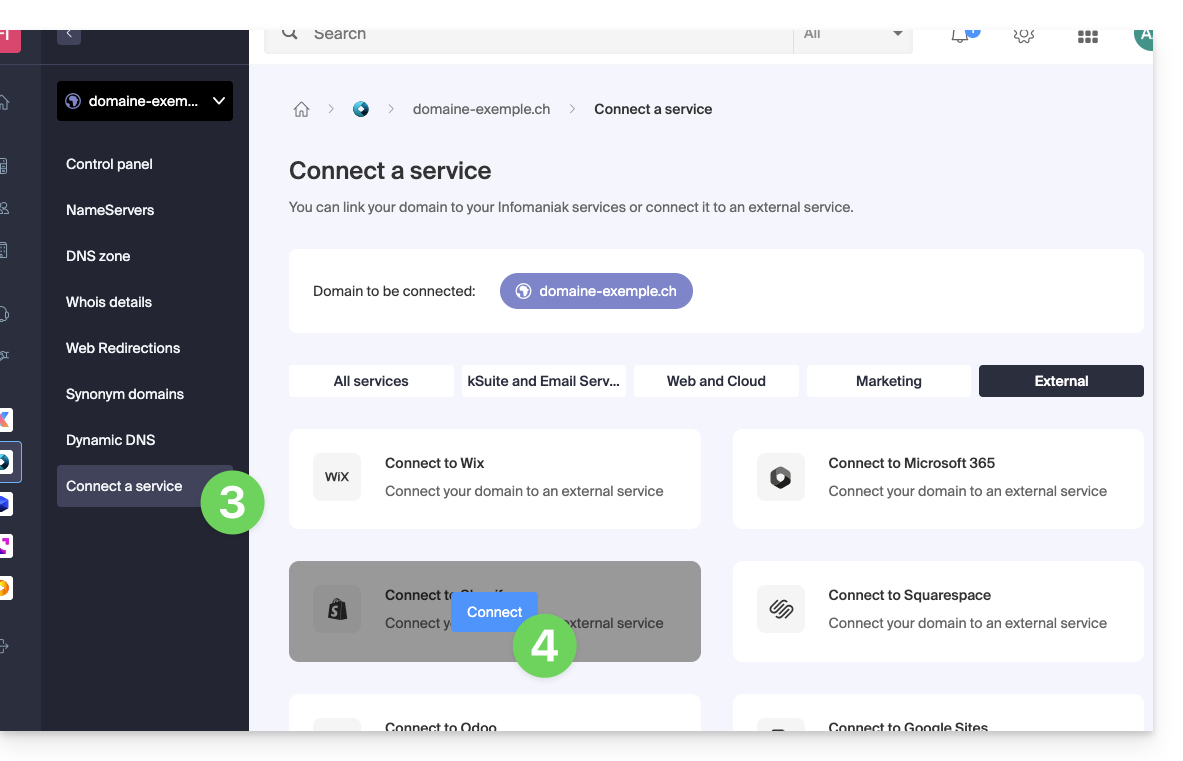
- Click on Connect a service in the left-hand menu.
- Click on the blue Connect button on the Shopify tile:
- The A records will be replaced with a record with the value
23.227.38.65. - The CNAME record "www" will be modified to have the value
shops.myshopify.com.
- The A records will be replaced with a record with the value
- Click the Next button.
Web traffic will be directed to the Shopify servers a few hours later.
These two DNS changes do not affect the mail configuration.
Link to this FAQ: https://faq.infomaniak.com/2164
Has this FAQ been helpful?