Knowledge base
1000 FAQs, 500 tutorials and instructional videos. Here, there are only solutions!
Modify an existing Starter plan (basic website)
Update 10/05/2026
This guide explains how to upgrade a free Web Starter plan to a paid plan with more features, such as shared Web Hosting or Web Hosting on a Cloud Server.
Introduction
- When you purchase a domain name from Infomaniak, you can add 1 free email address and 10 MB of basic web space.
- With just a few clicks, you can upgrade this plan to enjoy a richer experience.
Modify the Starter plan - basic web page
To upgrade this free plan:
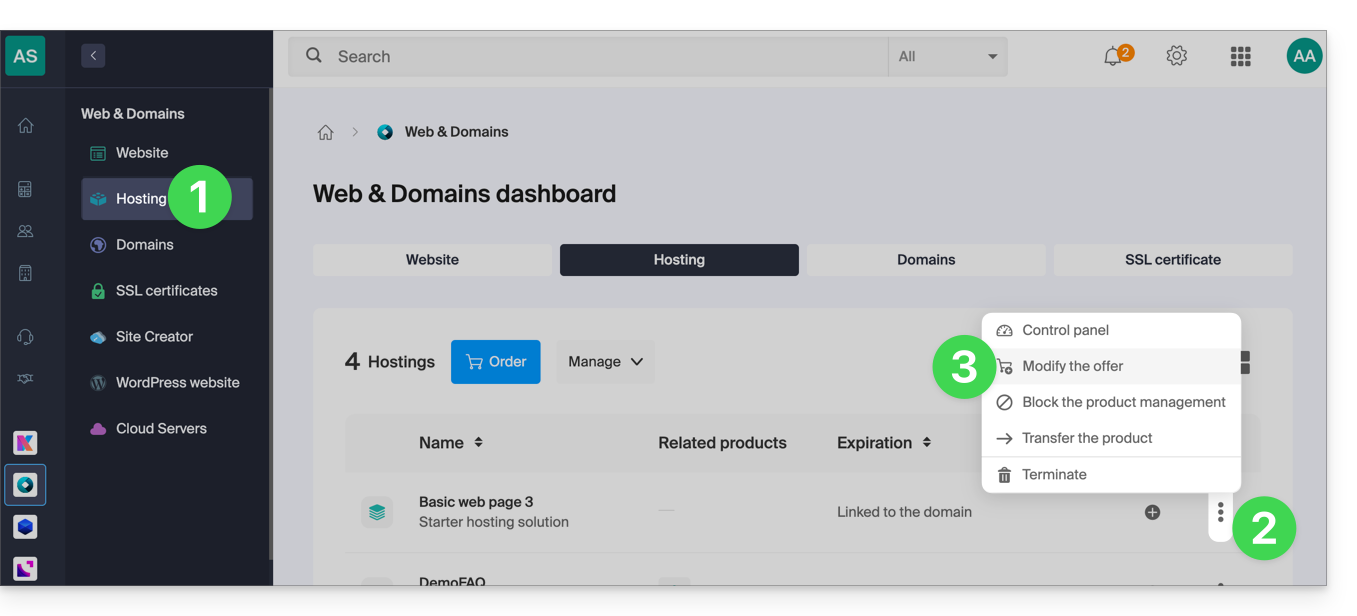
- Click here to access the management of your hosting on the Infomaniak Manager (need help?).
- Click on the action menu ⋮ located to the right of the item in question.
- Click on Modify plan:
- Follow the wizard to choose the new type of hosting, and pay to complete the plan change.
Link to this FAQ: https://faq.infomaniak.com/2111
Has this FAQ been helpful?