Knowledge base
1000 FAQs, 500 tutorials and instructional videos. Here, there are only solutions!
Cancel a domain name managed by Infomaniak
Update 08/13/2026
This guide explains how to completely delete a Domain registered with Infomaniak.
Introduction
- For most products, confirm the cancellation request by email; otherwise, no data will be deleted.
- When a domain name is deleted, all products that depend on and use that domain name will no longer function.
- These “linked” products will not be deleted.
- Any outstanding or out-of-plan charges remain due.
- A cancellation confirmation is sent to any other administrators of the Organization.
- Backups will be permanently deleted upon cancellation, making any restoration impossible.
- Refer to this other guide if you are looking for information on restoring a deleted domain.
Cancel a domain name
To access the cancellation process:
- Click here to access the management interface for your product on the Infomaniak Manager (need help?).
- Click on the action menu ⋮ located to the right of the item in question.
- Choose Cancel:
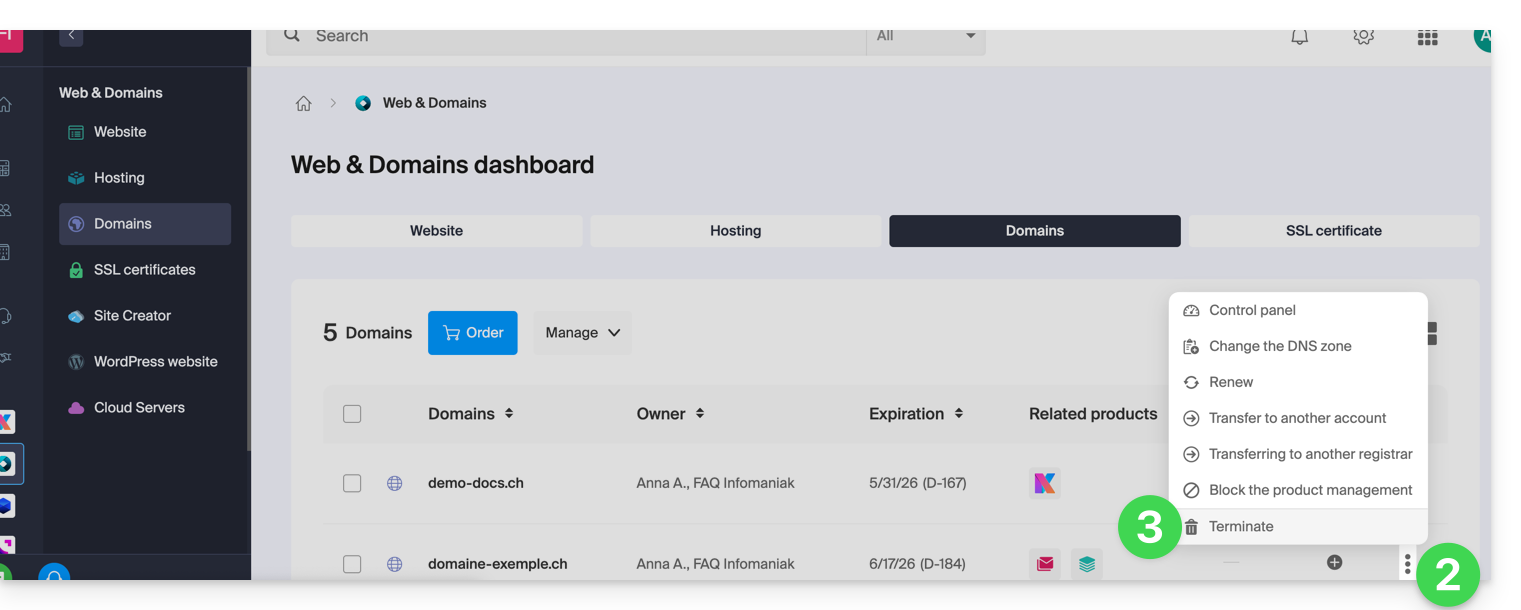
- Follow the procedure until the end.
Link to this FAQ: https://faq.infomaniak.com/2086
Has this FAQ been helpful?