Knowledge base
1000 FAQs, 500 tutorials and instructional videos. Here, there are only solutions!
Understanding the Difference Between a Domain and a DNS Zone
This guide explains how a domain name and a DNS zone work.
Introduction
- When you browse a website such as
https://www.abc123.xyz,abc123.xyzis the domain name. - Each domain name has DNS (Domain Name System), which indicates where the DNS zone is located (e.g., with which provider).
- The DNS zone then allows you to delegate the management of various services related to the domain name to different providers.
- For a single domain name, it is possible to delegate:
- web hosting to provider X (via an "
A" record) - and email service to provider Y (via an "
MX" record)
- web hosting to provider X (via an "
- For a single domain name, it is possible to delegate:
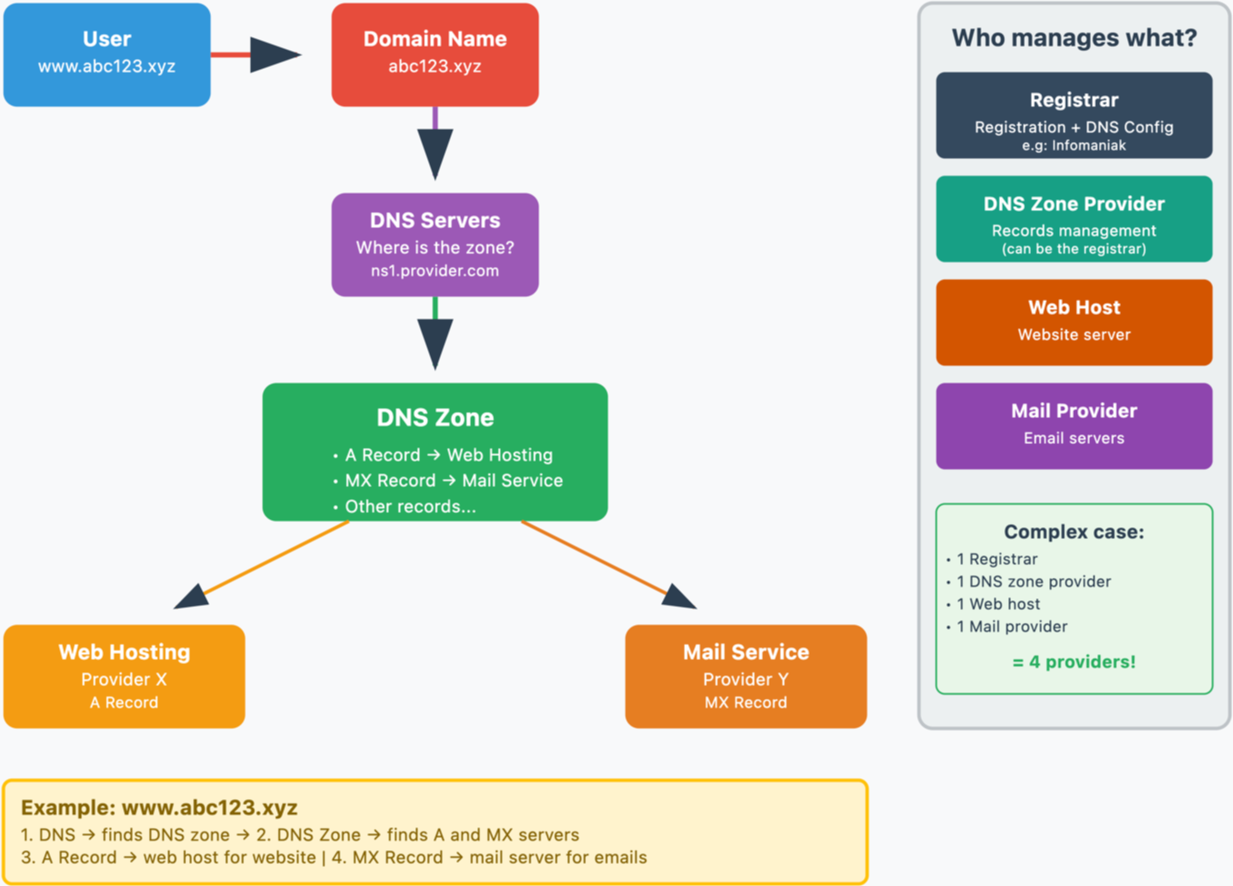
Domain name, DNS and DNS zone, then services
Who manages what?
- Each domain name is registered and managed by a registrar. For example, Infomaniak is a registrar, one of the cheapest in Switzerland.
- The DNS of a domain name is configured with the registrar that manages the domain name.
- The DNS zone can be managed by the registrar or another provider.
- Web hosting and email service can be managed by any hosting provider.
In the most complex case, it is therefore possible to have 1 different provider for the following services: domain name registration and DNS management, DNS zone management, web hosting, email service.
The following diagram summarizes these different possibilities with the involvement of different providers:
Infomaniak
As a registrar and hosting provider, Infomaniak can manage all of these services. This is the simplest solution.
- In the case of Infomaniak, the DNS servers are generally in the form nsXX.infomaniak.com and nsXX.infomaniak.com (XX being 11 or 12, for example).
- You can modify the DNS servers for your domain name, as well as modify the "internal" settings of these DNS servers, i.e., modify the DNS zone of a domain name.
And within these DNS zones, to redirect traffic to services, we distinguish:
- an MX record which allows a domain name (
domain.xyzfor example) to point to a mail server. - an A record which allows a domain name (
domain.xyzfor example) or a subdomain (example.domain.xyzfor example) to point to a web server that has a static IP address (otherwise, you would have to constantly edit the A record to enter the new IP address - see this other guide on this subject).
Possible scenarios
Examples and fictitious names
| All services are with Infomaniak | |||
|---|---|---|---|
| domain name | domain.xyz | registered with -> | Infomaniak |
| DNS of the domain name | ns1.infomaniak.com… | therefore, the DNS zone must exist with -> | Infomaniak |
| site hosted by -> | Infomaniak | therefore, the DNS zone must contain an A record | 123.45.67.8 for example |
| email hosted by -> | Infomaniak | therefore, the DNS zone must contain MX records | mx-mail.maniak for example |
| All services are with Infomaniak except email | |||
|---|---|---|---|
| domain name | domain.xyz | registered with -> | Infomaniak |
| DNS of the domain name | ns1.infomaniak.com… | therefore, the DNS zone must exist with -> | Infomaniak |
| website hosted by -> | Infomaniak | therefore, the DNS zone must contain A records | 123.45.67.8 for example |
| email hosted by -> | Medical Service | therefore, the DNS zone must contain MX records | med-mx.net for example |
| All services are with Infomaniak except the website | |||
|---|---|---|---|
| domain name | domain.xyz | registered with -> | Infomaniak |
| DNS of the domain name | ns1.infomaniak.com… | therefore, the DNS zone must exist with -> | Infomaniak |
| website hosted by -> | Clinic | therefore, the DNS zone must contain A records | 9.87.65.4 for example |
| email hosted by -> | Infomaniak | therefore, the DNS zone must contain MX records | mx-mail.maniak for example |
| All services are with Infomaniak except for the domain name | |||
|---|---|---|---|
| domain name | domain.xyz | registered with -> | GoMamie |
| Domain name DNS | ns1.infomaniak.com… | therefore the DNS zone must exist with -> | Infomaniak |
| website hosted by -> | Infomaniak | therefore the DNS zone must contain an A record | 123.45.67.8 for example |
| email hosted by -> | Infomaniak | therefore the DNS zone must contain an MX record | mx-mail.maniak for example |
| All services are with Infomaniak except for the DNS zone | |||
|---|---|---|---|
| domain name | domain.xyz | registered with -> | Infomaniak |
| Domain name DNS | ns.privateDNS.org… | therefore the DNS zone must exist with -> | Private DNS |
| website hosted by -> | Infomaniak | therefore the DNS zone must contain an A record | 123.45.67.8 for example |
| email hosted by -> | Infomaniak | therefore the DNS zone must contain an MX record | mx-mail.maniak for example |
| No service exists with Infomaniak except for the domain name | |||
|---|---|---|---|
| domain name | domain.xyz | registered with -> | Infomaniak |
| DNS of the domain name | ns.privateDNS.org… | therefore, the DNS zone must exist at -> | Private DNS |
| website hosted by -> | Clinic | therefore, the DNS zone must contain an A record | 9.87.65.4 for example |
| email hosted by -> | Medical Service | therefore, the DNS zone must contain an MX record | med-mx.net for example |
| No service exists with Infomaniak except for the DNS zone | |||
|---|---|---|---|
| domain name | domain.xyz | registered with -> | GoMamie |
| DNS of the domain name | ns1.infomaniak.com… | therefore, the DNS zone must exist at -> | Infomaniak |
| website hosted by -> | Clinic | therefore, the DNS zone must contain an A record | 9.87.65.4 for example |
| email hosted by -> | Medical Service | therefore, the DNS zone must contain an MX record | med-mx.net for example |
| No service exists with Infomaniak except for the email | |||
|---|---|---|---|
| domain name | domain.xyz | registered with -> | GoMamie |
| DNS of the domain name | ns.privateDNS.org… | therefore, the DNS zone must exist at -> | Private DNS |
| website hosted by -> | Clinic | therefore, the DNS zone must contain an A record | 9.87.65.4 for example |
| email hosted by -> | Infomaniak | therefore, the DNS zone must contain MX records | e.g., mx-mail.maniak |
etc.
Link to this FAQ: https://faq.infomaniak.com/2026
Has this FAQ been helpful?