Knowledge base
1000 FAQs, 500 tutorials and instructional videos. Here, there are only solutions!
Connect via SSH and use command-line tools
Update 10/13/2026
This guide explains how to connect via SSH to a Web Hosting or a Cloud Server.
Connecting via SSH…
… via a browser such as Brave, Chrome, Edge, Firefox, Opera, Safari…
- Click here to access the hosting & website management section in your Infomaniak Manager (❓: help).
- Click on the name of the relevant hosting.
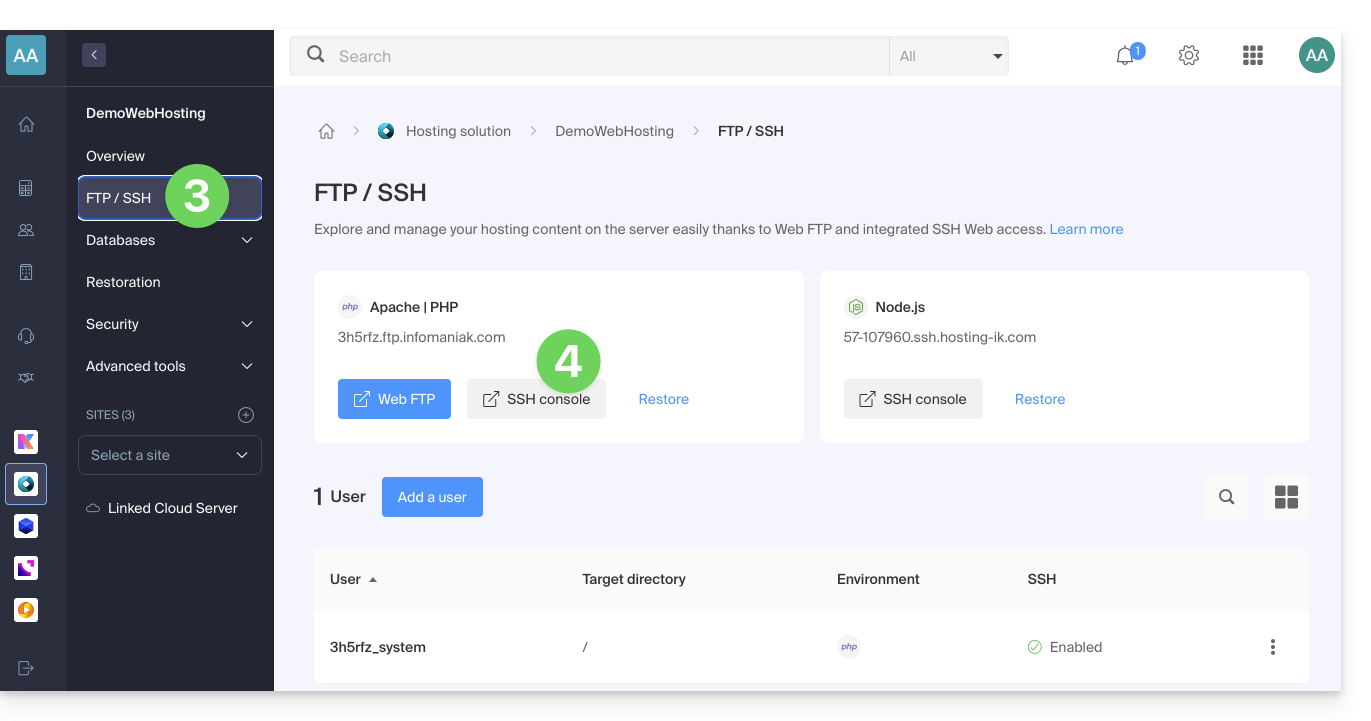
- Click on FTP / SSH in the left-hand menu.
- Click on the SSH Console button:
… via the terminal or an application
To connect via SSH, use the following commands from a Terminal application (command-line interface, CLI) on your device, for example:
- Terminal (an application already integrated into macOS and Linux)
- PuTTY (Windows) (❓: help)
Then, enter the following command:
ssh username@serverusernameis the username for the FTP account (❓: help)serveris the host server (e.g. xxxx.ftp.infomaniak.com)
To find out which command is available and to know the path to use, run the "whereis" command:
$ whereis mysql
mysql: /opt/mysql/bin/mysql
Link to this FAQ: https://faq.infomaniak.com/1941
Has this FAQ been helpful?