Knowledge base
1000 FAQs, 500 tutorials and instructional videos. Here, there are only solutions!
Secure a video stream by restricting the domain
This guide explains how to restrict access to Infomaniak video streaming feeds to only your own website.
This protection does not prevent the embedding of a stream via an HTML iframe tag. Use unique hash protection for a higher level of security.
Restrict access to broadcasts to a domain
To do this:
- Click here to access the management interface for your product in the Infomaniak Manager (need help?).
- Click directly on the name assigned to the product in question.
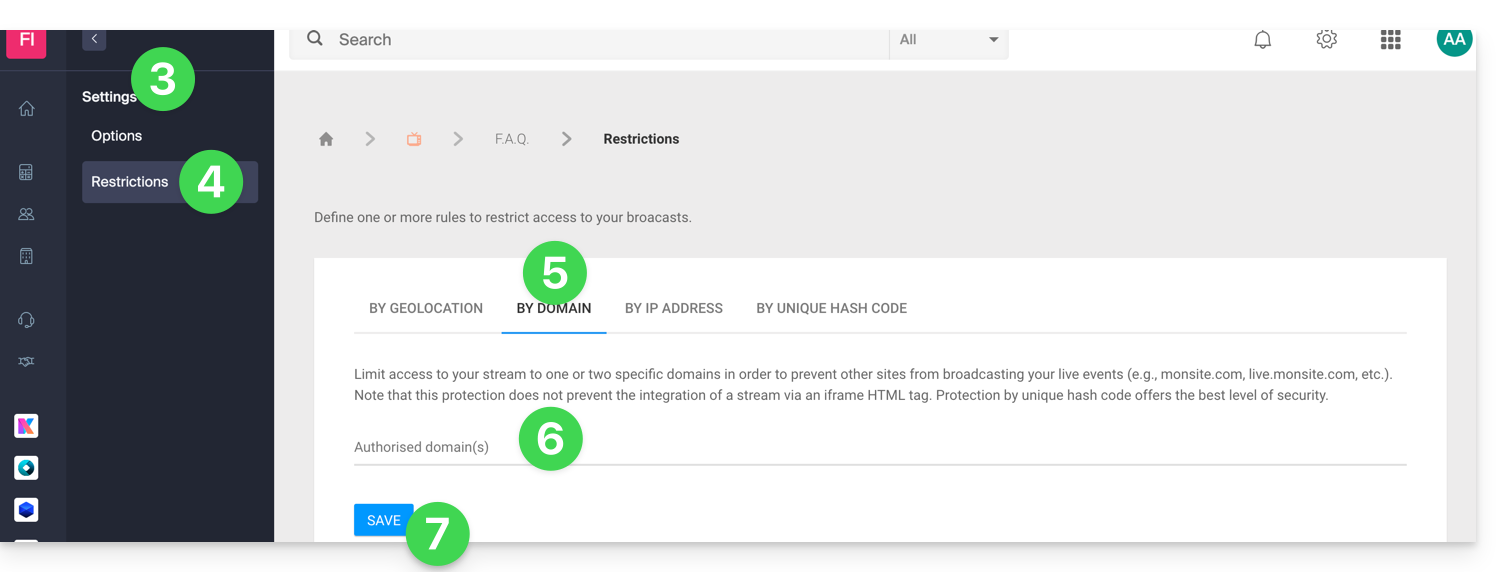
- Click on Settings in the left-hand menu.
- Click on Restrictions in the left-hand menu.
- Click on the Domain Restriction tab.
- Define the site(s) that must be specifically allowed to load the feed.
- Click on the Save button:
Refer to this other guide to customize the replacement image offered to viewers who are blocked.
Link to this FAQ: https://faq.infomaniak.com/1543
Has this FAQ been helpful?