Knowledge base
1000 FAQs, 500 tutorials and instructional videos. Here, there are only solutions!
Resolve infinite site loading (increase the max_children value)
This guide explains how to increase the max_children value on Managed Cloud Server to increase the number of simultaneous PHP processes that can be used by your site. This will be very useful for resolving infinite page loading issues on your site.
Preamble
- By default on all hosting, the
max_childrenlimit is set to 20.- Although it is possible to increase this value from the Infomaniak Manager, the
max_childrenlimit is automatically adjusted based on the configuration of your Managed Cloud Server. - To increase this limit on shared hosting, migrate to Managed Cloud Server.
- Although it is possible to increase this value from the Infomaniak Manager, the
- To understand how to calculate the
max_childrenneeded as accurately as possible, refer to this article on the subject.
Increase the max_children value
Prerequisites
- Ensure that you have the necessary resources on the Managed Cloud Server.
- Ensure that all resources of the Managed Cloud Server are not being used; if it turns out that they are fully used, increasing the
max_childrenvalue will have no effect (Modify Managed Cloud Server resources). - Monitor the resources of your server, in case the resources of your server are reached, it will be necessary to check the optimization of processes and your site before considering increasing the
max_childrenvalue. - Consult the PHP error reports from the
/ik-logsfolder (master process php logs - file name: php-fpm.log) to check if the "max_children" limit has been exceeded... example of error:[05-Jul-2024 09:08:58] WARNING: [pool www.infomaniak.ch] server reached max_children setting (20), consider raising it
To access the management of PHP / Apache parameters of the site for which you need to increase the max_children value on Managed Cloud Server, refer to this other guide.
You will be able to...
- ... choose a new
max_childrenvalue: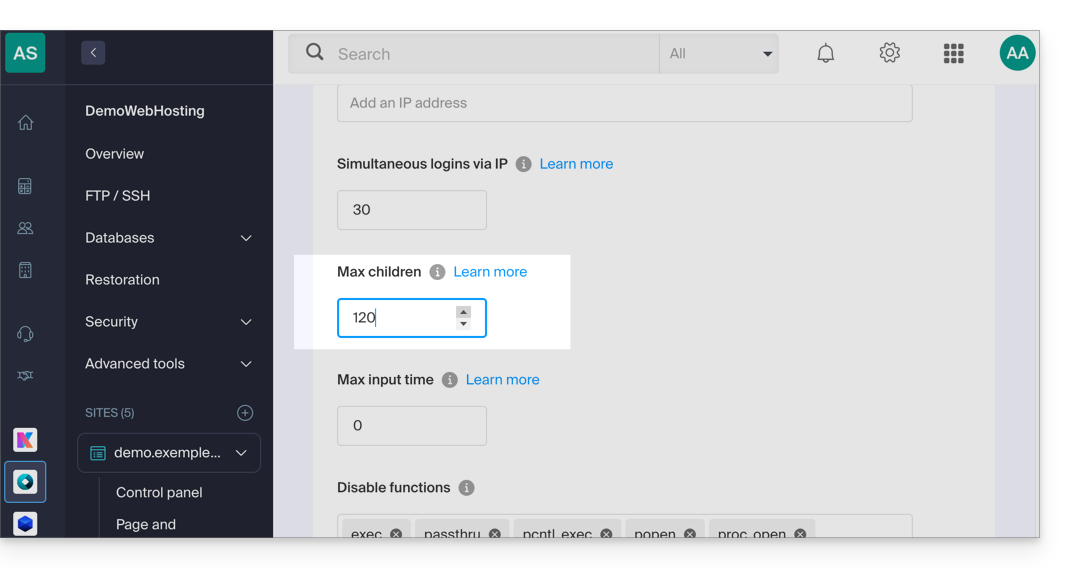
Do not forget to save the changes at the bottom of the page.
Limits depending on the server
Limit of max_children depending on the resources of the Managed Cloud Server:
| Managed Cloud Server Configuration | max_children |
|---|---|
| 2 CPU / 6 Go RAM | 20 |
| 4 CPU / 12 Go RAM | 40 |
| 6 CPU / 18 GB RAM | 60 |
| 8 CPU / 24 GB RAM | 80 |
| 12 CPU / 36 GB RAM | 120 |
| 16 CPU / 48 GB RAM | 160 |
| 24 CPU / 72 GB RAM | 240 |
| 32 CPU / 96 or 128 GB RAM | 320 |
Link to this FAQ: https://faq.infomaniak.com/1270
Has this FAQ been helpful?