Knowledge base
1000 FAQs, 500 tutorials and instructional videos. Here, there are only solutions!
Hide recipient addresses in an email
This guide details the different ways to address an email to multiple recipients, including hiding the email addresses of other participants.
Introduction
- When sending emails, it is sometimes necessary to include multiple recipients using the following fields:
- To
- CC:
- French: Copie Conforme
- English: Carbon Copy
- BCC:
- French: Copie Conforme Invisible
- English: Blind Carbon Copy
- Do not overload the To and CC fields with recipients who are not directly concerned by the email.
- Use the BCC field to protect the email addresses of recipients when there are multiple people on the list.
- For multiple, recurring, and/or large-scale email sends exceeding the imposed limits, it is recommended to use dedicated tools instead:
Understanding and using these 3 email fields
The To field
This field is used to indicate the primary recipient(s) of the email, those who receive the email as a direct copy.
- Use this field for the primary recipients who are directly concerned by the content of the email.
- Examples: work meeting, project report, direct communication with a client.
The CC field
Used to send a copy of the email to other people in addition to the main recipients. All recipients can see who received a copy of the email.
- Use this field to include secondary recipients who need to be informed but are not the main participants in the discussion.
- Example: inform a supervisor about a conversation, include colleagues who are interested in the topic without requiring them to participate.
The CCI field
Used to send a copy of the email to people without the other recipients knowing that they also received the email.
- Use this field to include recipients who should receive the email without the other recipients being aware.
- Example: sending an email to a group with a supervisor in CC for follow-up, to avoid disclosing email addresses to all recipients (often used in mass emails).
Using the available fields in Mail Infomaniak
To access the relevant fields in your Infomaniak email account:
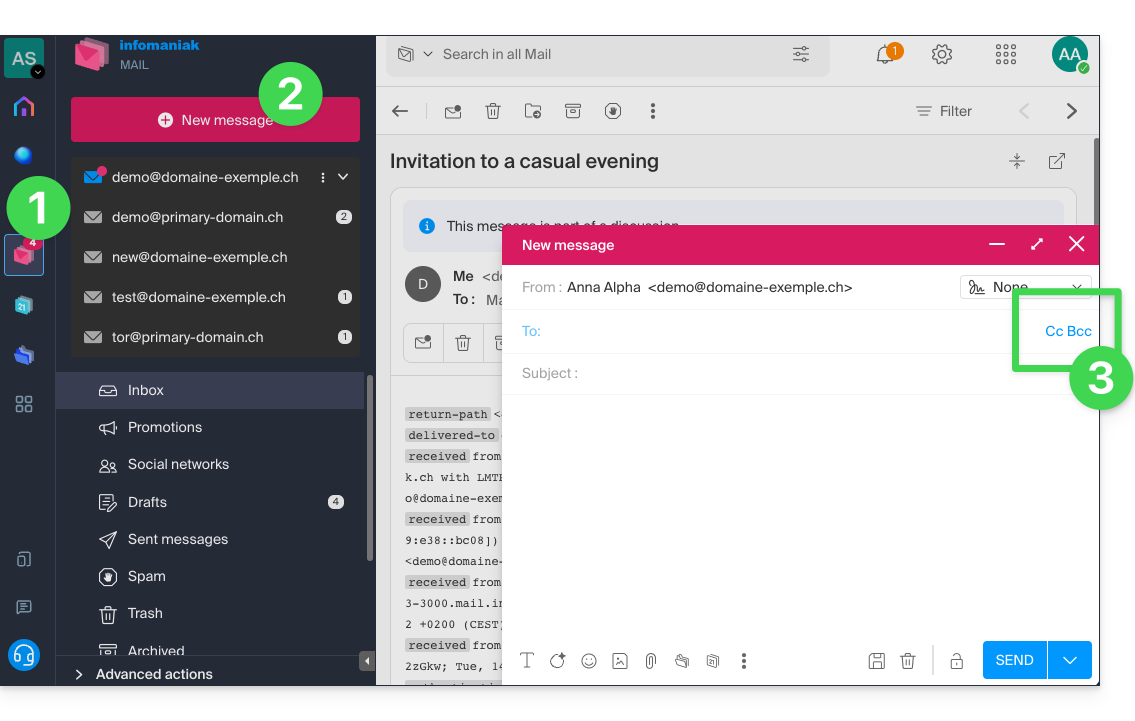
- Click here to access the Infomaniak Mail web app (online service ksuite.infomaniak.com/mail).
- Click on New message.
- Click on CC & BCC:
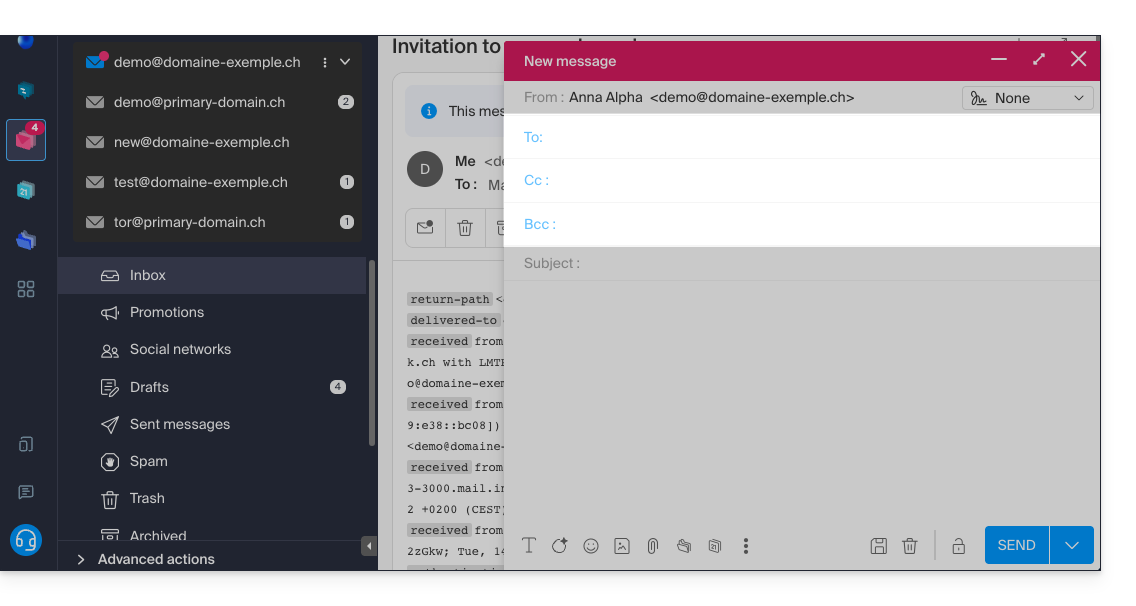
- Additional fields will appear, allowing you to enter the email addresses of your recipients:
Examples of use
Each of these fields has a specific function and can be used strategically depending on the context of your communication. Be transparent and ethical in the use of the CCI field to avoid misunderstandings or conflicts:
- Team communication
- To: main project members
- CC: Project Manager, other relevant departments
- CCI: Director for information without direct involvement
- Email marketing
- To: do not use (or simply indicate the sender's email address)
- CC: do not use
- BCC: list of subscribers to protect individual email addresses
- Important announcement
- To: main recipients (e.g., managers)
- CC: board members, key collaborators
- BCC: other stakeholders for confidential information
- Meeting announcement
- To: John Doe, Jane Smith
- CC: projet.manager@entreprise.com
- BCC: directeur@entreprise.com
- Event invitation
- To: main guests
- CC: coordination@evenement.com
- BCC: list of secondary guests (to protect email addresses)
Link to this FAQ: https://faq.infomaniak.com/1049
Has this FAQ been helpful?