Base de conhecimento
1000 perguntas frequentes, 500 tutoriais e vídeos explicativos. Aqui, você encontra apenas soluções!
Este guia explica o que é um código de suporte e um código VIP (que não deve ser confundido com o código de autorização usado para a transferência de nomes de domínio) na Infomaniak.
Código de suporte e código VIP
O código de suporte permite que o departamento de suporte da Infomaniak o identifique de forma rápida e segura quando você entrar em contato com eles e fornecer essa sequência de números. Ele é exibido na página do seu perfil de usuário.
O código VIP é reservado para clientes que subscreveram o Suporte Premium e permite a identificação quando você liga para o técnico de referência. Ele é exibido na página de gerenciamento deste serviço.
Nesta página de gerenciamento, você também encontrará suas várias informações que permitem entrar em contato com a Infomaniak no âmbito da oferta de suporte contratada.
O código está presente no seu documento técnico e também é exibido na janela de contato que se abre quando você deseja entrar em contato com a Infomaniak através do botão de assistência: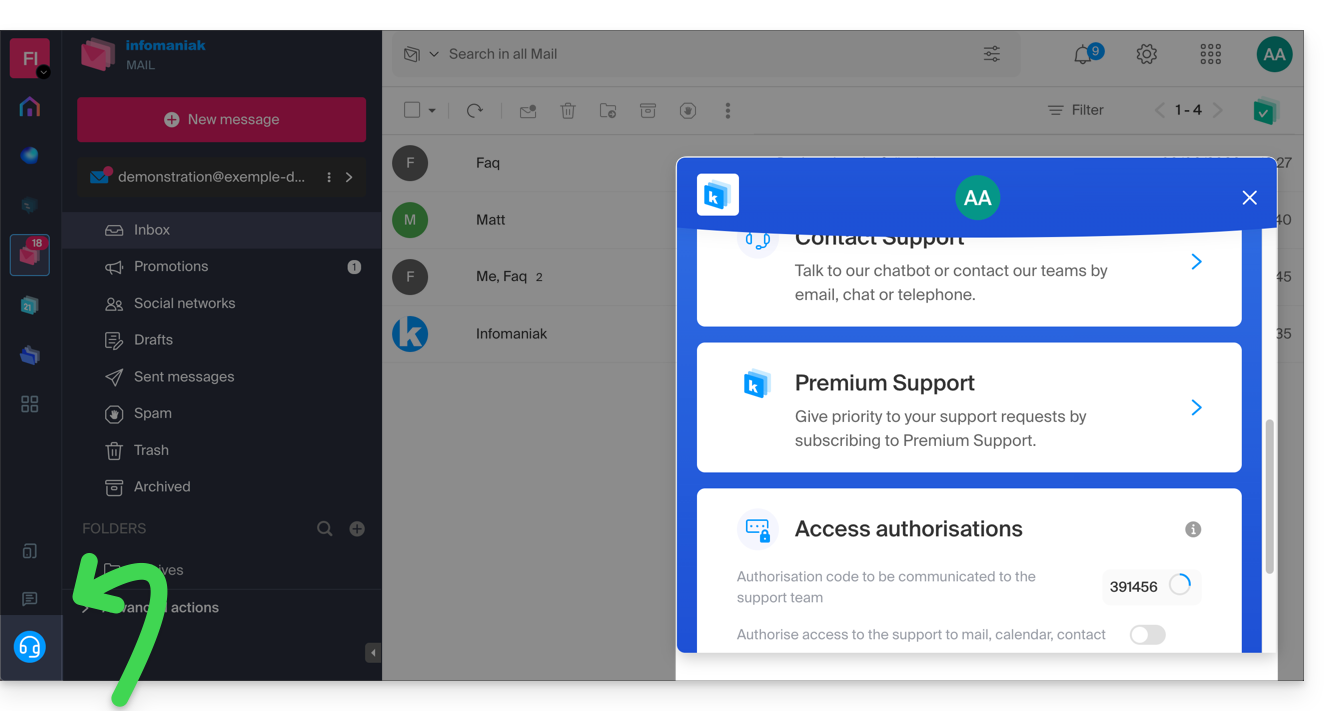
No mesmo local, você pode conceder um acesso temporário aos seus serviços (para acesso possível apenas para os colaboradores do Suporte da Infomaniak).
Link para esta FAQ: https://faq.infomaniak.com/766
Esta seção de perguntas frequentes foi útil?
Este guia explica como criar um pedido de orçamento como Cliente Infomaniak que necessita de apoio, como cancelar o pedido caso já tenha encontrado uma solução e como um Parceiro Infomaniak pode responder a este pedido de orçamento.
Criar um pedido de orçamento
A seguir, o processo a ser seguido quando desejar responder a um pedido de proposta:
- Clique aqui para acessar a página de envio de propostas.
- Este é um serviço gratuito que permite que vocêapresente sua proposta a todos os Parceiros Infomaniak que desejam receber este tipo de solicitação.
- Assim que o seu pedido de orçamento for enviado, cada Parceiro envolvido recebe uma mensagem com um resumo do pedido.
- É-lhe proposto consultar o seu pedido de orçamento completo numa interface dedicada, dentro da sua conta de Parceiro no Manager Infomaniak.
- Se ainda for válido (consulte abaixo), o Parceiro exibirá seu pedido de orçamento e terá acesso aos seus dados de contato.
- Em seguida, ele poderá apresentar uma proposta adaptada às suas necessidades e você decidirá como prosseguir:
- Colaborar com o Parceiro (tornando-se seu Cliente dentro da Infomaniak, por exemplo) e, nesse caso, você poderá remover o pedido de orçamento (consulte abaixo).
- Aguardar o recebimento de outras propostas ao longo dos dias.
Cancelar o pedido de orçamento em andamento
Quando submete um pedido de orçamento, recebe automaticamente um e-mail para o seu endereço de contacto:
- Este e-mail contém um link para cancelar o seu pedido de orçamento.
- Atenção: o efeito é imediato.
- Dessa forma, não será mais visível na interface disponibilizada aos Parceiros Infomaniak.
Link para esta FAQ: https://faq.infomaniak.com/1437
Esta seção de perguntas frequentes foi útil?
Este guia explica o funcionamento do Programa de Parceiros da Infomaniak, suas condições de elegibilidade e suas inúmeras vantagens exclusivas para os profissionais de TI.
Introdução
- Ao tornar-se Parceiro, você expande seus negócios com um fornecedor reconhecido pela sua confiabilidade, segurança (certificação ISO) e compromisso exemplar com o meio ambiente.
- O programa está aberto a qualquer entidade profissional (Suíça ou Europa) que cumpra os seguintes critérios:
- Ser uma empresa registrada no Registro Comercial (ou SIRET/equivalente) com um site ativo.
- Gerenciar um volume de produtos igual ou superior a CHF 2000 / € 1800 por ano.
- Garantir o suporte técnico de primeiro nível e a faturação para seus próprios clientes.
- Comprometer-se a usar exclusivamente as soluções Infomaniak para os projetos provenientes da plataforma de licitações.
- Respeitar as condições específicas para Revendedores.
- Torne-se um Parceiro para usufruir imediatamente de descontos, reembolsos e ferramentas de gestão centralizadas.
- Se for um utilizador individual, opte pelo Programa de Afiliados (não é possível acumular com o estatuto de Parceiro).
Vantagens exclusivas para Parceiros
O Programa de Parceiros foi concebido para maximizar a sua rentabilidade, oferecendo ao mesmo tempo uma infraestrutura soberana e de alto desempenho.
Suporte prioritário "Suporte Plus" incluído
- Acesso gratuito ao Suporte Plus: como Parceiro, você tem acesso prioritário aos especialistas da Infomaniak.
- As suas solicitações são tratadas prioritariamente por equipas técnicas sediadas na Suíça, garantindo a máxima rapidez na resposta aos seus clientes.
- Uma linha direta e uma interface de gestão de tickets dedicada para resolver rapidamente os seus problemas complexos.
Rentabilidade e Economias
- Descontos e Reembolsos: até 35% de desconto nos produtos mais populares da Infomaniak e reembolsos recorrentes nos serviços contratados.
- Preços de Domínios: acesso aos melhores preços do mercado nas extensões mais comuns.
- Ferramentas Oferecidas: acesso gratuito e ilimitado a temas WordPress da Elegant Themes (Divi, etc.).
Visibilidade e Desenvolvimento
- Pedidos de orçamento: receba em primeira mão as necessidades divulgadas pelos clientes da Infomaniak através da plataforma de pedidos de orçamento.
- Diretório de Parceiros: melhore o seu SEO e a sua visibilidade ao ser listado gratuitamente no diretório oficial.
Gestão simplificada (painel de revendedor)
- Interface centralizada: um painel de controle único para gerenciar toda a sua base de clientes e acompanhar suas receitas.
- Delegação de acesso: gerencie os direitos de acesso de seus colaboradores e defina áreas de atuação específicas nas contas de seus clientes.
- Marca branca e faturamento: total liberdade na revenda dos seus serviços e gestão simplificada dos fluxos financeiros.
Recursos e Guias Técnicos
- O que é um Parceiro?
- O que é um Cliente (no sentido de Parceiro)?
- Adicionar um cliente e gerenciar seus produtos
- Permitir que um parceiro gerencie seus produtos
- Gerenciar as permissões de acesso entre Parceiro e Cliente
- Gerenciar a faturação Infomaniak entre Parceiro e Cliente
- Exportar dados de faturamento de clientes
- Interromper uma relação entre parceiro e cliente
Link para esta FAQ: https://faq.infomaniak.com/2064
Esta seção de perguntas frequentes foi útil?
Este guia ajuda você a entender o que é um Cliente no contexto do Programa de Parceiros da Infomaniak.
Definição
Um Cliente é uma pessoa física ou jurídica que escolheu a Infomaniak como seu provedor de hospedagem para adquirir e gerenciar produtos. Se você ainda não possui nenhum produto na Infomaniak, durante o processo de pedido, será solicitado que você crie uma conta.
O Cliente pode adicionar um Parceiro que faça parte do Programa de Parceiros da Infomaniak e conceder-lhe direitos de acesso completos ou limitados à sua conta e aos seus produtos.
O Parceiro será responsável por atender às solicitações de suporte para os produtos que gerencia.
Como Cliente do Parceiro, você deverá entrar em contato apenas com ele para qualquer solicitação de suporte.
Link para esta FAQ: https://faq.infomaniak.com/2666
Esta seção de perguntas frequentes foi útil?
Este guia ajuda você a entender o que é um Parceiro no âmbito do Programa de Parceiros da Infomaniak.
Definição
Um parceiro é uma pessoa física ou jurídica que escolheu a Infomaniak como seu provedor de hospedagem para gerenciar um portfólio de clientes, dos quais será responsável pelo suporte, pela parte técnica (e pela faturação, se desejado).
Se você ainda não é um Parceiro Infomaniak, pode se inscrever neste endereço ou pode fazer sua solicitação de inscrição diretamente do seu Painel de Controle, caso já possua uma conta.
Link para esta FAQ: https://faq.infomaniak.com/2667
Esta seção de perguntas frequentes foi útil?
Este guia explica como adicionar um Cliente no âmbito do Programa de Parceiros da Infomaniak.
Pré-requisitos
- Ser o responsável legal dentro da Organização Parceira.
Adicionar um cliente "sob gestão"
Para adicionar um Cliente no âmbito da sua atividade de Parceiro:
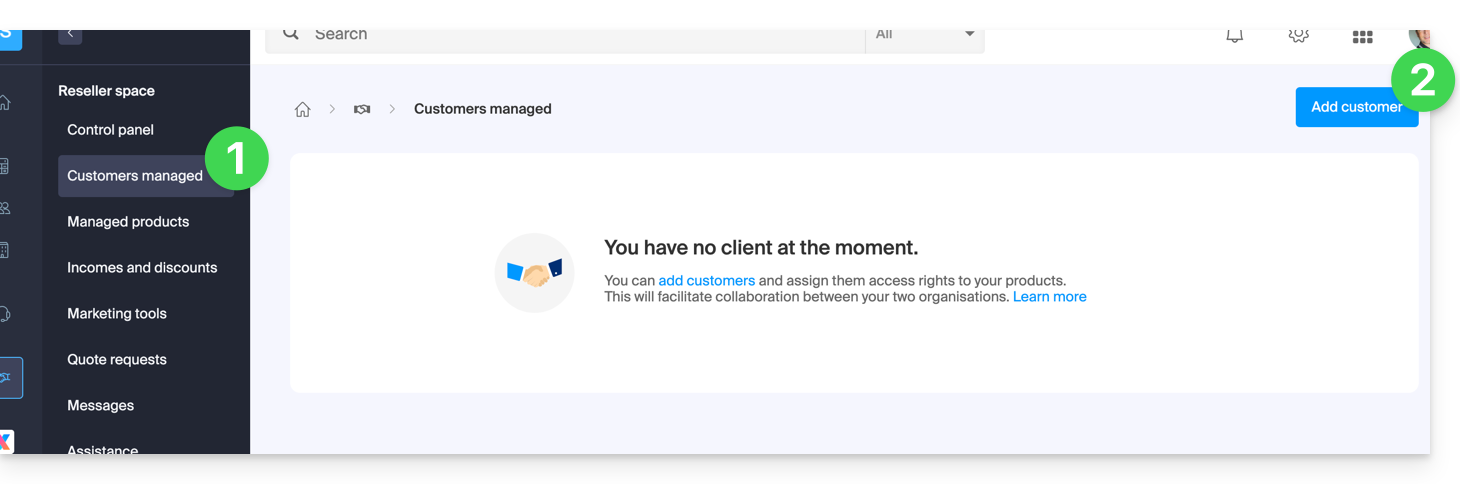
- Clique aqui para aceder aos seus Clientes sob gestão no Espaço de Parceiros do painel de controlo Infomaniak (precisa de ajuda?).
- Clique no botão azul “Adicionar um cliente” no canto superior direito:
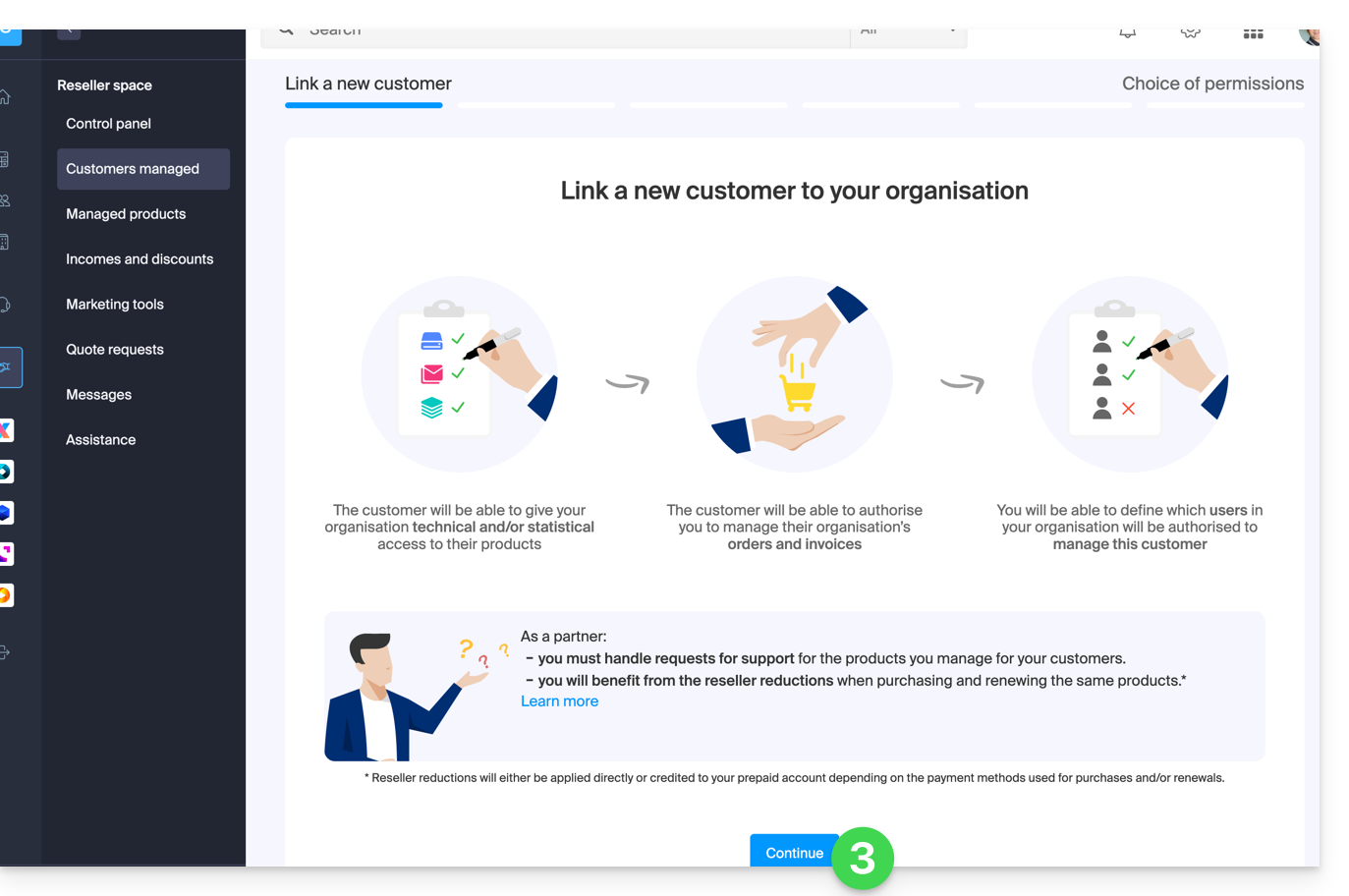
- Siga o procedimento para concluir:
- O pedido pendente será visível no seu painel de controlo:
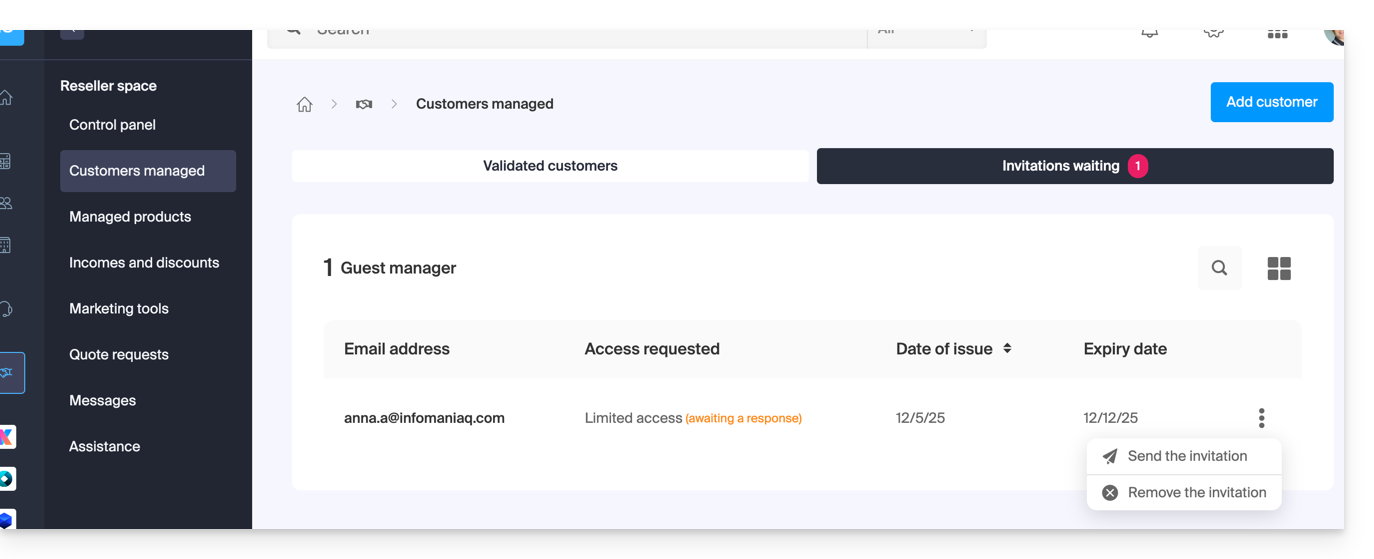
- O cliente receberá um e-mail com o pedido dos diferentes acessos e terá a possibilidade de decidir se concede direitos de acesso diferentes dos solicitados pelo parceiro.
- Após a aceitação do convite por um cliente, verifique os direitos de acesso concedidos, bem como os meios de pagamento utilizados (se aplicável) no perfil do seu cliente.
Aceder à conta do cliente e aos seus produtos…
... como responsável legal ou administrador parceiro
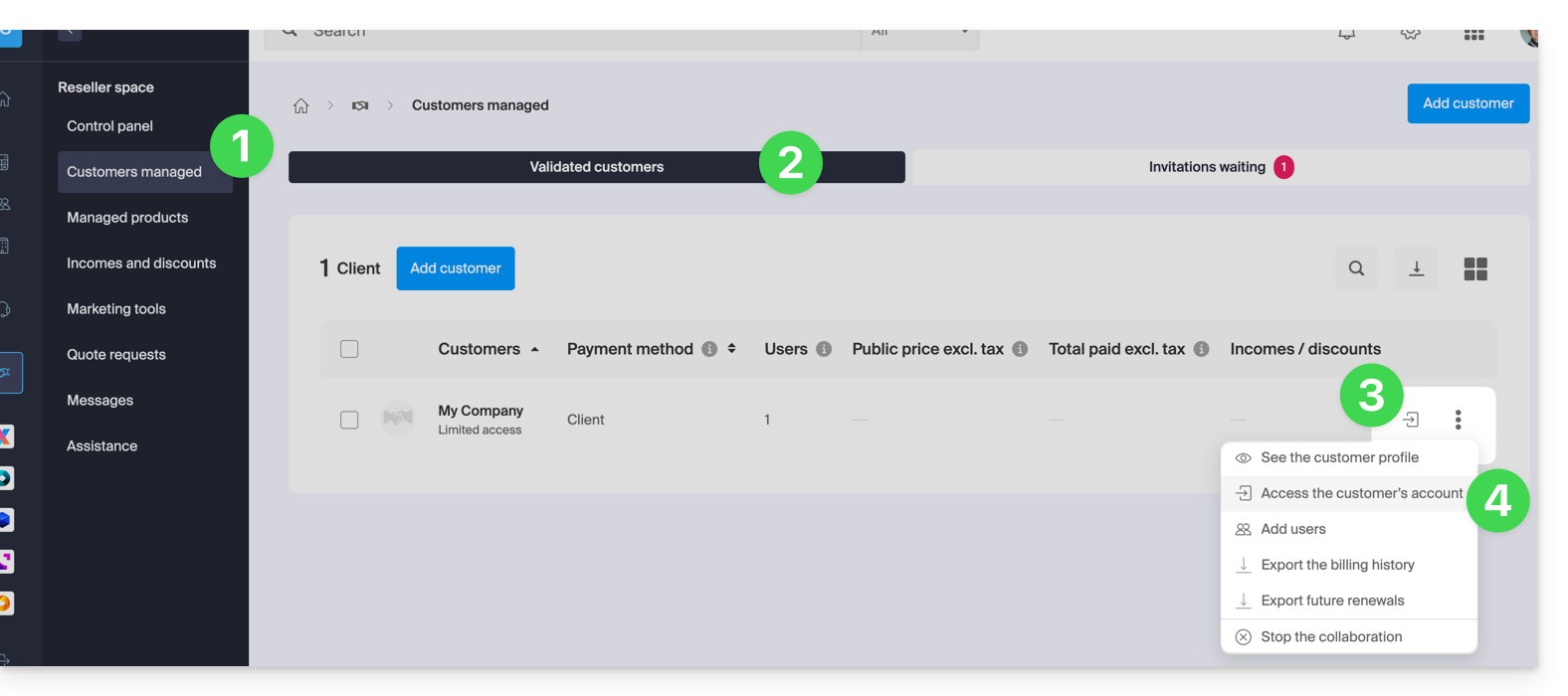
- Clique aqui para acessar seus clientes gerenciados no Espaço de Revenda do Gerenciador Infomaniak (precisa de ajuda?).
- Clique, se necessário, na aba Clientes validados.
- Clique no ícone à direita do cliente em questão na tabela exibida para acessar o painel de controle dele.
- Clique no menu de ação ⋮ à direita do cliente em questão na tabela exibida para acessar mais opções (como a exportação de dados para um arquivo CSV (formato .csv) por exemplo):
… como colaborador da Organização Parceira
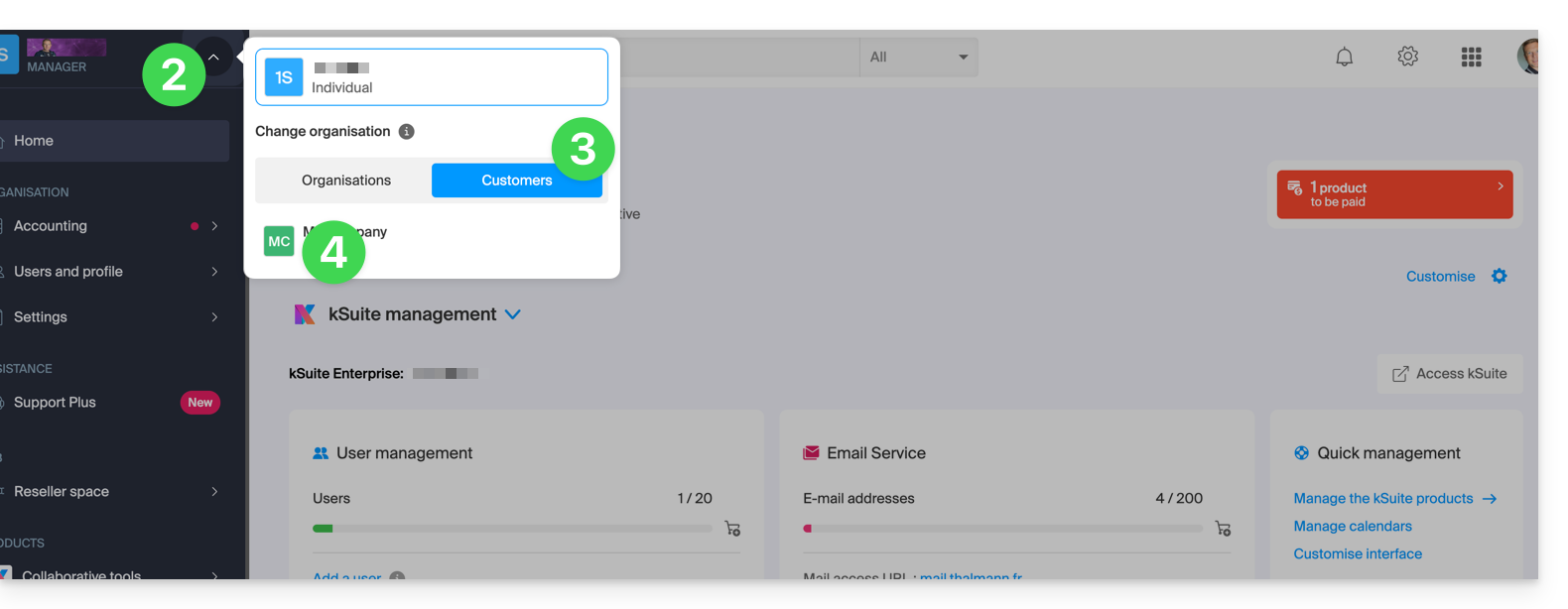
- Clique aqui para acessar o painel de controle Infomaniak.
- Clique na seta para baixo no canto superior esquerdo do seu menu lateral.
- Clique na aba Clientes.
- Clique no cliente desejado no menu que aparece para acessar o painel de controle Infomaniak:
Link para esta FAQ: https://faq.infomaniak.com/2668
Esta seção de perguntas frequentes foi útil?
Este guia explica como conceder acesso a um Parceiro (entre os Parceiros recomendados pela Infomaniak) aos produtos da sua Organização presentes no Manager Infomaniak, ou seja, a interface de administração dos seus produtos.
Introdução
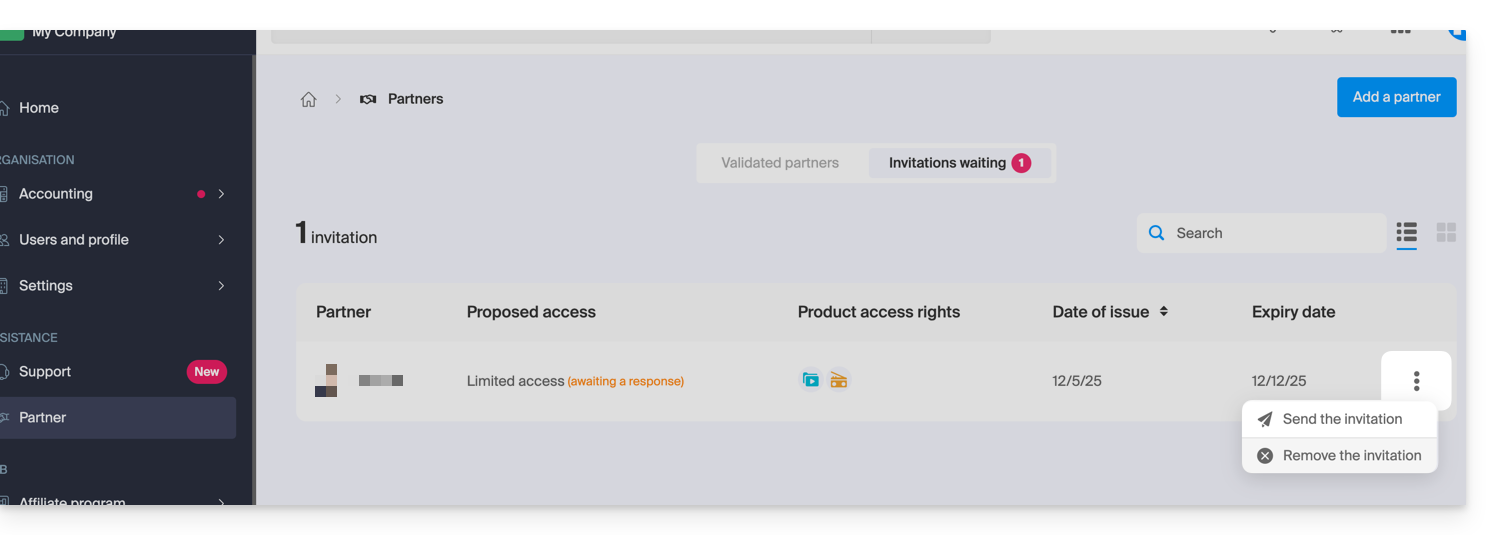
- Se o Parceiro já estiver vinculado à organização do Cliente antes do convite, por exemplo, como usuário externo, seu status será atualizado após o início da parceria.
- O convite pendente pode ser reenviado ou excluído antes de ser aceito.clicando em Parceiro no menu lateral esquerdo do Gerenciador de Clientes:
- A qualquer momento, uma parceria pode ser encerrada.
Como Cliente, adicione um Parceiro conhecido
Pré-requisitos
- Ser o responsável legal da organização.
Para autorizar o acesso de um Parceiro a alguns dos seus produtos:
- Clique aqui para acessar a seção de adição de um Parceiro no painel de controle Infomaniak (precisa de ajuda?):
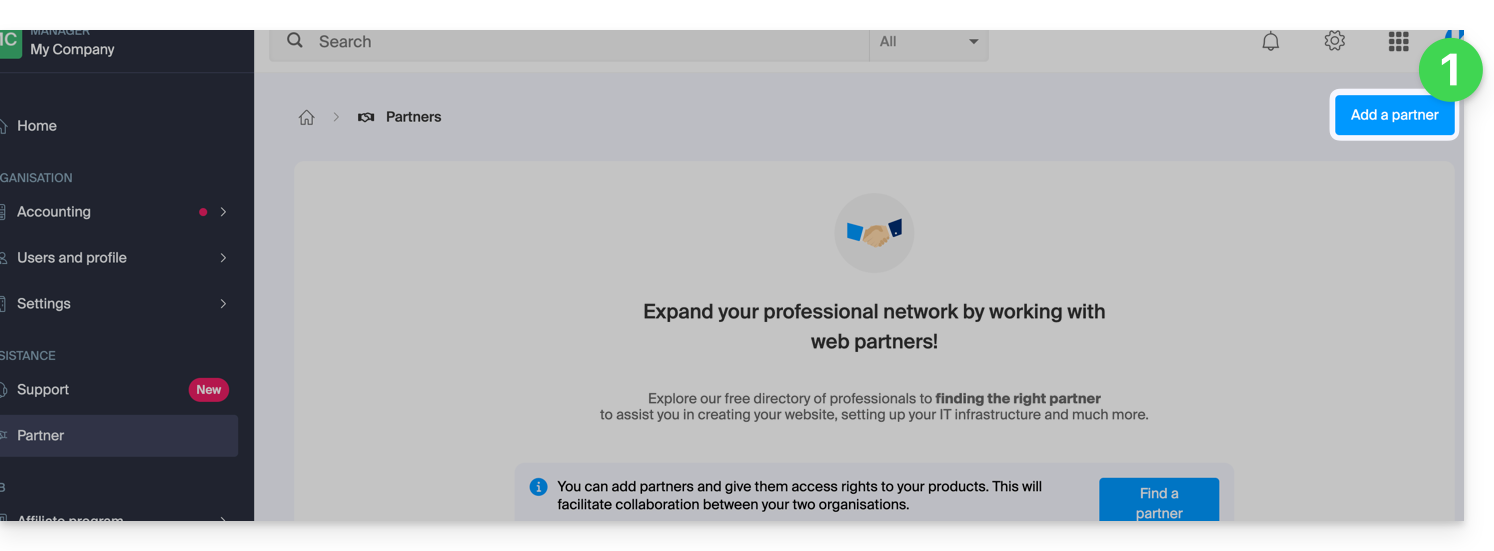
- Insira o nome ou o endereço de e-mail do Parceiro a quem você concederá acesso.
- Marque a caixa para selecionar o Parceiro correspondente nos resultados da pesquisa.
- Clique no botão azul para Continuar:
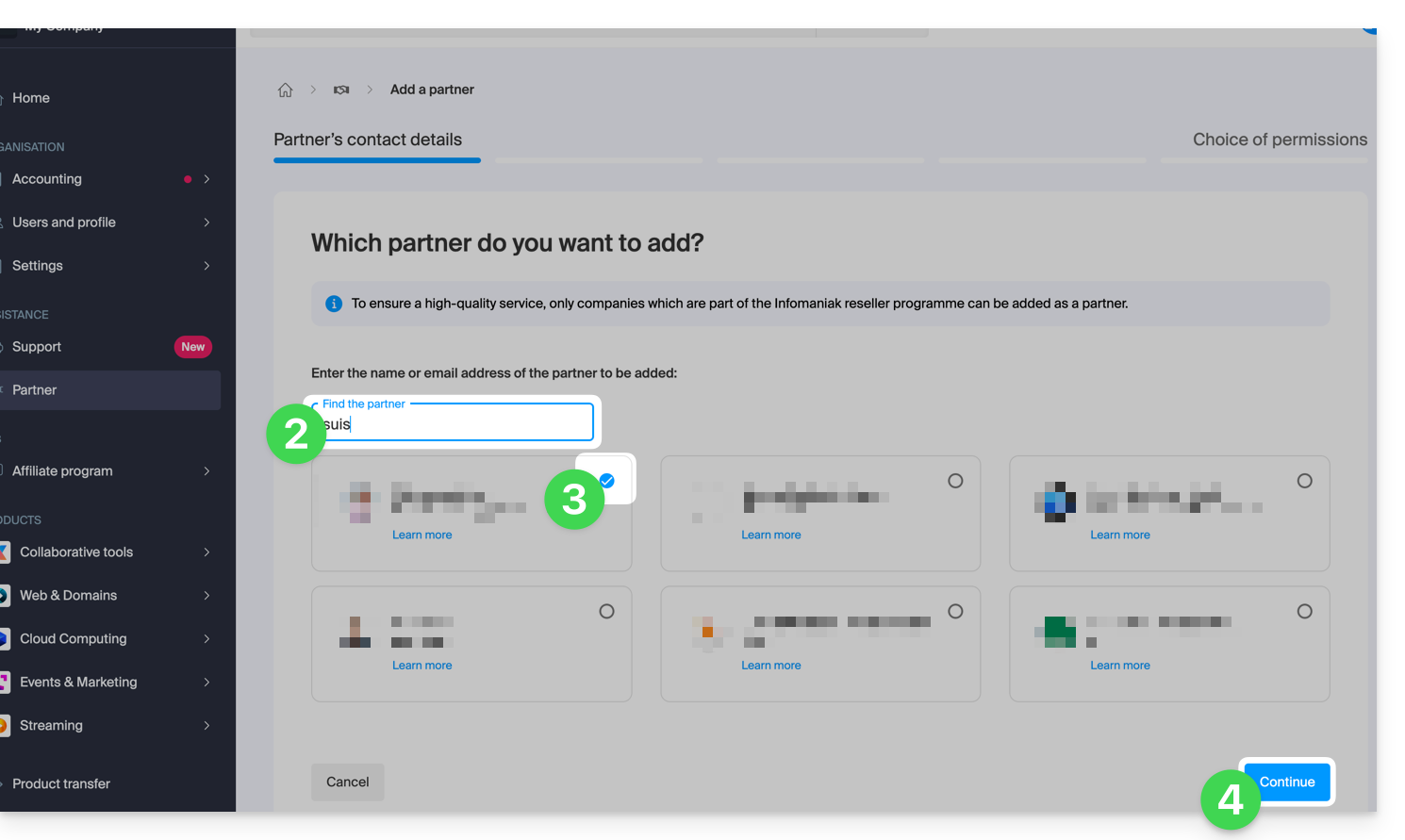
- O próximo passo apresenta uma escolha importante sobre as permissões concedidas ao Parceiro; as duas opções são detalhadas abaixo…
Conceder ao parceiro acesso...
... limitado
- Clique no botão à esquerda para escolher conceder ao Parceiro um acesso limitado:
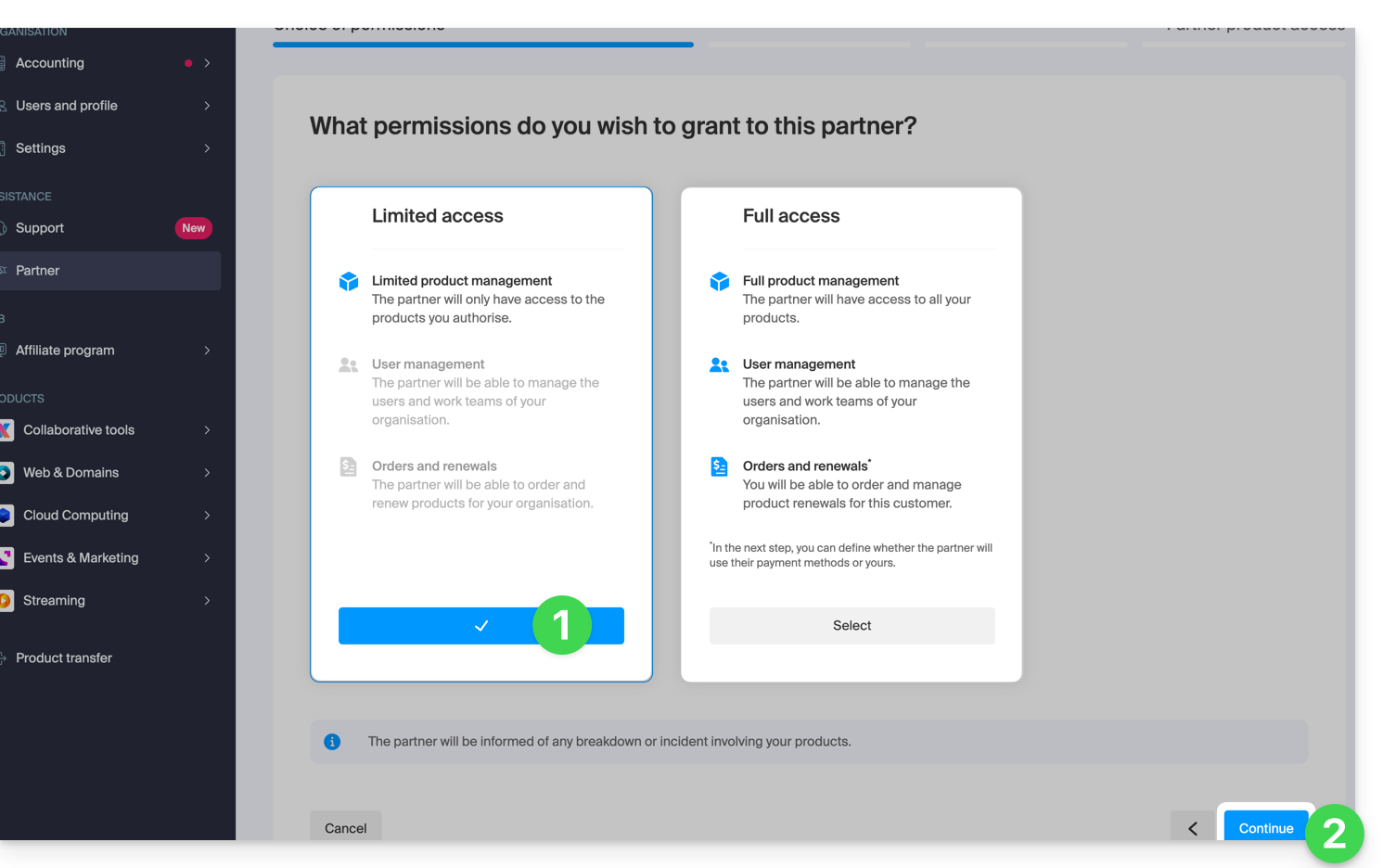
- Clique no botão para Continuar.
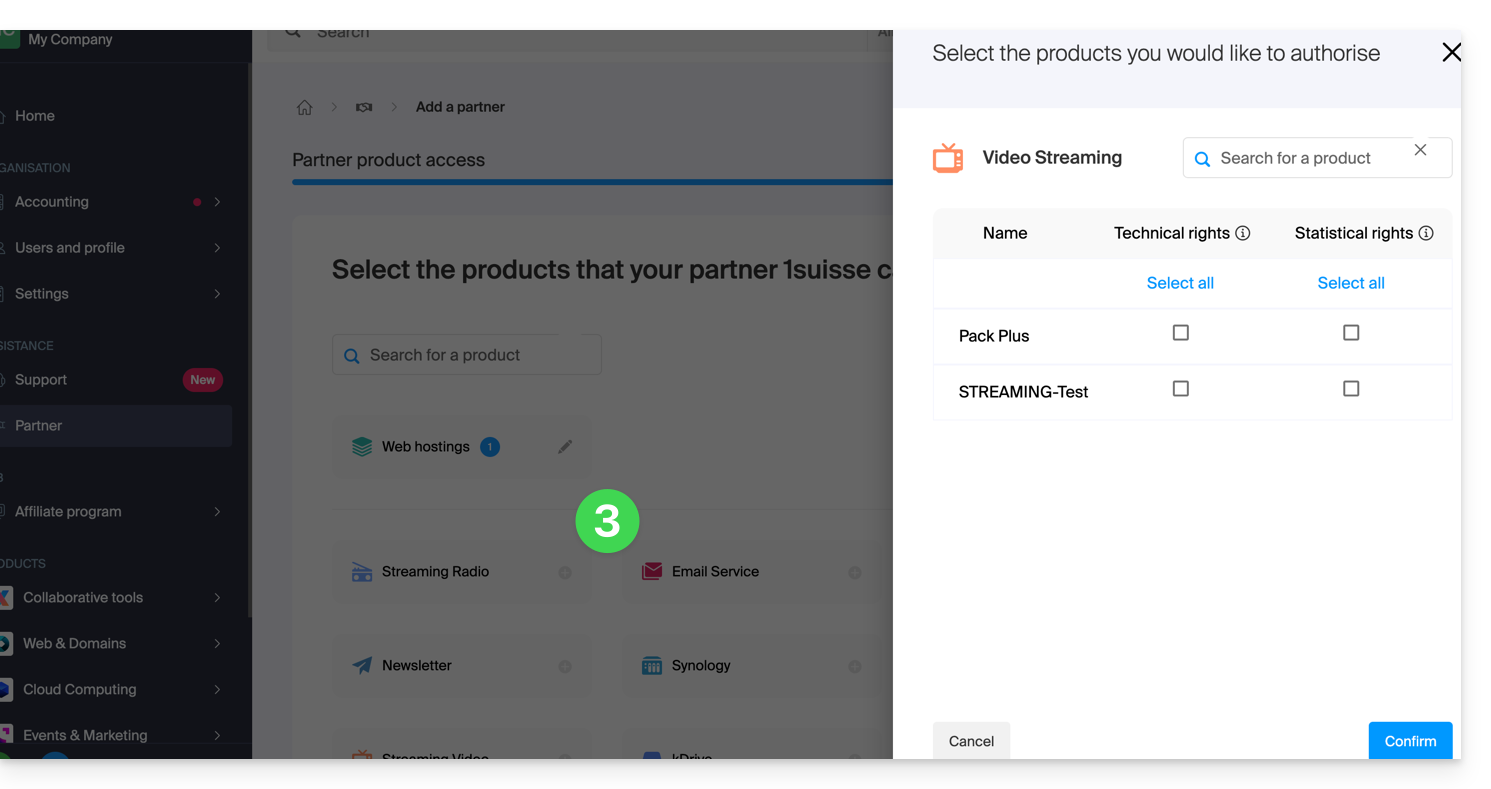
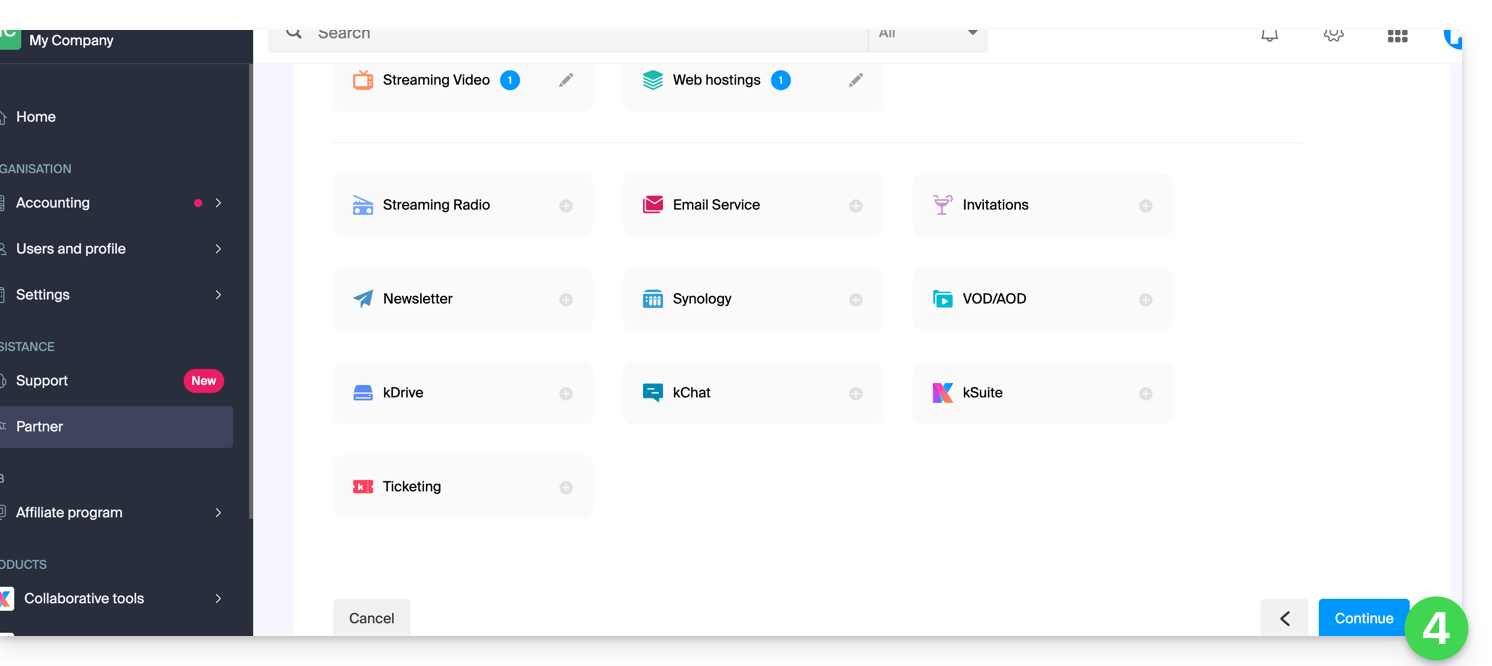
- Clique na categoria de produto correspondente e, no painel que se abre, clique no produto desejado; repita o processo para todos os produtos aos quais deseja conceder acesso:
- Clique no botão azul no canto inferior direito para Continuar:
- Um e-mail é enviado automaticamente ao Parceiro convidado, contendo um link que permite a ele aceitar (ou recusar) a proposta de gestão:
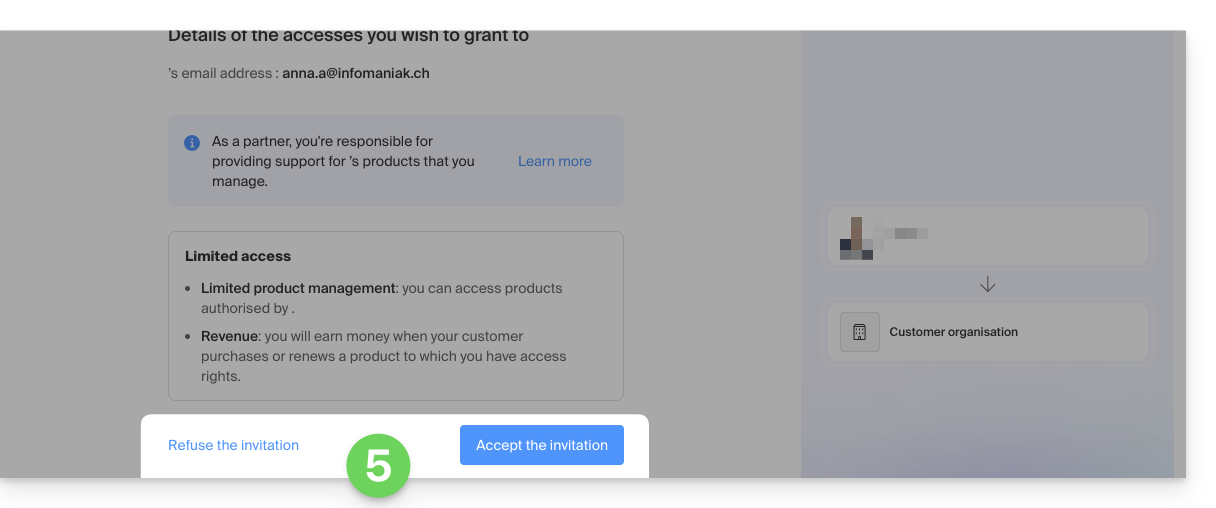
- Após a aceitação da proposta, o painel do Parceiro dá acesso à Organização do Cliente e aos produtos aos quais lhe foi concedido o direito de acesso.
... completo
- Clique no botão da direita para escolher conceder ao Parceiro um acesso completo.
- Clique no botão azul no canto inferior direito para Continuar:
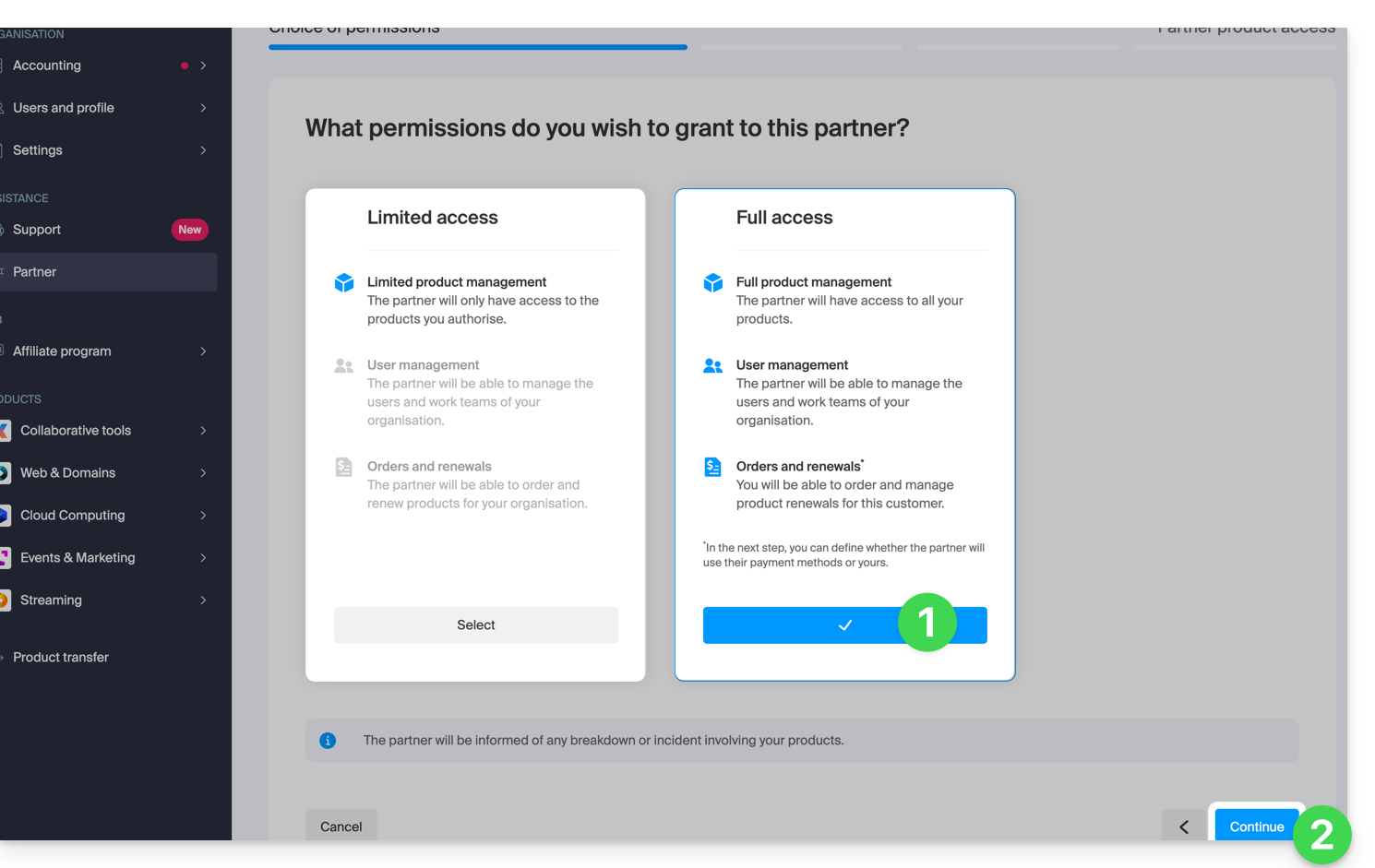
- O cliente deve escolher se deseja confiar também sua carteira ao parceiro.
- Clique no botão azul no canto inferior direito para Continuar:
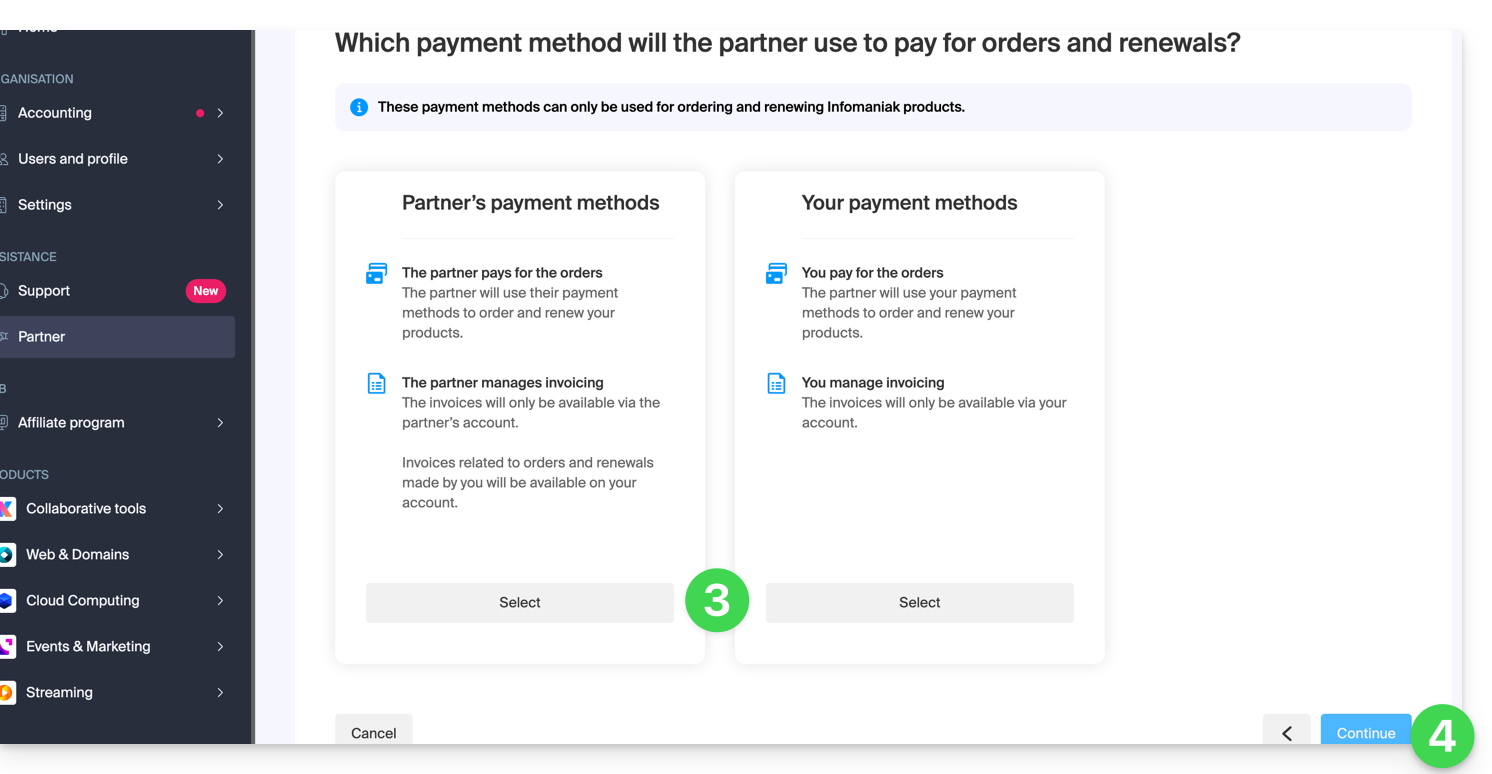
- Um e-mail é enviado automaticamente ao Parceiro convidado, contendo um link que permite a ele aceitar (ou recusar) a proposta de gestão:
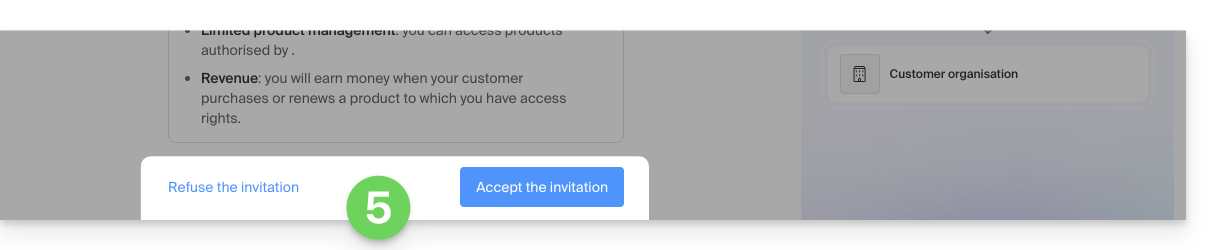
- Após a aceitação da proposta, o painel do Parceiro oferece acesso a toda a organização do Cliente.
Link para esta FAQ: https://faq.infomaniak.com/2669
Esta seção de perguntas frequentes foi útil?
Este guia explica quais são as diferenças entre os dois tipos de autorização de acesso possíveis quando o Parceiro deseja iniciar uma parceria, escolhendo o Cliente que ficará sob sua gestão.
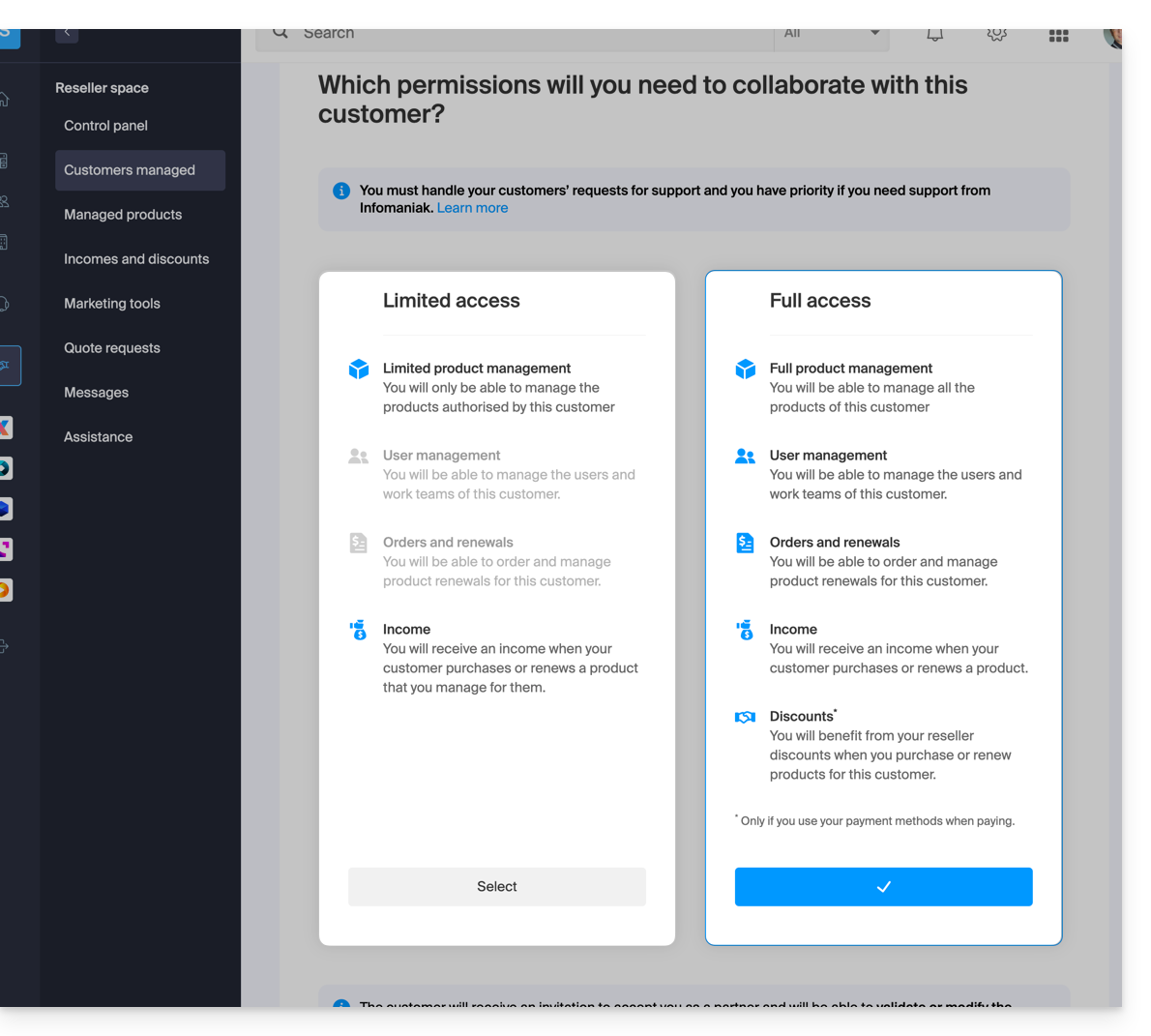
Acesso limitado
Ao fazer esta escolha:
- o Cliente
- concede ao seu Parceiro o acesso especificamente a determinados produtos
- pode ter vários Parceiros com acesso limitado na sua Organização, desde que gerem produtos diferentes
- o Parceiro
- gerencia apenas os produtos que o Cliente atribuiu para sua gestão (Gestão limitada de produtos)
- pode gerenciar os usuários e os Grupos do Cliente (Gestão de usuários)
- não pode encomendar e renovar produtos para seu Cliente (Encomendas e renovações)
- recebe uma receita quando o Cliente efetua compras ou renova produtos para os quais o Parceiro tem a gestão (Receita)
Acesso completo
Ao fazer esta escolha:
- o Cliente
- concede ao seu Parceiro acesso a todos os seus produtos (Gestão completa dos produtos)
- só pode ter um único Parceiro com acesso completo na sua Organização
- o Parceiro
- pode gerir os utilizadores e os Grupos do Cliente (Gestão de utilizadores)
- pode encomendar e renovar produtos para o seu Cliente (Encomendas e renovações)
- recebe uma remuneração por cada encomenda ou renovação de produto (Remuneração)
- beneficia de descontos de revendedor ao comprar ou renovar produtos para o seu Cliente, apenas se utilizar os seus próprios métodos de pagamento (Descontos)
- o Cliente e o Parceiro podem definir quais serão os métodos de pagamento utilizados para as encomendas e renovações (Métodos de pagamento)
O tipo de autorização concedida ao Parceiro pode ser alterado a qualquer momento, e apenas pelo Cliente.
Link para esta FAQ: https://faq.infomaniak.com/2670
Esta seção de perguntas frequentes foi útil?
Link para esta FAQ: https://faq.infomaniak.com/2671
Esta seção de perguntas frequentes foi útil?
Este guia ajuda você a entender os conceitos de comissão e cashback (rendimento) recorrente no âmbito do Programa de Parceiros da Infomaniak.
Pré-requisitos
- Compreender as diferenças entre os 2 tipos de permissões que vinculam um Cliente ao Parceiro, podendo ser definidas a partir do painel de controlo.
- Compreender as diferenças entre os 2 tipos de métodos de pagamento que vinculam um Cliente ao Parceiro, podendo ser definidos a partir do painel de controlo.
Reembolso
Trata-se de um valor correspondente à diferença entre o preço de tabela e o preço preferencial do qual o Parceiro beneficia como revendedor da Infomaniak.
Este valor é creditado como cashback na conta pré-paga do Parceironos seguintes casos:
Parceria com acesso total (meios de pagamento do Cliente)
- Quando o Cliente faz um pedido ou renova um produto.
- Quando o Parceiro faz um pedido ou renova um produto em nome do seu cliente, utilizando os meios de pagamento do mesmo.
Parceria com acesso total (métodos de pagamento do Parceiro)
- Quando o Cliente faz um pedido ou renova um produto.
Parceria com acesso limitado
- O Cliente faz um pedido ou renova um produto que está sob a gestão do Parceiro.
Desconto
Um Parceiro beneficia de descontos em pedidos e renovações devido ao seu estatuto de revendedor Infomaniak. O desconto aplica-se no seguinte caso:
Parceria com acesso total (métodos de pagamento do Parceiro)
- Quando o Parceiro faz um pedido ou renova um produto em nome do seu cliente, utilizando os seus próprios métodos de pagamento.
Acumulação
O desconto é cumulativo com a tarifa progressiva dos serviços de hospedagem Web/Mail.
Com 35 serviços de hospedagem web, você paga, por exemplo, apenas CHF 208,32 por mês por serviço, em vez de CHF 347,20, o que representa um desconto total de -40%.
Detalhe do cálculo em CHF (sem impostos):
- preço normal para 35 hospedagens web: CHF 347,20
- com desconto de parceiro de 20%: CHF 277,76
- preço final para parceiros com desconto progressivo de 25%: CHF 208,32
Detalhe do cálculo em euros (sem IVA):
- preço normal para 35 hospedagens web: 201,25 €
- com desconto de parceiro de 20%: 161 €
- preço para parceiros final com desconto progressivo de 25%: 120,75 €
O desconto progressivo (- 25%) é aplicado, portanto, ao valor restante após a aplicação do desconto para parceiros (- 20%).
Link para esta FAQ: https://faq.infomaniak.com/2672
Esta seção de perguntas frequentes foi útil?
Este guia explica como encerrar uma parceria entre um Cliente e um Parceiro no âmbito do Programa de Parceiros da Infomaniak.
Encerrar a parceria…
... como Cliente
Para isso:
- Clique aqui para acessar o gerenciamento de suas parcerias no Gerenciador Infomaniak (precisa de ajuda?).
- Clique no menu de ação ⋮ à direita do Parceiro em questão na tabela que é exibida.
- Clique em Interromper a colaboração:
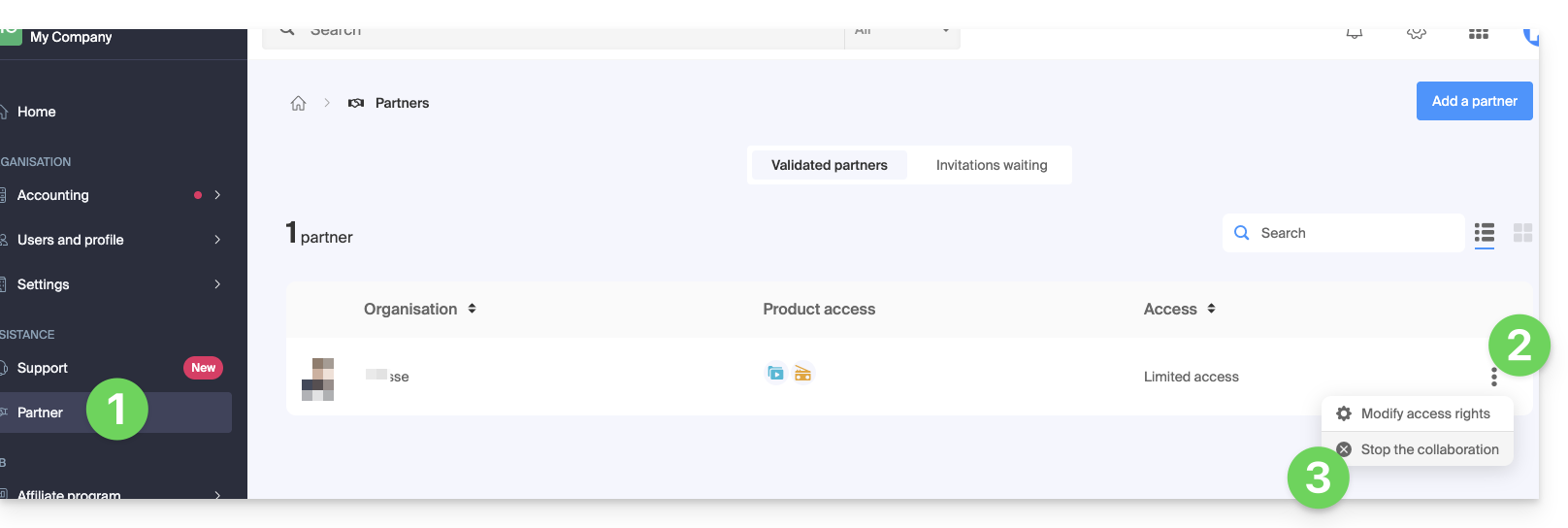
- Confirme, pela primeira vez, a remoção do Parceiro.
- Confirme definitivamente inserindo a senha da sua conta Infomaniak.
- A parceria foi cancelada com sucesso.
... como Parceiro
Para isso:
- Clique aqui para aceder aos seus Clientes geridos no Espaço de Revenda do Manager Infomaniak (precisa de ajuda?).
- Clique no menu de ação ⋮ à direita do Cliente em questão na tabela que é exibida.
- Clique em Interromper a colaboração:
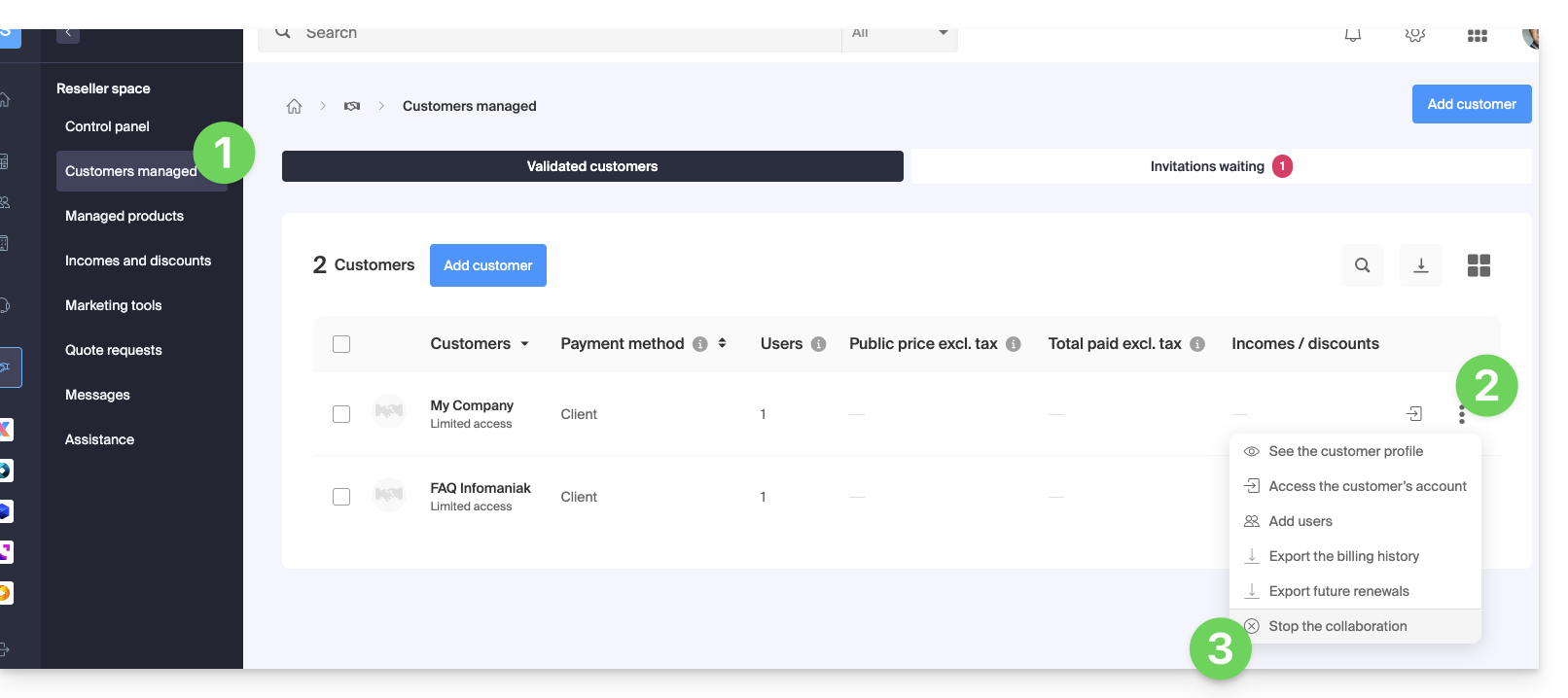
- Confirme, pela primeira vez, a remoção do Cliente.
- Confirme definitivamente ao inserir a senha da sua conta Infomaniak.
- A parceria foi cancelada com sucesso.
Link para esta FAQ: https://faq.infomaniak.com/2673
Esta seção de perguntas frequentes foi útil?
Link para esta FAQ: https://faq.infomaniak.com/2679
Esta seção de perguntas frequentes foi útil?
Como Parceiro Infomaniak, recomenda-se gerir os seus clientes Swiss Backup numa única conta/acesso Acronis e definir grupos/unidades na consola Acronis.
Não é possível migrar clientes finais ou cópias de segurança de clientes finais entre 2 contas Swiss Backup.
Link para esta FAQ: https://faq.infomaniak.com/2768
Esta seção de perguntas frequentes foi útil?