Knowledge base
1000 FAQs, 500 tutorials and instructional videos. Here, there are only solutions!
Change the size of a hosting on Cloud Server
This guide explains how to modify the disk space of a hosting on Managed Cloud Server.
Preamble
- The databases are installed on the same Cloud Server, so the disk space for the databases is not limited to the size of the hosting but to the total disk space of the Cloud Server.
- To modify this total disk space, it is necessary to modify the configuration of the Cloud Server.
- To modify this total disk space, it is necessary to modify the configuration of the Cloud Server.
Modify the disk space of a Web hosting
To access the hosting on Cloud Server:
- Click here to access the management of your product on the Infomaniak Manager (need help?).
- Click directly on the name assigned to the product concerned.
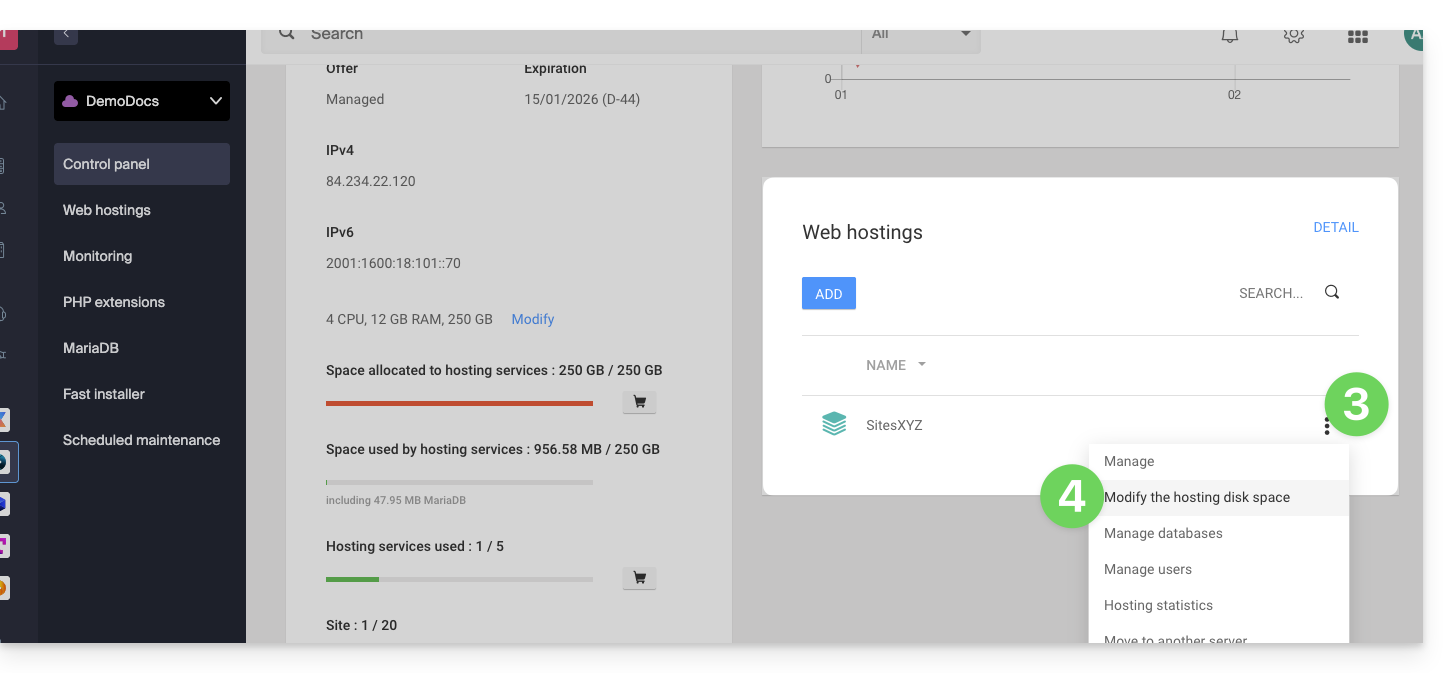
- Click on the action menu ⋮ located to the right of the Web hosting concerned, in the Web Hostings section.
- Click on Modify the disk space of the hosting:
- Adjust the size according to the allocated and still available disk space.
- Click on the Confirm button to validate the modification.
Link to this FAQ: https://faq.infomaniak.com/484
Has this FAQ been helpful?