Knowledge base
1000 FAQs, 500 tutorials and instructional videos. Here, there are only solutions!
Summarize emails with Euria
This guide will help you quickly discover the essential features of Euria, the artificial intelligence available within kSuite. It is particularly effective for summarizing emails in the Infomaniak Mail web app (online service ksuite.infomaniak.com/mail).
✘ UNAVAILABLE with
kSuite Free
my kSuite (ik.me, etik.com, ikmail.com)
Summarize an email
Prerequisites
- Read and understand this other guide about the model used and the responsibilities of each party.
To access the summary feature:
- Click here to access the Infomaniak Mail web app (online service ksuite.infomaniak.com/mail).
- Log in with the credentials of your Infomaniak account (not the password for your email address).
- Go to the email you want to summarize (it can be in any folder).
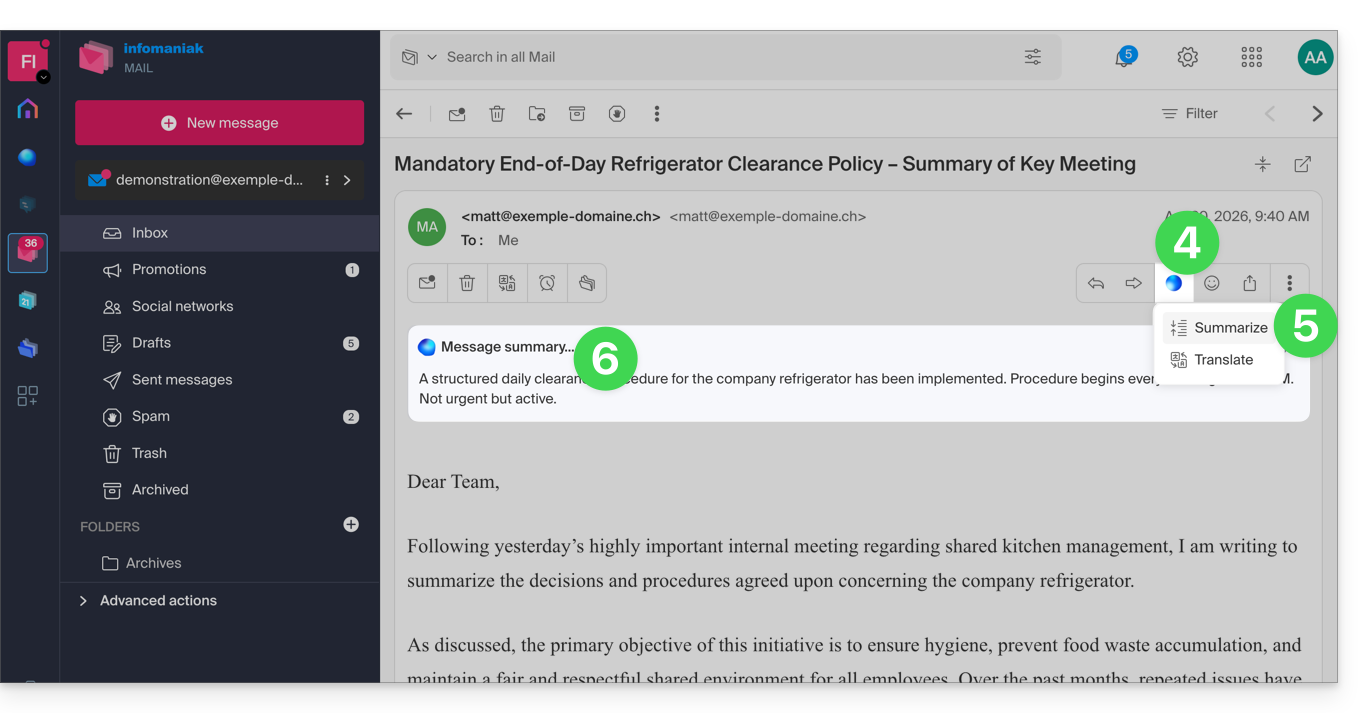
- Click on the Euria button located in the top toolbar.
- Click on Summarize.
- The message summary is displayed in a block above the original message (visible only to you):
Link to this FAQ: https://faq.infomaniak.com/308
Has this FAQ been helpful?