Knowledge base
1000 FAQs, 500 tutorials and instructional videos. Here, there are only solutions!
Manage a website's preview image in the Infomaniak Manager
Update 10/09/2026
This guide explains how to manage the preview image (thumbnail) of a website as seen in the Infomaniak Manager.
Create the preview image in the Manager
To access the Manager to manage the website preview image:
- Click here to access the hosting & website management section in your Infomaniak Manager (❓: help).
- Click on the name of the website in question.
- The preview image of the current website is displayed (it is at most 7 days old).
- If it is not up to date, hover over the image and click on Update preview:
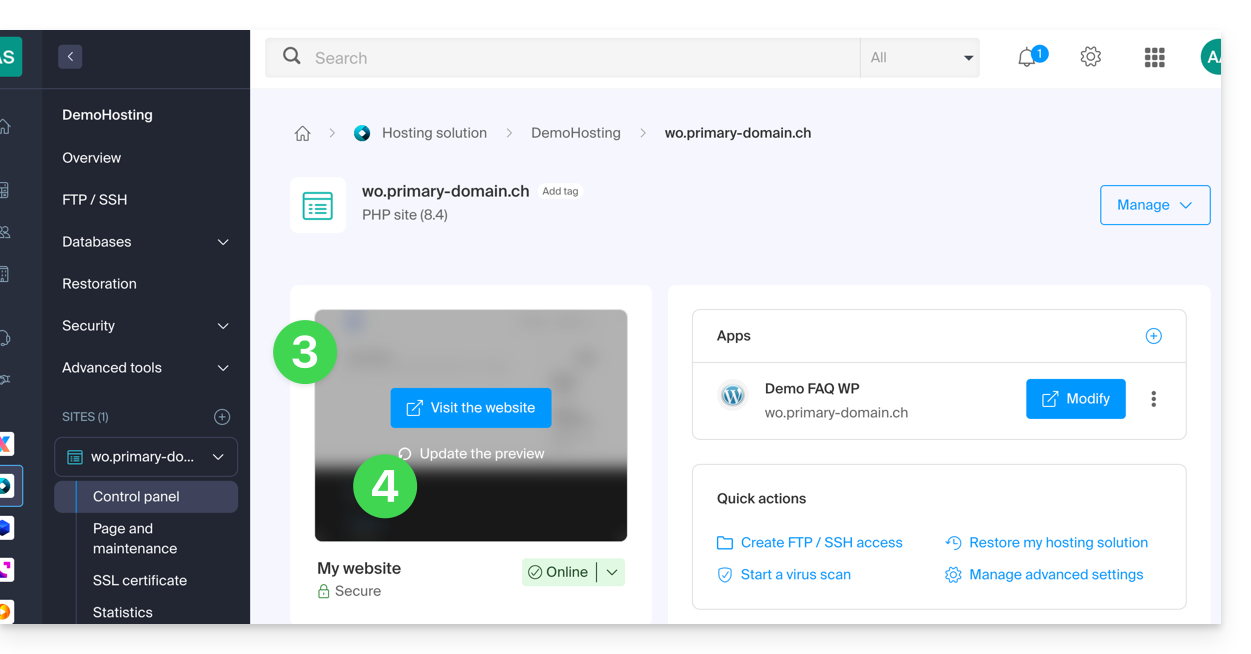
If no link allows you to refresh the image, it means that a recent request has already been made within the last thirty minutes.
Link to this FAQ: https://faq.infomaniak.com/2916
Has this FAQ been helpful?