Knowledge base
1000 FAQs, 500 tutorials and instructional videos. Here, there are only solutions!
Create an AI project with custom instructions and a knowledge base using Euria from Infomaniak
This guide explains how to configure and optimize Projects on Euria, Infomaniak's AI assistant, to create customized and secure workspaces using your own instructions and documents.
Introduction
- A Project on Euria is a dedicated workspace that allows you to group your interactions around a specific topic or activity.
- By adding custom instructions and your own documents, you create a real knowledge base that the AI assistant uses to provide much more precise and contextually relevant answers.
- It is the equivalent of Projects on ChatGPT or Claude, with the added benefit of exclusive hosting in Switzerland and complete protection of your data.
Why and how to create my first AI Project on Euria, a Project with custom instructions?
Without a project, an AI assistant responds in a general way. With an Euria project, you provide context through custom instructions: your preferred tone, information about your company, your reference files, etc. Result: tailored responses, as if your AI assistant already knows your world. Unlike ChatGPT's custom instructions or Claude's project instructions, your data remains hosted in Switzerland and is never used to train models.
Go to Euria, Infomaniak's AI assistant, log in, and create your first project in a few clicks. Add your custom instructions and your documents to immediately obtain a personalized AI assistant, hosted in Switzerland:
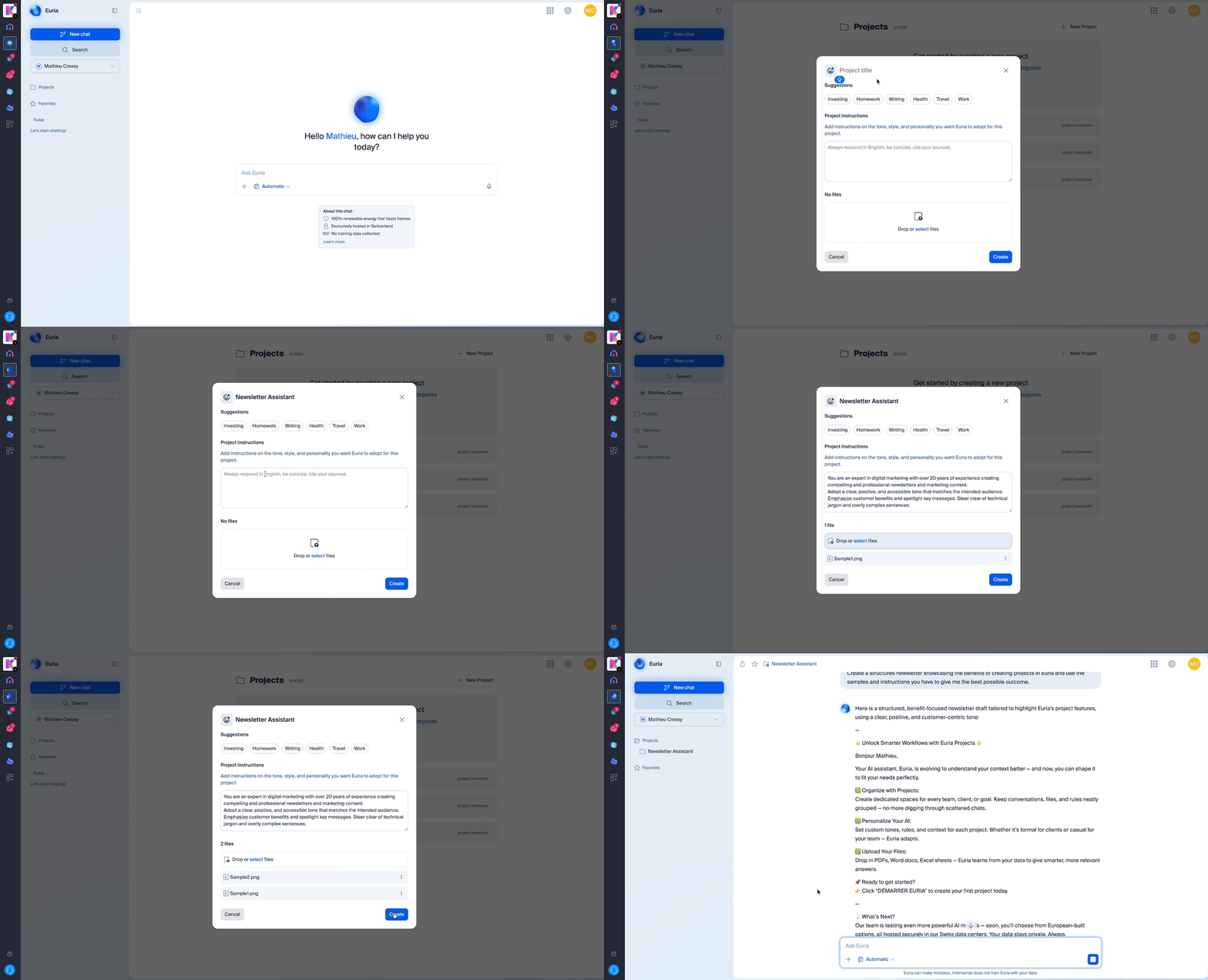
- From the Euria home screen, click on « Projects » in the left-hand menu.
- Click on « New project » and give it a name (e.g., « Marketing », « Customer Support », « My company »).
- Your project is created – all that remains is to customize it with your instructions and documents.
Add a custom instruction
A custom instruction is a directive that you give to Euria so that it can adapt its responses to your specific needs. Once in your project, go to the Instructions section. This is where you can specify to Euria:
- The tone to adopt (formal, friendly, technical, etc.)
- The context of your interactions (industry, type of customers, objectives, etc.)
- The role that the AI should play (writer, advisor, analyst, etc.)
- Specific instructions (languages to use, desired response formats, information to always include, etc.)
The more detailed your custom instructions are, the more relevant and consistent your AI assistant's responses will be.
Build a knowledge base with your documents
Open a project from euria.infomaniak.com, then drag and drop the documents of your choice into the right-hand bar.
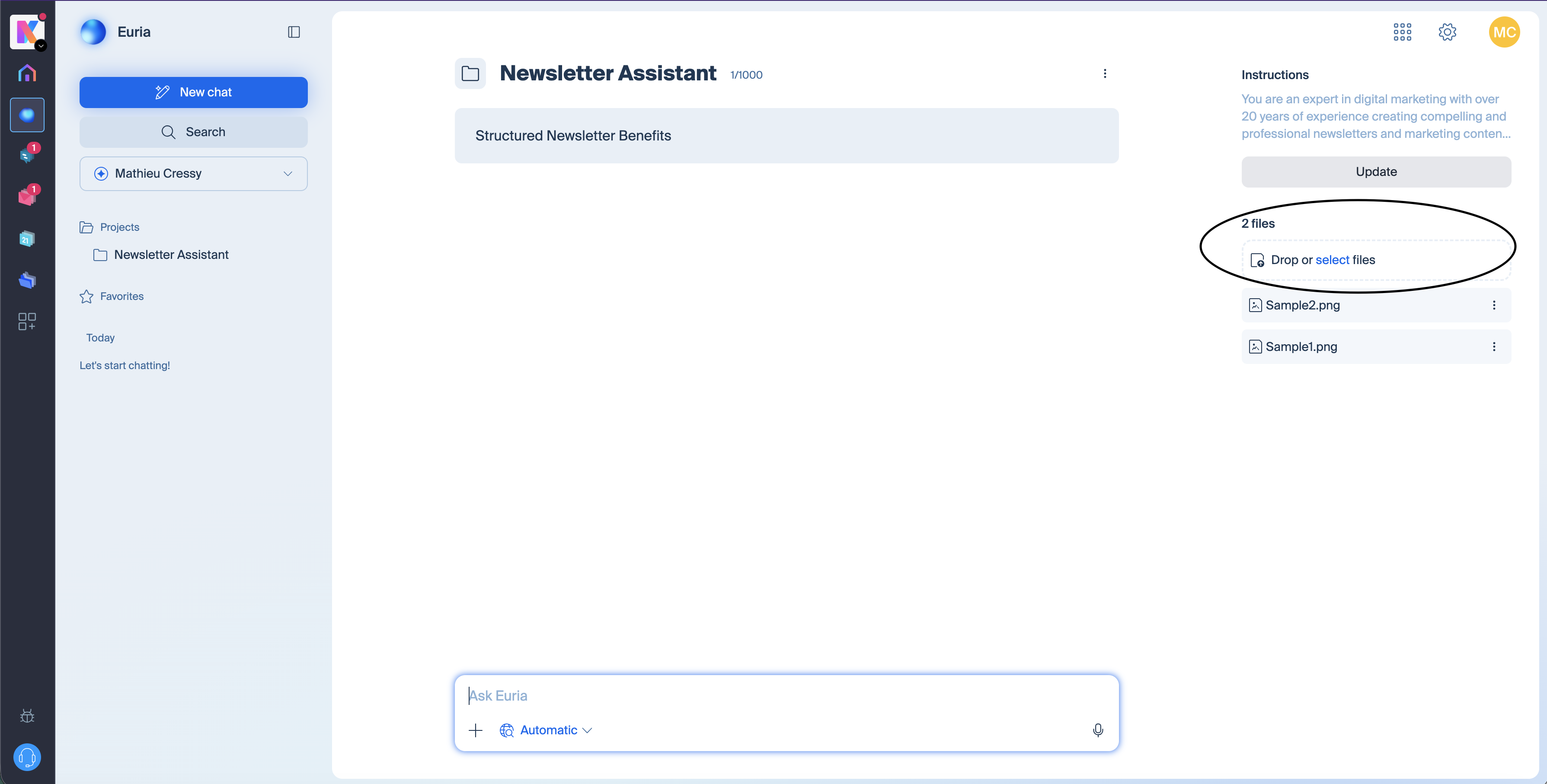
You can import your files (PDFs, texts, spreadsheets, etc.). Euria will use these documents to answer your questions with accurate and up-to-date information. This is ideal for uploading, for example, an editorial charter, a product catalog, internal FAQs, procedures, or any other reference document. The richer your knowledge base, the more effective your personalized AI assistant will be.
Types of files accepted for the knowledge base
Euria accepts several common formats for populating your knowledge base: PDF, text documents, markdown, Word, Excel, etc. If a format is not supported, Euria will notify you during import.
Create Multiple Projects on Euria
You can create as many projects as needed – one per client, per department, per topic… Each project operates independently with its own custom instructions and its own knowledge base, for an AI assistant that is truly tailored to each use case.
How does Euria differ from ChatGPT and Claude for AI project management?
Like ChatGPT and Claude, Euria allows you to create workspaces with custom instructions and a knowledge base. The main differences lie in data protection and technological transparency.
Euria is hosted exclusively in Switzerland, in Infomaniak's data centers. Your documents and conversations remain private, no data is used to train the AI models, and you have complete control over your information. In addition, Euria relies exclusively on open-source models, which are auditable and deployed locally – unlike the proprietary and closed technologies of ChatGPT or Claude. An open-source model "does not call its country of origin." Once deployed locally, it functions like any software installed on a server. For companies and professionals concerned about the sovereignty of their data, Euria offers a sovereign solution to ChatGPT and Claude that complies with the strictest confidentiality requirements. Sovereignty here applies to the infrastructure, jurisdiction, data flows, and Infomaniak's business model, which depends exclusively on its customers.
Is my data protected on Euria?
Euria is based exclusively on open-source models hosted and run in Switzerland.
In practice: the models are not retrained with user data, and conversations are not used to train other models.
The major difference compared to OpenAI, Google, or Anthropic:
there is no dependency on an external API
no data flow to a hyperscaler
no opaque proprietary technology
100% of Infomaniak's staff and data centers are in Switzerland
and Infomaniak is a 100% independent and Swiss company, compliant with GDPR
Link to this FAQ: https://faq.infomaniak.com/2907
Has this FAQ been helpful?