Knowledge base
1000 FAQs, 500 tutorials and instructional videos. Here, there are only solutions!
Secure a video stream by restricting IP addresses
Update 08/04/2026
This guide explains how to restrict access to Infomaniak video streaming based on the IP addresses of visitors/viewers.
Restrict access to streams by IP address
To do this:
- Click here to access the management interface for your product on the Infomaniak Manager (need help?).
- Click directly on the name assigned to the product in question.
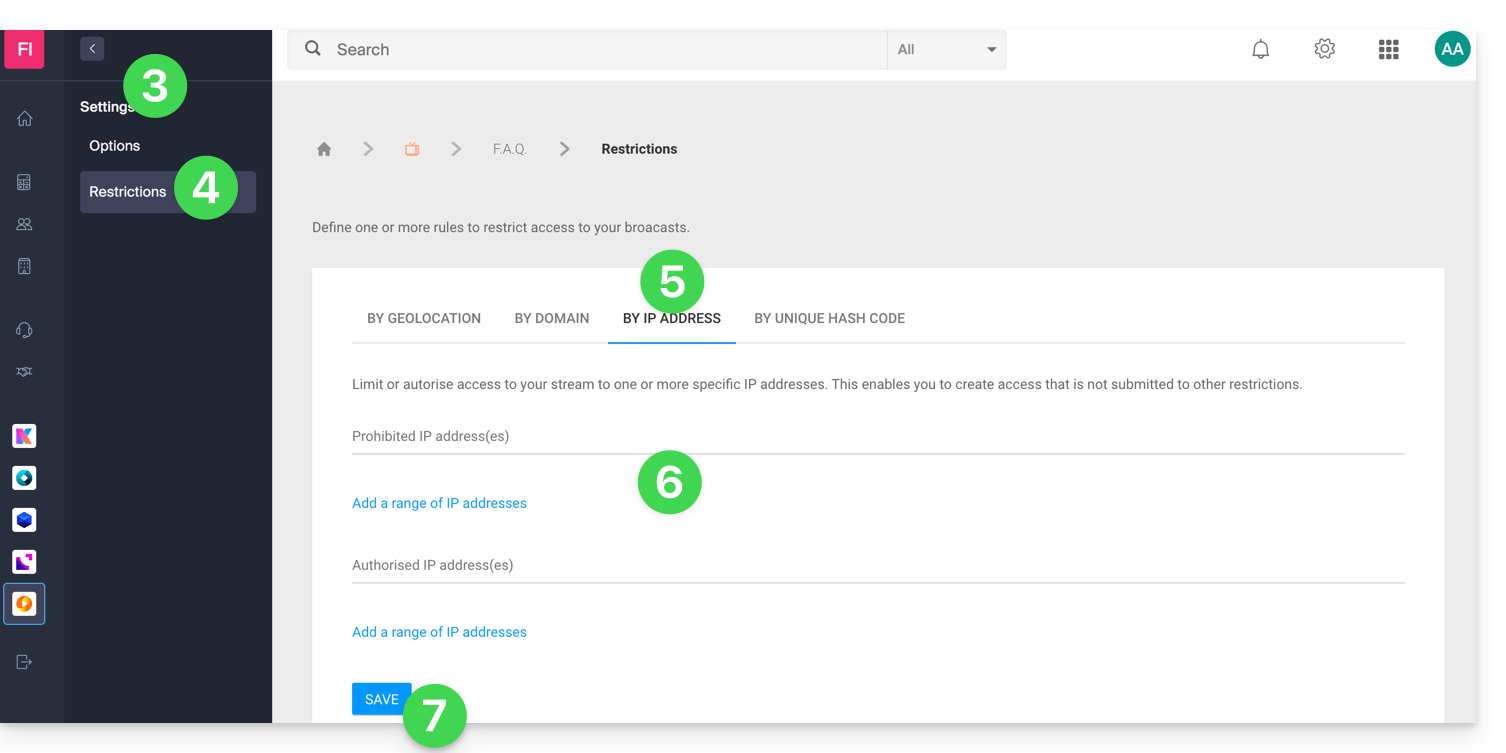
- Click on Settings in the left-hand menu.
- Click on Restrictions in the left-hand menu.
- Click on the IP address restriction tab.
- Define the IP addresses (or IP ranges) that should be specifically allowed or blocked.
- Click on the Save button:
Refer to this other guide to customize the replacement image offered to viewers who are blocked.
Link to this FAQ: https://faq.infomaniak.com/2864
Has this FAQ been helpful?