Knowledge base
1000 FAQs, 500 tutorials and instructional videos. Here, there are only solutions!
Rename a Web Hosting
This guide explains how to rename a Web hosting present in the Infomaniak Manager within your Organization.
Preamble
- A Web hosting is, schematically, the storage space reserved for hosting one or more of your websites.
- By default, your Infomaniak hosting takes the name of the first site you add to this hosting:
- You own the domain name "domaine.xyz" and want a site with this domain name...
- You buy a Web hosting that will be automatically named "domaine.xyz" even if you later add a second site "toto.com".
- The hosting can be renamed with a more generic name like "My Websites" to better reflect its actual content.
- This renaming is intended to improve the readability/understanding of the products listed in your Manager and has strictly no impact on the addresses of the websites: refer to this other guide to act on the domain name.
Renaming a Web hosting
To access the Web hosting to perform the name change:
- Click here to access the management of your product on the Infomaniak Manager (need help?).
- Click directly on the name assigned to the product concerned.
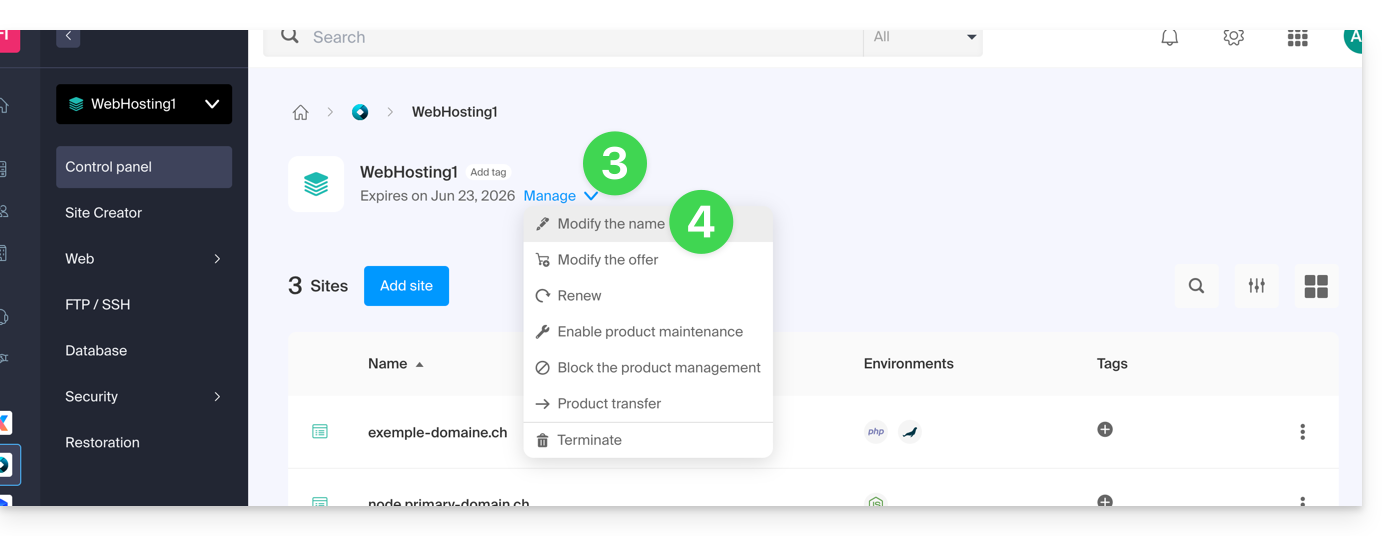
- Click on the Manage button.
- Click on Edit name:
- Enter the desired name.
- Click on Save.
Link to this FAQ: https://faq.infomaniak.com/2803
Has this FAQ been helpful?