Knowledge base
1000 FAQs, 500 tutorials and instructional videos. Here, there are only solutions!
Cancel Infomaniak Site Creator
Update 09/07/2026
This guide concerns Site Creator. The tool is free with web hosting or is available under various plans when ordered separately.
Introduction
- When Site Creator is installed as a site on one of your web hosting accounts, you delete the site (and its content) created with Site Creator, just like any other site you own on a web hosting account.
- A confirmation of termination is sent to any other administrators of the Organization.
- Backups will be permanently deleted when a Site Creator is cancelled, making any restoration impossible.
Site Creator Deletion Procedure
To delete the website created with Infomaniak Site Creator:
- Click here to access your product management interface on the Infomaniak Manager (need help?).
- Click on the action menu ⋮ to the right of the website in question in the table that appears.
- Click on Cancel:
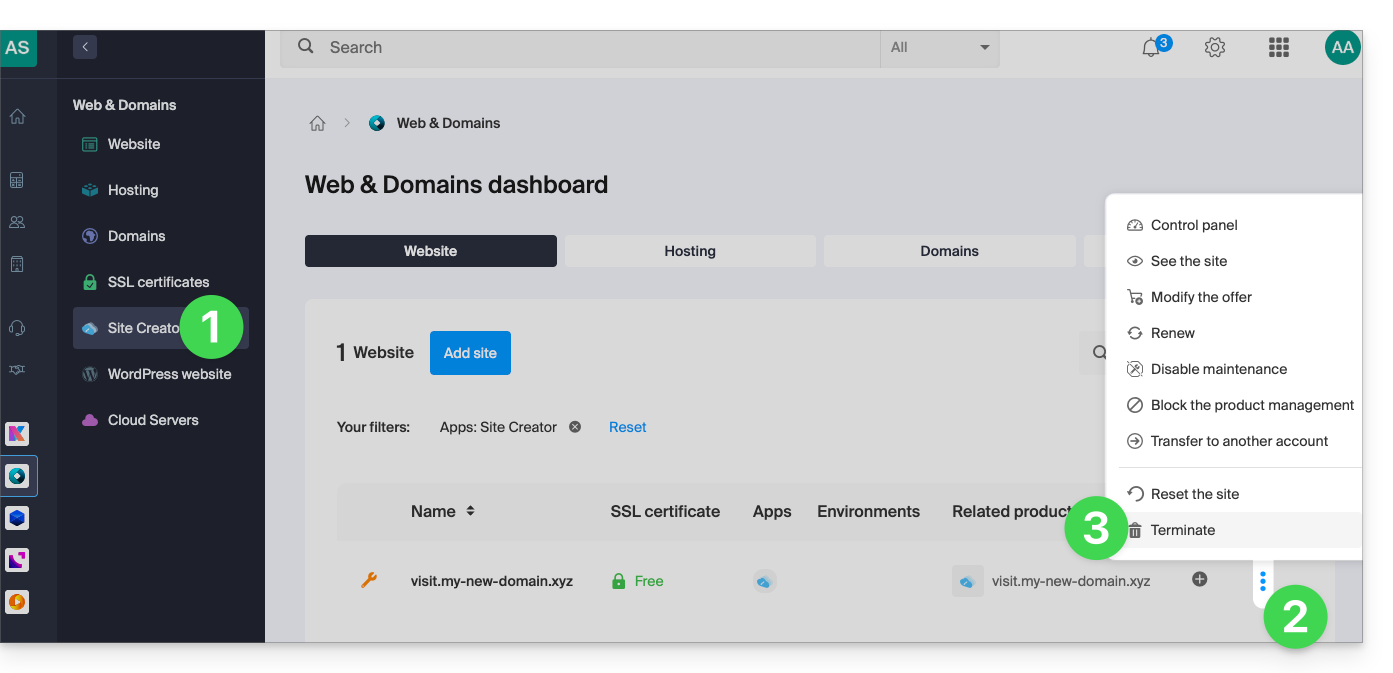
You can restart a blank Site Creator after deleting the tool.
Link to this FAQ: https://faq.infomaniak.com/2686
Has this FAQ been helpful?