Knowledge base
1000 FAQs, 500 tutorials and instructional videos. Here, there are only solutions!
Manage email addresses in bulk
This guide explains how to perform a bulk action (deletion, activation of the anti-spam filter, etc.) on multiple existing email addresses within a Mail Service.
Introduction
To define the parameters that should be applied to all future email address creations, please refer to this other guide.
Bulk Actions
To perform these actions in bulk:
- Click here to access the management of your product on the Infomaniak Manager (need help?).
- Click directly on the name assigned to the product in question.
- Check the box to the left of Email address to select all addresses, or select the desired addresses one by one.
- The list of available actions will then appear at the bottom of the page, including in the action menu ⋮:
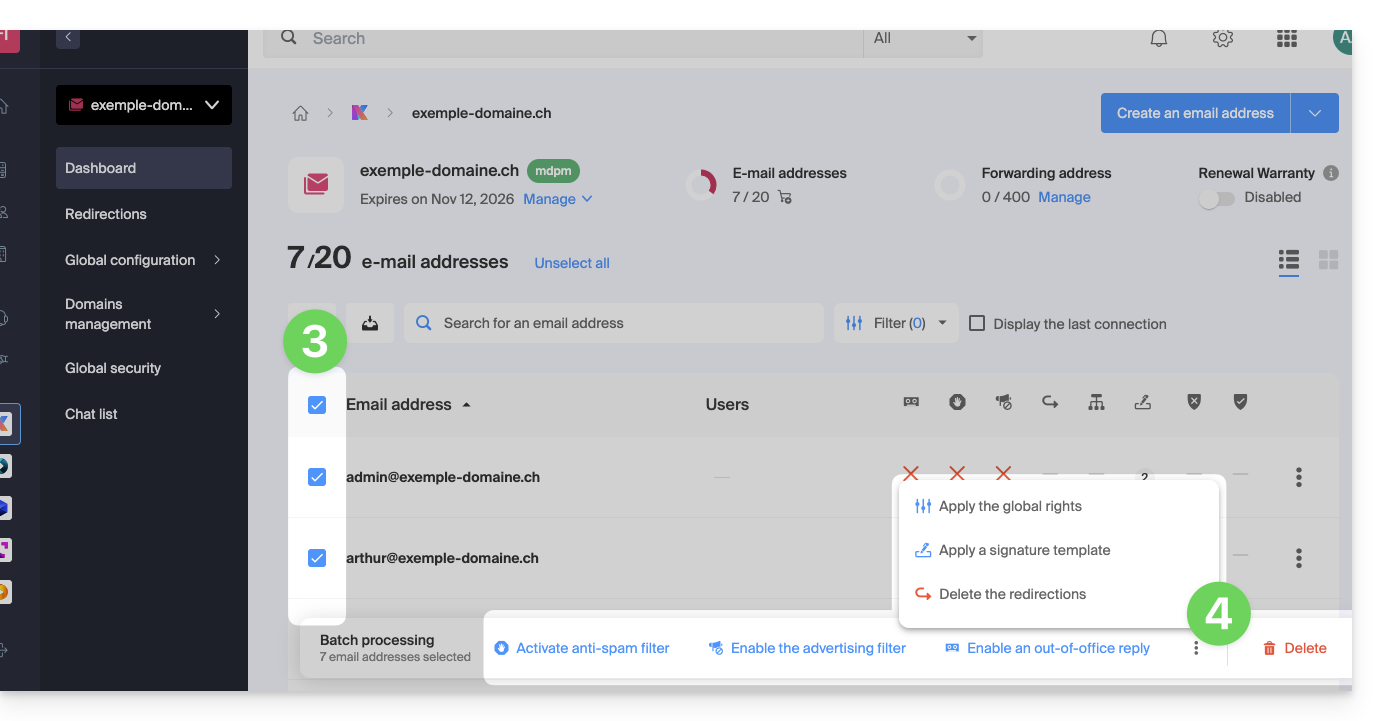
The following bulk actions are possible:
- activate the anti-spam filter
- activate the ad filters
- apply general rights
- activate an auto-reply
- apply a signature template
- delete forwarding rules
- delete email addresses
Link to this FAQ: https://faq.infomaniak.com/2683
Has this FAQ been helpful?