Knowledge base
1000 FAQs, 500 tutorials and instructional videos. Here, there are only solutions!
Delete a Group (work team)
Update 09/03/2026
This guide explains how to delete a Group (a work team) from the Infomaniak Manager.
Prerequisites
- Be Administrator or Legal Representative within the Organization.
- Have created one or more Groups.
Delete a Group
Deleting the Group is irreversible and users will lose their rights and access to the various products of it; users, email address, kDrive folder, kChat channel, will not be deleted.
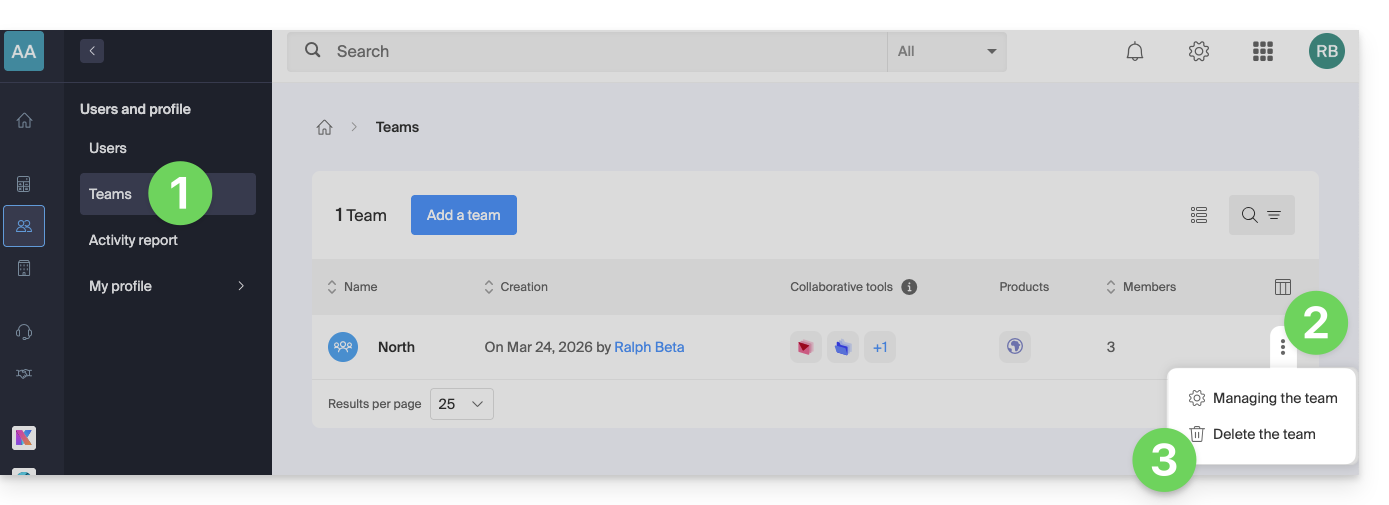
- Click here to access Group management on the Infomaniak Manager (need help?).
- Click on the action menu ⋮ located to the right of the item concerned.
- Choose Delete the Group:
- Click the button to delete the Group permanently.
Learn more
Link to this FAQ: https://faq.infomaniak.com/2591
Has this FAQ been helpful?