Knowledge base
1000 FAQs, 500 tutorials and instructional videos. Here, there are only solutions!
Troubleshooting certificate issues when Cloudflare is active
This guide explains how to resolve an issue with the installation of an SSL certificate (Let's Encrypt or Sectigo) if you are using Cloudflare with strict security rules, such as country or IP address filtering.
Adjust SSL / geoblocking settings
When an SSL certificate is requested via Infomaniak (free Let's Encrypt or Sectigo), the certificate authority must verify that you are the owner of the domain. This verification can be done via HTTP (using special files placed on your website), DNS, or email:
- Let's Encrypt uses
/.well-known/acme-challenge/. - Sectigo generally uses
/.well-known/pki-validation/(or DNS / email, depending on the option chosen).
If these checks fail (for example, because Cloudflare blocks access), the certificate cannot be issued or renewed. However, Let's Encrypt no longer verifies only from a single location. For some time now (and even more so since March 2024), it performs its checks from several countries simultaneously – including new ones such as Sweden or Singapore. As a result, if one of these countries is blocked by your Cloudflare settings, the certificate request may fail, even if everything else is configured correctly.
Even worse: even if you try to create an exception specifically for the challenge address (.well-known/acme-challenge), it may not work with certain Cloudflare rules. Indeed, blocking rules based on country or IP address are applied before any exception based on URL paths.
Adjust the SSL/TLS mode
In Cloudflare, use Full or Full (strict) mode. These modes temporarily tolerate an expired or self-signed certificate while validation is in progress: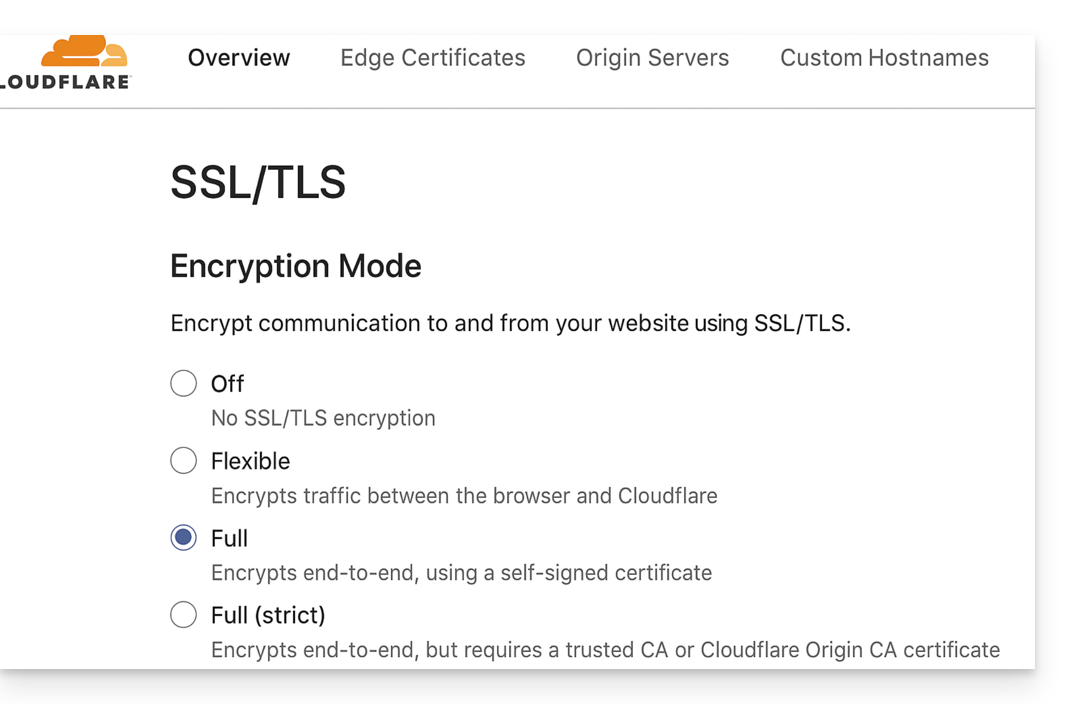
Allow validation paths
Avoid restrictive "IP Access Rules" and instead use "Custom Rules" that allow unrestricted access to the following paths:
/.well-known/acme-challenge/(Let's Encrypt)/.well-known/pki-validation/(Sectigo)
Temporarily disable geoblocking
If necessary, temporarily disable geographic or IP blocking during the validation process, then re-enable your security measures after the certificate is issued or renewed.
Link to this FAQ: https://faq.infomaniak.com/2517
Has this FAQ been helpful?