Knowledge base
1000 FAQs, 500 tutorials and instructional videos. Here, there are only solutions!
Cancel my kSuite / my kSuite+ (ik.me, etik.com, ikmail.com)
Update 09/07/2026
This guide explains how to completely cancel my kSuite and my kSuite+ (ik.me, etik.com, ikmail.com).
Please note: if you delete your account, you will never be able to recreate or reuse this email address (or any of its aliases), and you will lose access to all accounts that use it. You will retain your Infomaniak account (according to a recovery procedure that will be sent via SMS), but the email and kDrive data will be permanently lost.
Cancel my kSuite / my kSuite+ plan
To access the cancellation process:
- Click here to access the Infomaniak Manager.
- Click on the downward-pointing chevron to the right of Manage.
- Choose Cancel my kSuite:
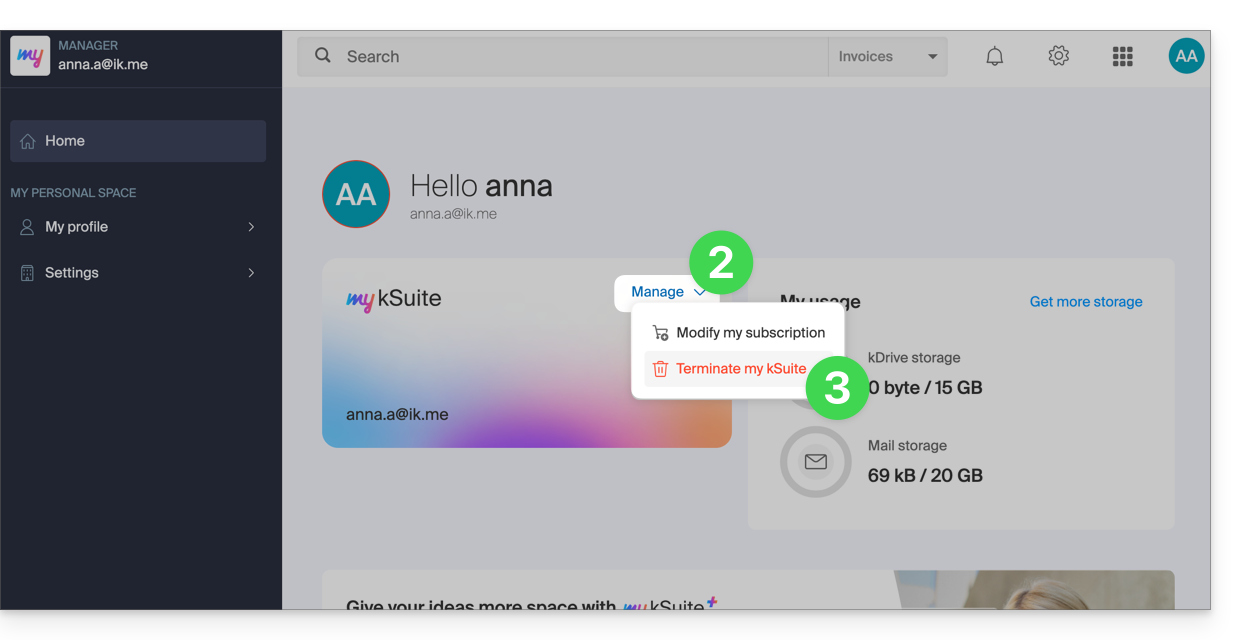
- Follow the procedure until the end.
Link to this FAQ: https://faq.infomaniak.com/2499
Has this FAQ been helpful?