Knowledge base
1000 FAQs, 500 tutorials and instructional videos. Here, there are only solutions!
Modify an existing my kSuite plan
This guide explains how to upgrade your my kSuite plan (ik.me, etik.com, ikmail.com) and switch to a paid my kSuite+ plan, for example, to increase its maximum storage capacity. You will keep the email address you created when you subscribed to the free plan.
Introduction
- To help you identify the my kSuite / kSuite offer that best suits your needs, please refer to this other guide.
- Please refer to this other guide regarding the limitations specific to the my kSuite offer and the advantages of the my kSuite+ offer.
- You are not required to upgrade to my kSuite+ to add services: refer to this other guide about Organizations.
- You can also revert to my kSuite after subscribing to my kSuite+, but the incurred fees will still be due.
Upgrade to my kSuite+
To access the current my kSuite plan and switch to a higher plan:
- Click here to access the Manager for your my kSuite plan.
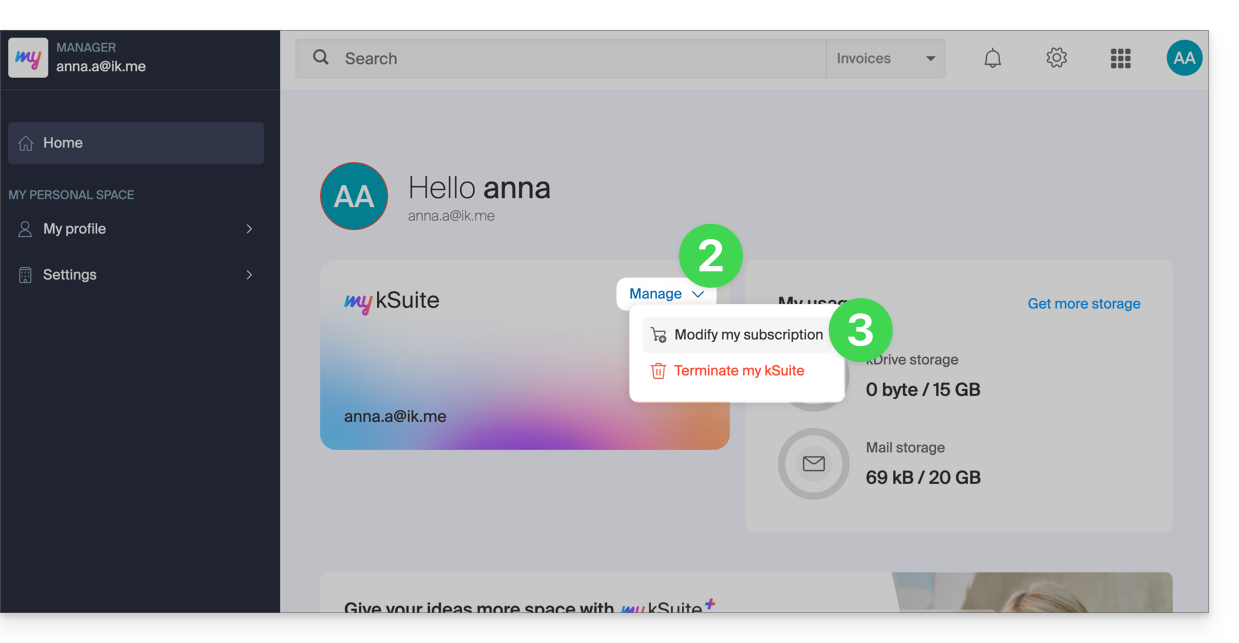
- Click on the chevron to the right of Manage.
- Choose Modify my plan to upgrade from the free plan to a paid, more comprehensive plan:
- The reverse (switching from my kSuite+ back to my kSuite) is also possible, in the same place.
Order a new kDrive
There is no limit to the number of paid kDrives you can add to your Infomaniak account. Order a new kDrive if needed.
Link to this FAQ: https://faq.infomaniak.com/2496
Has this FAQ been helpful?