Knowledge base
1000 FAQs, 500 tutorials and instructional videos. Here, there are only solutions!
Sync kDrive and Qnap via WebDAV
This guide provides instructions for synchronizing kDrive with a QNAP NAS (or vice versa) via the WebDAV protocol, which can be found in the HBS 3 Hybrid Backup Sync application.
✘ UNAVAILABLE with
kSuite Free / kSuite Standard
my kSuite / my kSuite+ (ik.me, etik.com, ikmail.com)
Prerequisites
- You must have a Qnap NAS that is accessible from the internet.
- Know your kDrive ID (kDrive ID).
Synchronize kDrive and Qnap via HBS 3
To do this:
- Log in to the Qnap NAS administration interface (QTS).
- If necessary, download and install the HBS 3 Hybrid Backup Sync app.
- Open HBS 3.
- Go to Sync from the menu on the left.
- Create a synchronization task (Two-way Sync Job).
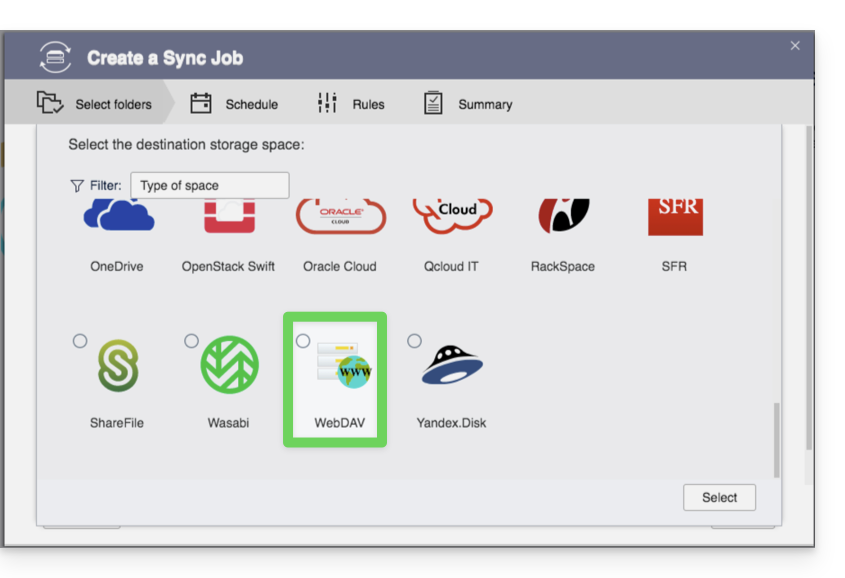
- Choose WebDAV from the list of Cloud providers:
- For the account settings, use the following information:
- Server address:
https://IDkDrive.connect.kdrive.infomaniak.com(see prerequisites) - Username: the email address used to log in to your Infomaniak account
- Password: create an application password for this specific use.
- Server address:
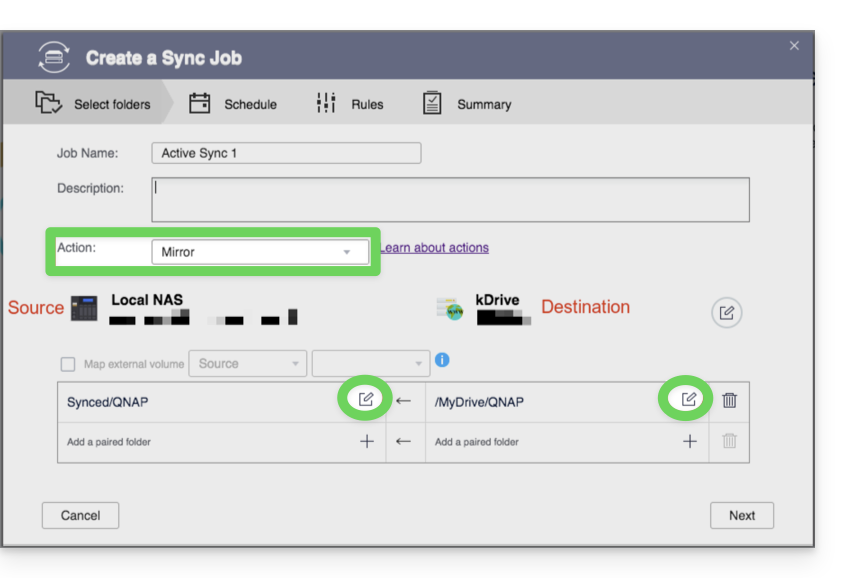
- Choose the local source and destination folder:
- Customize the task frequency.
- Complete the wizard.
Link to this FAQ: https://faq.infomaniak.com/2405
Has this FAQ been helpful?