Knowledge base
1000 FAQs, 500 tutorials and instructional videos. Here, there are only solutions!
Understanding Email Storage and Size Limits
This guide details the size limits (message size and disk space) implemented for Infomaniak's email services and provides instructions on how to check your storage usage.
Introduction
- Maximum storage space in gigabytes (GB):
- kSuite Free = 20
- kSuite Standard = unlimited
- kSuite Business = unlimited
- kSuite Enterprise = unlimited
- my kSuite = 20
- my kSuite+ = unlimited
- Mail Service Starter = 20
- Mail Service Premium = unlimited
- Other limitations:
Email Size and Number Limits
Regarding the emails themselves and their attachments:
- The maximum size of an email, both when sending and receiving, is 210763776 bytes, or exactly 201 MB.
- This includes the header and body (text, HTML, attachments, etc.), regardless of the method used to send the email.
- Note that an attachment can be encoded in base64, so its size in the email is not necessarily the same as its size on disk.
- With the Infomaniak Mail web app (online service ksuite.infomaniak.com/mail), the size limit for attachments is 25 MB.
- Beyond this limit, and up to a maximum of 3 GB, a SwissTransfer link is generated and integrated into your message: the data is stored in Switzerland in Infomaniak's Cloud, and your recipients can use this link to easily download the attachments during a predefined period.
- Beyond 3 GB (and up to 50 GB), it is recommended to use SwissTransfer directly for your sends.
- The number of messages in the respective storage space is not limited.
- However, it is not recommended to keep more than 4,000 to 5,000 messages per folder (slowing down message indexing).
- It is therefore advisable to move your messages to subfolders, which also makes it easier to view them; you can do this manually or set up automatic sorting rules (❓: help).
Email retention time limit
Retention period:
- There is no time limit for message storagein the inbox or in subfolders, except for an email that is deleted, or reported as spam, or moved manually/automatically to the "Trash" or "Spam" folder (or one of its equivalent names such as "Deleted Items", "Erased Messages", "Junk Mail", including spellings in another language, such as "Junk" - non-exhaustive list)... In this case, the email is automatically deleted after 30 days with no possibility of recovery.
Therefore, never use a folder named, for example, Trash or Infected to store and keep important messages.
- Backups performed by Infomaniak have a retention period (❓: help).
Display the total size from the Infomaniak Web Mail app
To do this:
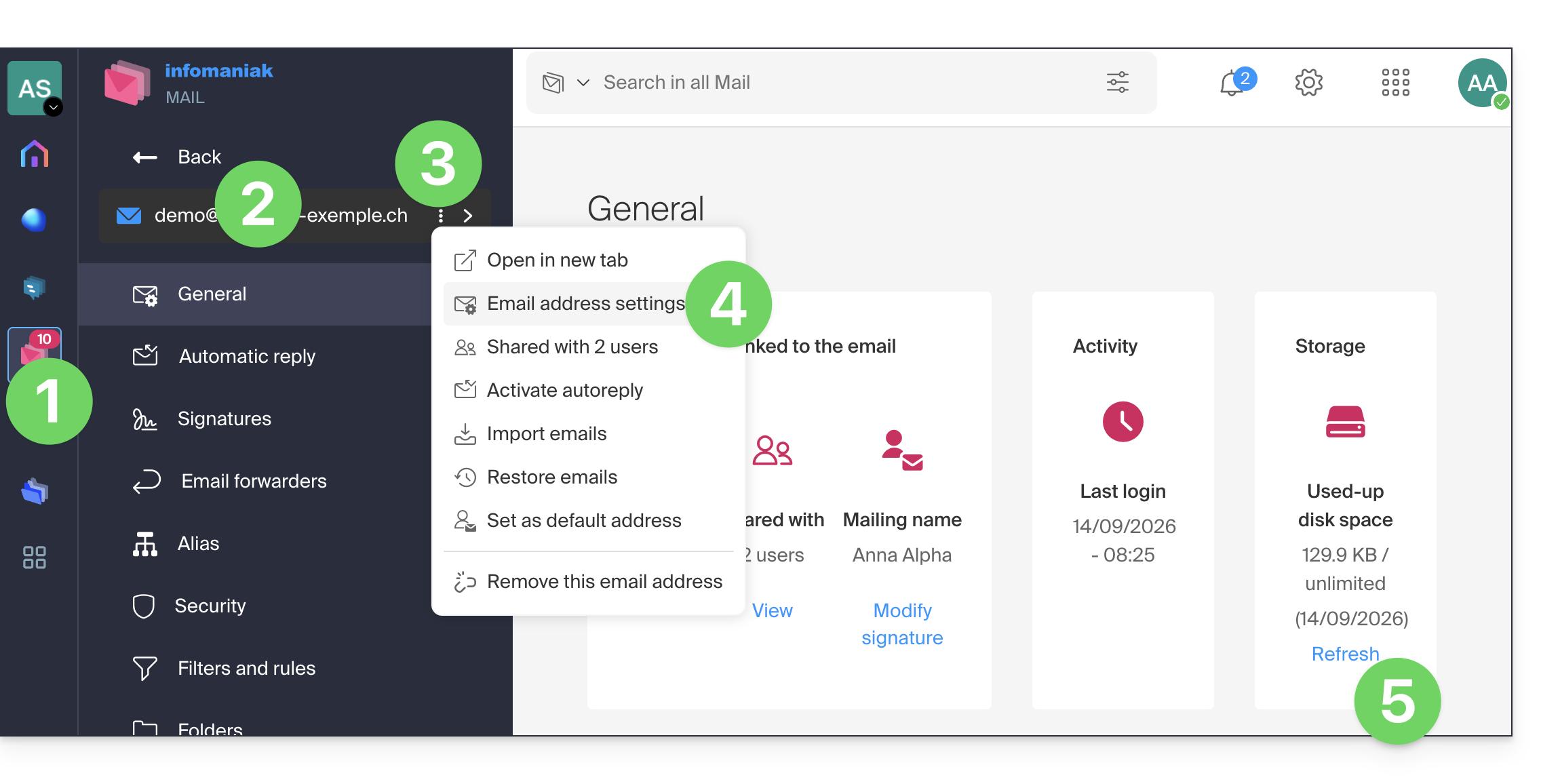
- Click here to access the Infomaniak Mail web app (online service ksuite.infomaniak.com/mail).
- Check or select the relevant email address from the dropdown menu in the left-hand menu.
- Click on the action menu ⋮ to the right of the item in question in the table that appears.
- Click on Mail address settings.
- Click on Refresh in the Storage box to display the mailbox size:
Still having a problem?
If your recipient's email address is not hosted with Infomaniak, you may receive an error message (❓: help) when sending the email. This message may take various forms, such as Recipient address rejected: 5.2.2 Over quota 554 5.0.0 Service unavailable.
This may indicate that your recipient's mailbox is full and they can no longer receive emails, or that the email you are trying to send is too large.
In this case, you should contact your correspondent and ask them to empty/reduce the size of their inbox or to tell you the maximum size of messages you can send them.
Link to this FAQ: https://faq.infomaniak.com/2351
Has this FAQ been helpful?