Knowledge base
1000 FAQs, 500 tutorials and instructional videos. Here, there are only solutions!
Back up data with Mountain Duck to Swiss Backup (Swift)
This guide details how to manually back up data using the Mountain Duck application (macOS / Windows) via the OpenStack Swift protocol on Swiss Backup, the backup solution in a Swiss independent cloud.
Introduction
- Mountain Duck allows file synchronization as an alternative to Dropbox (for this use, it is also recommended to use kDrive).
Configure Mountain Duck with Swiss Backup
Prerequisites
- Have an Swiss Backup Infomaniak account with an available device quota (minimum 1) for a Cloud backup.
- Add 1 device of type Cloud to obtain the OpenStack Swift parameters.
- Download and install Mountain Duck (macOS / Windows).
To configure a new backup:
- Open Mountain Duck.
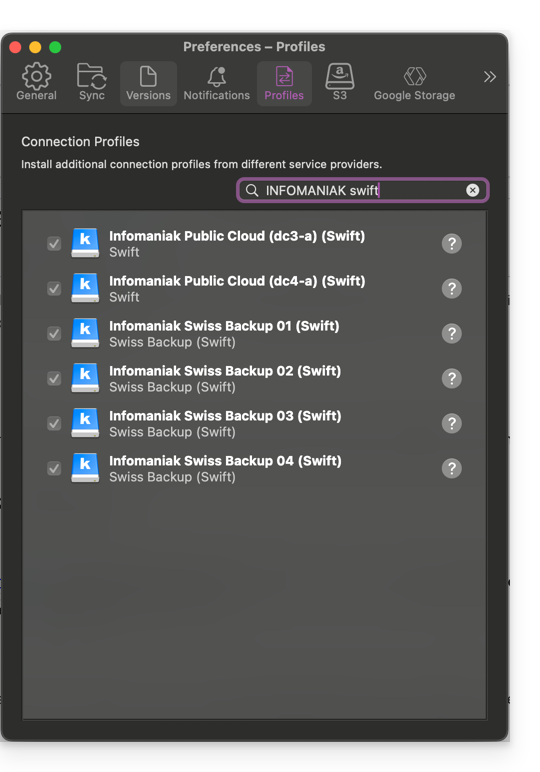
- In the application preferences, find and add the necessary profiles:
- Create a New connection.
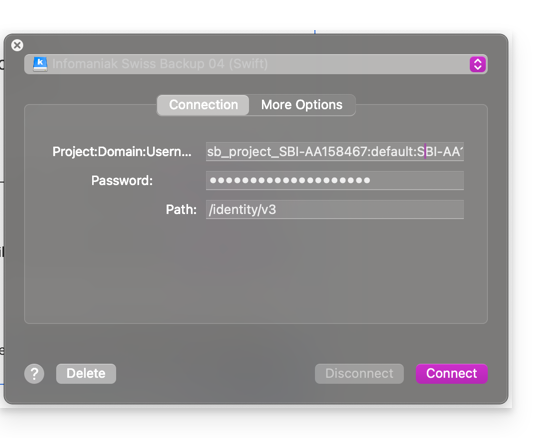
- Select the corresponding profile from the list of proposed profiles (according to the information specific to your device — refer to this other guide).
- Enter the information specific to your device in the fields (based on the information specific to your device – refer to this other guide) by combining Project:Domain:Username:
- Click Connect.
Link to this FAQ: https://faq.infomaniak.com/2337
Has this FAQ been helpful?