Knowledge base
1000 FAQs, 500 tutorials and instructional videos. Here, there are only solutions!
Cancel an Infomaniak / Mail account
This guide explains how to delete an Infomaniak account (i.e., a user account), which means removing your access to the Manager and/or the Mail web app at ksuite.infomaniak.com/mail.
Introduction
- This operation will result in the immediate deletion of your calendars and address books.
- All access to the Manager using this ID will be lost.
- This operation does not delete the email addresses accessed from the account in question (except for certain free offers, but in this case, this is specified before the deletion operation).
- If the account you are using is the only account within an Organization, you must first delete the Organization or appoint someone else in order to delete your account.
Delete an Infomaniak / Mail account
To access the user profile section:
- Click here to access the My profile menu in the Infomaniak Manager.
- Click on the trash can to the right of your name to delete your account and data:
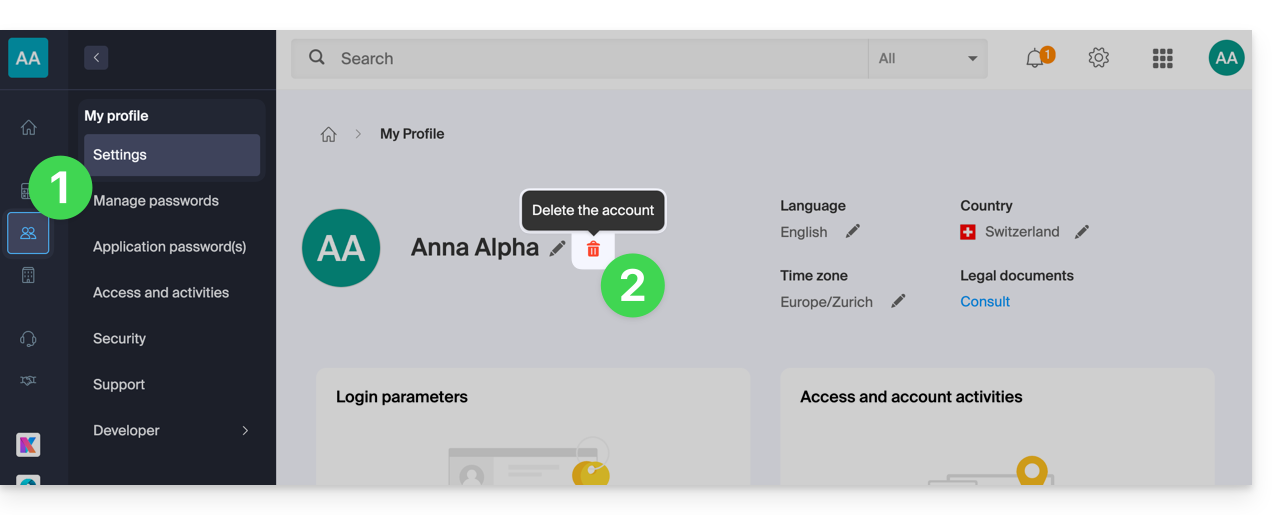
- Enter your login password one last time, and the Infomaniak account will be deleted.
Link to this FAQ: https://faq.infomaniak.com/2333
Has this FAQ been helpful?