Knowledge base
1000 FAQs, 500 tutorials and instructional videos. Here, there are only solutions!
Create a temporary email alias to filter incoming messages
This guide explains how to easily sort your messages using Plus Addressing (or "sub-addressing"), which means using aliases of your email address that do not need to be actually created on an Infomaniak Mail Service.
Introduction
- This feature is free of charge and available for all Infomaniak email services. It allows you to have multiple versions of your existing email address (i.e., aliases) so that you can, for example, separate your personal emails from the newsletters you subscribe to.
- These "wildcard" aliases mean that a message can be sent to an email address containing a
+(e.g.,abc+def@domain.xyz), and it will still arrive in the existingabc@domain.xyzinbox. You will also have the option to filter and sort it automatically based on what comes after the "+" if you set this up. - Please note that it is also possible to create real aliases without the
+character... - Infomaniak is fully compatible with the DEA system, which the functionality presented here depends on; if you encounter any problems, please contact the organization that uses it.
Use a “disposable” alias with your Infomaniak email address
The next time you sign up for a newsletter or a customer area that requires a username:
- Simply use a variation of your email address that includes the "+" sign (e.g., anna+event@domain.xyz) instead of entering your actual email address:
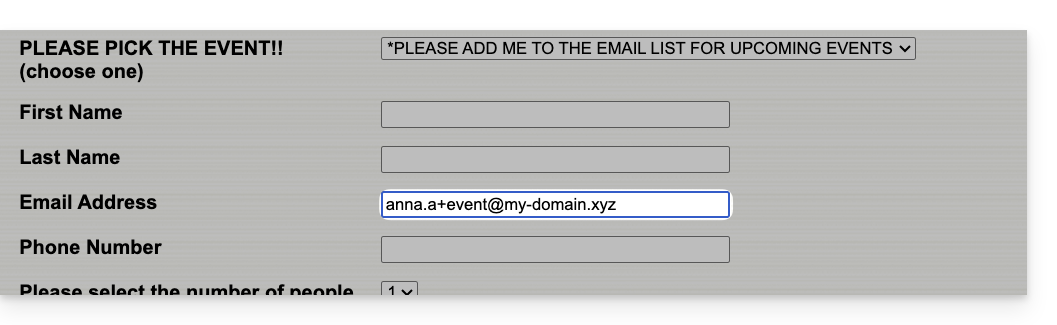
So, if your usual email address is anna@domain.xyz, emails sent to anna+event@domain.xyz or anna+nospam@domain.xyz (in short, anna+"whatever you want here"@domain.xyz…) will arrive in the inbox of anna@domain.xyz.
Next, to automatically move incoming messages sent to your aliases into specific folders, refer to this other guide to create sorting filters based on the recipient of the received message.
You can also configure a mail client so that sending from this type of email address works: refer to the second part of this other guide — this does not work when sending from the Infomaniak Mail web app (ksuite.infomaniak.com/mail online service).
Link to this FAQ: https://faq.infomaniak.com/2317
Has this FAQ been helpful?