Knowledge base
1000 FAQs, 500 tutorials and instructional videos. Here, there are only solutions!
Uninstall the Acronis Agent (macOS)
This guide explains how to completely uninstall the Acronis Backup Agent for Swiss Backup on Apple devices.
You can also consult the Acronis documentation on this topic.
Remove Backup Agent from macOS
To uninstall Cyber Protect:
- Click here to access the Acronis Console using the credentials obtained after adding the device (need help?).
- Click on the user icon in the top right corner.
- Click on Downloads:
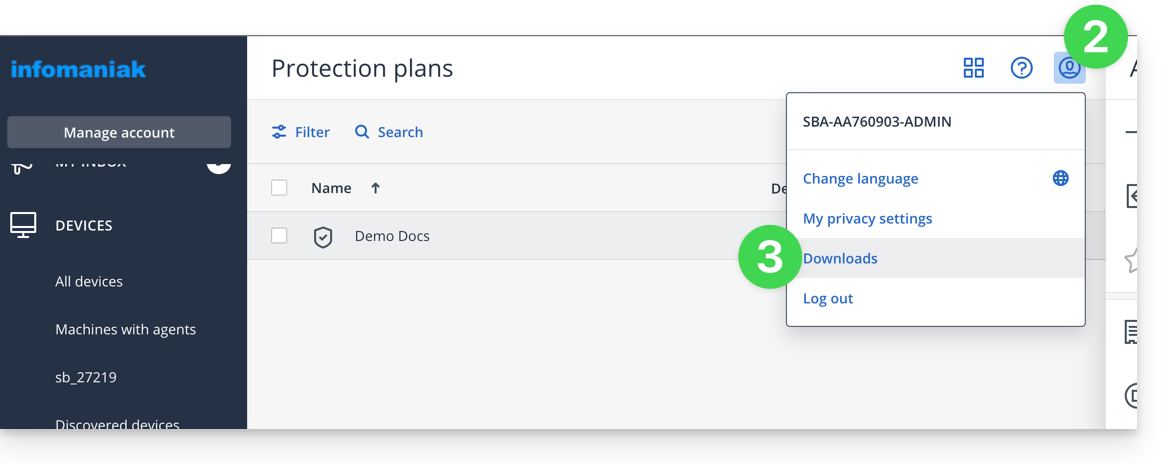
- Choose the client that is suitable for your device.
- Open the
.dmgfile once it has been downloaded. - Double-click on Uninstall:
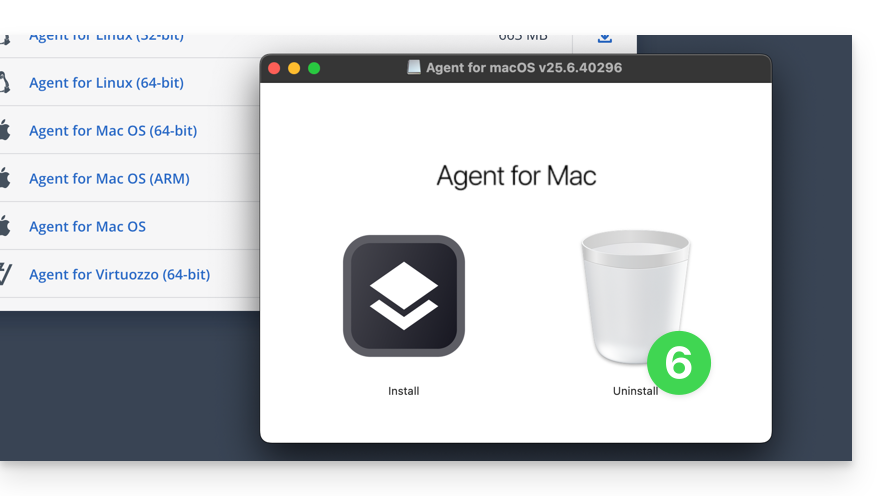
- Confirm the application launch if necessary.
- Confirm the application uninstallation if necessary.
- Wait until the uninstallation is complete.
Link to this FAQ: https://faq.infomaniak.com/2311
Has this FAQ been helpful?