Knowledge base
1000 FAQs, 500 tutorials and instructional videos. Here, there are only solutions!
Force kSync synchronization for contacts & calendars
This guide explains how to force a synchronization of your Infomaniak contacts & calendars when they are synchronized using the kSync app on your Android device.
Introduction
- The kSync app only synchronizes the contacts & calendars that are selected in the application.
- If you add calendars/agendas later from Calendar or address books from Contacts, you will need to add them to the synchronization in the kSync application.
Add a calendar / address book to synchronization
To force synchronization if necessary:
- Open the kSync mobile app on your Android device and tap on the relevant synchronized account.
- Tap Refresh list to update the address books / calendars:
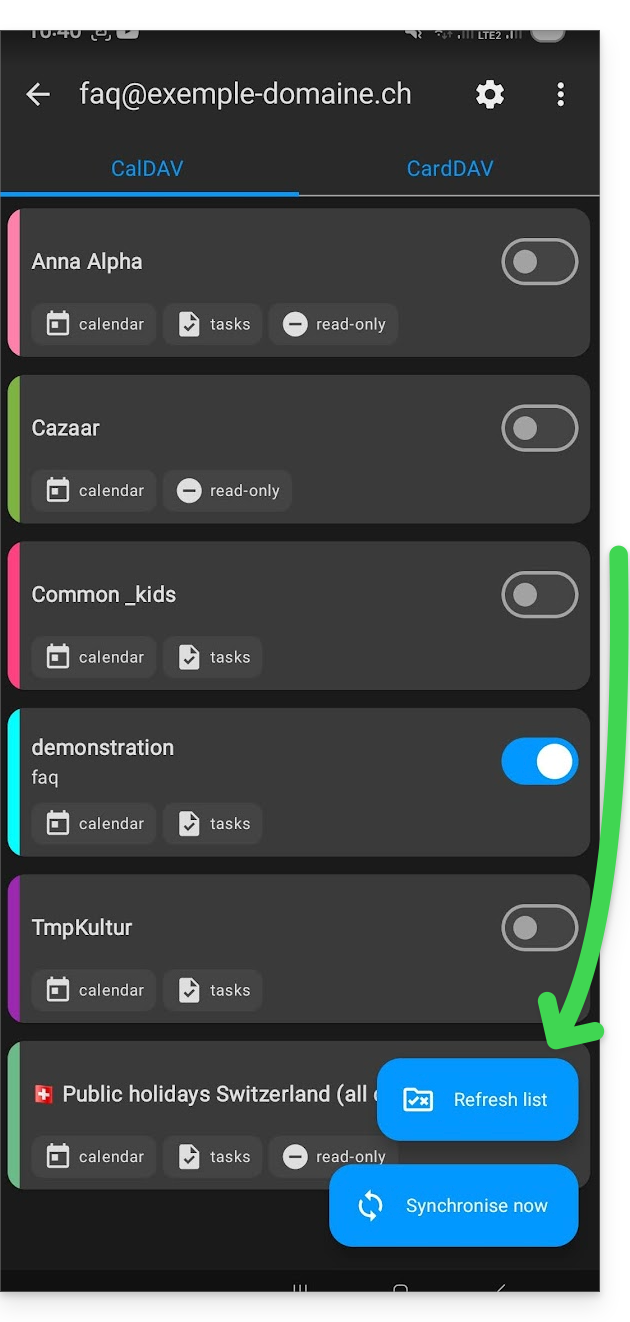
The new notebooks and calendars appear in the list. Configure the ones you want to synchronize.
Link to this FAQ: https://faq.infomaniak.com/2300
Has this FAQ been helpful?