burger
infomaniak
infomaniak
cloud-computing-logo
Cloud Computing
web-domain-logo
Web & Domains
event-marketing-logo
Events & Marketing
  • Our products
    • Collaborative tools icon chevron
    • Web & Domains icon chevron
    • Cloud Computing icon chevron
    • Events & Marketing icon chevron
    • Streaming icon chevron

      ksuiteCollaborative suite

      Discover the collaborative suite β†’ Discover β†’
    • kSuite Professional email, sovereign cloud and AI for sustainable performance
    • kSuite The suite for secure communication, storage and sharing
    • kdrive
      kDrive Store, collaborate and share your files
    • mail service
      Mail Service Create your email addresses with your domain
    • kChat
      kChat Communicate live with your teams
    • kmeet
      kMeet Organise your meetings online in complete security
    • swisstransfer
      SwissTransfer Send your files up to 50 GB free of charge.
    • kpaste
      kPaste Share and encrypt your sensitive information
    • ksuite
      Custom Brand Control the brand image of your products
    • kChat
      Chk Link reducer & QR code generator
      Find the web hosting solution you need
    • Domain name
      Domain name Reserve your domain name at the best price
    • Site Creator
      Site Creator Create your website with ease
    • web hosting
      Web Hosting Create your website with over 100 CMS
    • web hosting
      Wordpress Hosting Create your WordPress website easily
    • Cloud Server
      Cloud Server Power up your sites with guaranteed resources
    • Node.js Hosting Create a dynamic, interactive site with Node.js
    • SSL Certificat
      SSL certificates Secure your websites with an EV or DV certificate
    • Options
    • Domain privacy
      Domain Privacy Protect your domains’ private data
    • DNS Fast Anycast
      FastAnycast DNS Speed up your site access times
    • Dyn DNS
      DynDNS Access your devices remotely
    • Dyn DNS
      Renewal Warranty Secure your domains against loss and theft
      Find the right Cloud Computing solution

      Cloud services

    • public cloud
      Public Cloud (IaaS) Create your projects in a high-end, ultra-competitive Cloud
    • Cloud Server
      VPS Cloud Create a Windows / Linux server
    • Kubernetes service Deploy your containerised apps on a large scale.
    • VPS Lite
      VPS Lite Create a Windows/Linux server at a low cost
    • Database Service Manage your databases with a managed solution
    • jelastic cloud
      Jelastic Cloud (PaaS) Create your own customised environments
    • Other services

    • llm api
      AI Services Boost your productivity with our sovereign AI
    • swiss backup
      Swiss Backup Back up your devices in the Cloud
    • nas synology
      NAS Synology Rent a NAS in our secure data centers
    • High availibility
      Very High Availability Create a multi-data center infrastructure with customised SLAs
    • Housing
      Housing Install your servers in our data centers
    • Auth Add a privacy-friendly login method to your apps
      Infomaniak Events, the independent local events portal
      Online ticketing service with a wide choice of concerts, shows and events.
    • online shop
      Ticketing Create your ticketing service and sell tickets
    • kdrive
      Access Control Control access to your events with ease
    • kdrive
      Guest manager Automate your event invitations
    • kdrive
      Newsletter Send your newsletters at competitive prices
    • Streaming radio
      Streaming radio Create and broadcast your own live radio station online
    • streaming video
      Video-Streaming Create and broadcast live events and TV online
    • VOD and AOD
      VOD & AOD service Host and broadcast your recordings without limits
  • Resources
    documentation icon Documentation
    Guides & tutorials
    API documentation
    special offers icon Special offers
    Get started for free
    Student programme
    Become an affiliate
    partner program icon Partner programme
    Find a partner
    Become a partner
    Infomaniak Academy
    support icon Support & contact
    Contact Support
    Premium support - 24/7
    Contact our sales department
    Hiring an expert
    Migrate to Infomaniak
  • About us
    forest
    icon Ecological commitment
    We pollute. But we are taking action to reduce the footprint of our services and infrastructure
    Discover our commitment β†’
    icon About Infomaniak
    Our vision, our values
    Our teams
    Infomaniak is recruiting
    Press and communication
    Blog and news
    icon Security
    Data confidentiality
    Bug Bounty Programme
  • Get started for free
    Sign in
  • search-icon
    close-icon
      icon

      Would your needs exceed our solutions? To find out, contact us so that we can advise you personally.

      Our flagship products:
  • search-icon
  • Get started for free
    Sign in
Price Price
Knowledge base

1000 FAQs, 500 tutorials and explanatory videos. Here, there are only solutions!

Knowledge base Manage SPF records

    Manage SPF records

    This guide explains how to add or modify one or more SPF records in a DNS zone (of a domain name) managed on the Infomaniak Manager.


    Preamble

    • If your domain name is registered with Infomaniak, your email is managed by Infomaniak, but your website is hosted with another provider (e.g., Wix), you are probably managing the DNS zone (and therefore the SPF) with this other provider: refer to this other guide on this topic.


    Understanding SPF records

    The SPF (Sender Policy Framework) record type is a standard for verifying the domain name of the sender of an email and aims to reduce SPAM. It is used to indicate which server is authorized or not to send emails for a domain. If the SPF fails for an email, it means that the email was not sent from a server/IP address authorized by the administrator of the sending domain. The email is then considered as spam.

    Strict SPF -all: rejection of unauthorized emails

    Infomaniak automatically installs this type of record when creating a Mail Service on your domain (strict SPF):

    v=spf1 include:spf.infomaniak.ch -all

    Thus, the recipient server of the email you send will evaluate that any email not coming from Infomaniak servers will be rejected. This prevents malicious individuals from impersonating email addresses from your domain.

    Flexible SPF ?all: tolerance for certain emails

    You can decide to modify the SPF for a more flexible model:

    v=spf1 include:spf.infomaniak.ch ?all

    In this case, the recipient server of the email you send will evaluate, according to its own rules, whether it accepts emails not coming from Infomaniak servers.

    In summary:

    • ?: the receiving server accepts the message even if the sender is not listed in the SPF
    • ~: the receiving server generally accepts the message if it is not listed in the SPF but identifies it as suspicious
    • -: the receiving server rejects the message if it is not listed in the SPF (recommended)


    Adding an SPF via a TXT record

    There are 2 ways to manage SPFs.

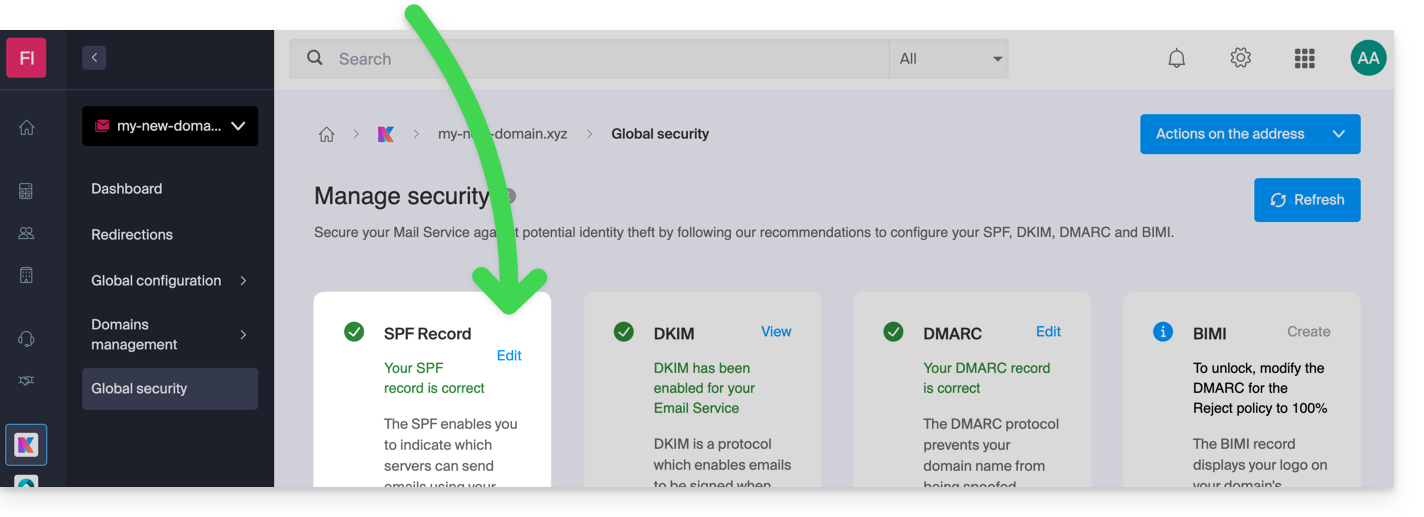
    If you have a Mail Service with Infomaniak, the simplest way is to go to the Global Security tool to manage SPFs:

    However, since the SPF record is a TXT type DNS record, you can also manage it from the DNS zone of the domain name:

    1. Click here to access the management of your domain on the Infomaniak Manager (need help?).
    2. Click directly on the name assigned to the domain in question.
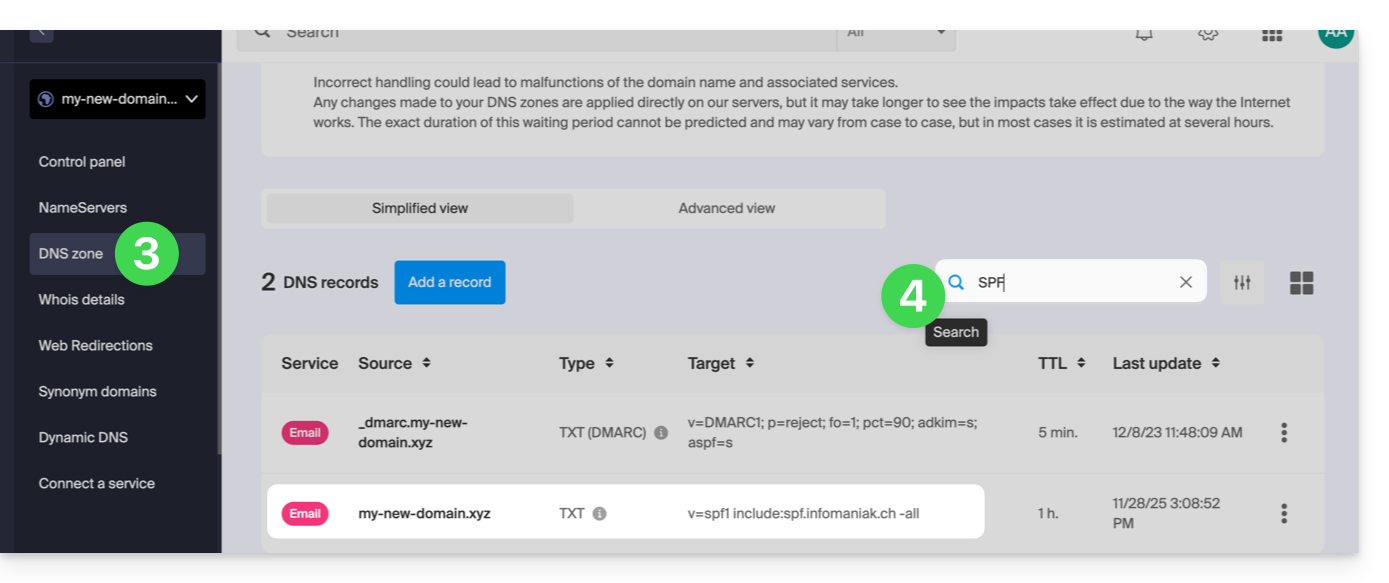
    3. Click on DNS Zone in the left sidebar menu.
    4. Check in the table that there is not already a TXT record with a value mentioning SPF as here:
    5. Click the button to add a record (you will get an error if you try to add a TXT record with an SPF value when one already exists in the zone):
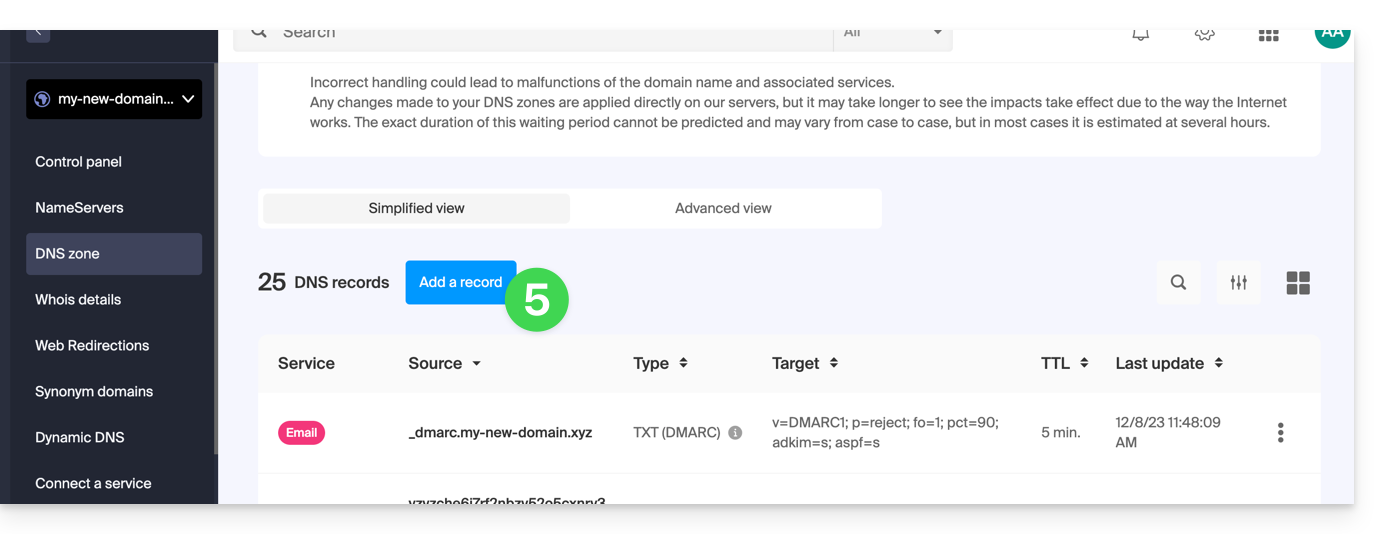
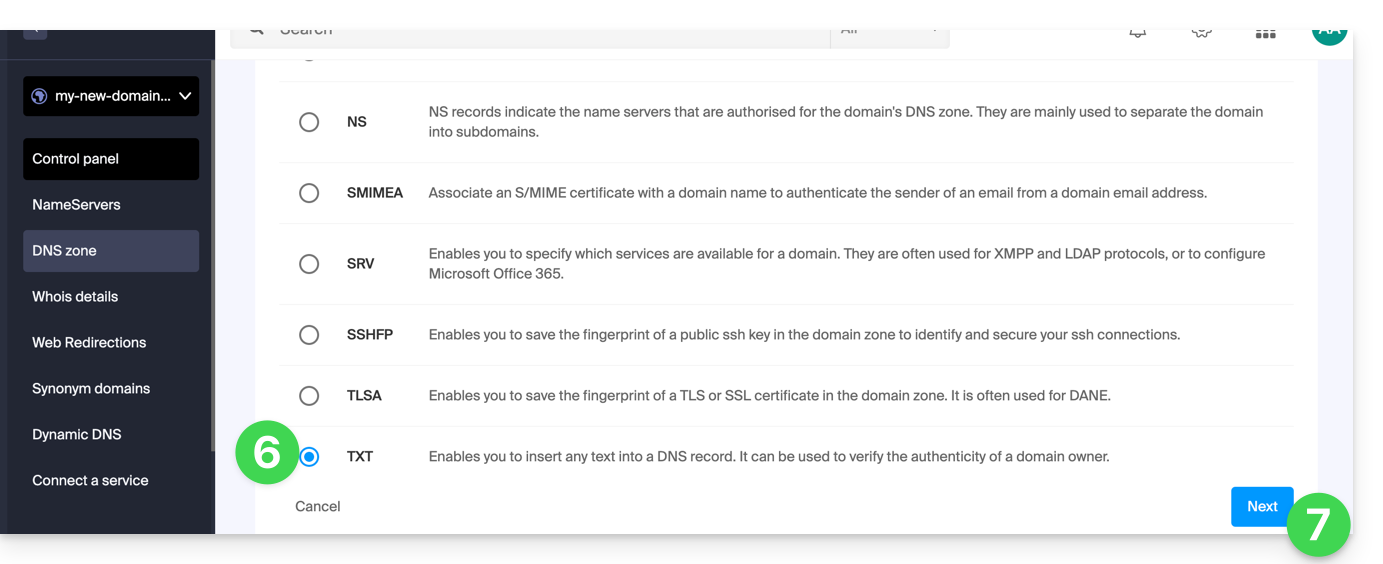
    6. Click the radio button TXT to add a record.
    7. Click the button Next:
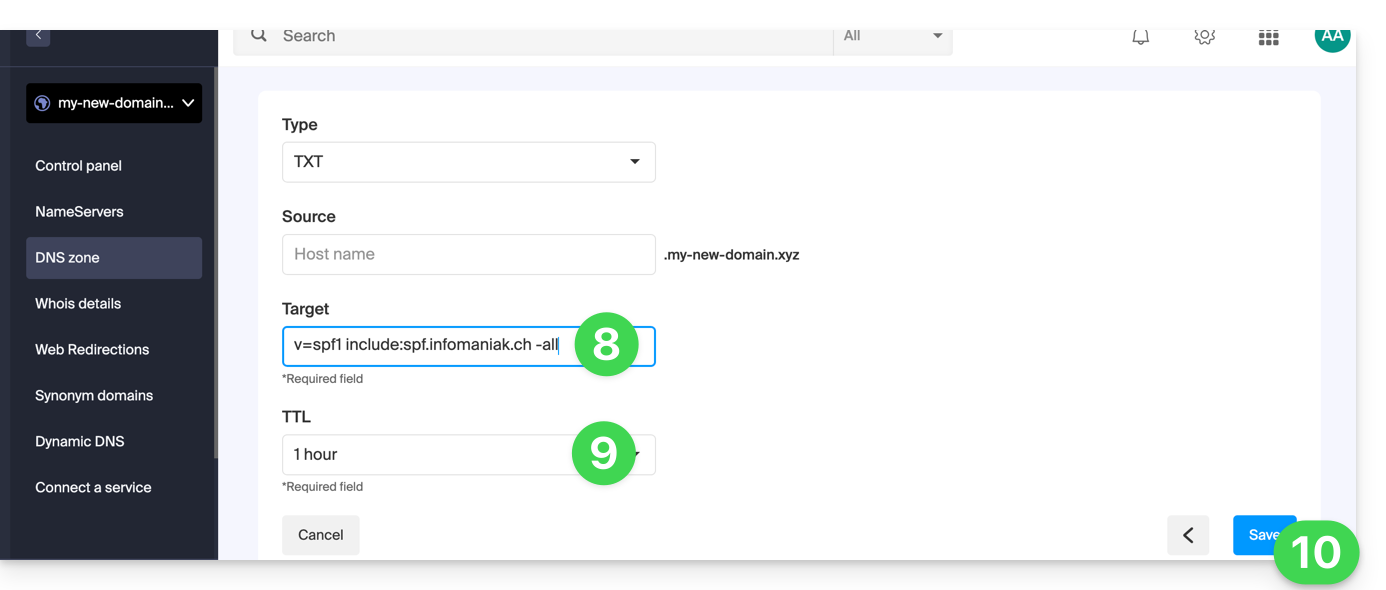
    8. Enter the SPF value required for your DNS zone.
    9. Leave the default value for TTL.
    10. Click the button Save:


    Add multiple SPFs

    If you use other mail providers in addition to Infomaniak, you need to obtain their SPF and then merge it with Infomaniak's according to a specific syntax.

    Having multiple distinct SPF records will cause errors. It is essential to group multiple SPFs into the same TXT!

    Example of 3 SPFs to merge:

    • That of Infomaniak: v=spf1 include:spf.infomaniak.ch -all
    • Those of 2 secondary providers:
      • v=spf1 include:the-second-domain.xyz ?all
      • v=spf1 include:the-other-domain.xyz ~all

    ...the final SPF to be inserted into your DNS zone should be in the form:

    v=spf1 include:spf.infomaniak.ch include:the-second-domain.xyz include:the-other-domain.xyz -all


    Delete any other SPF entry from the DNS zone of your domain! Any DNS addition/modification can take up to 48 hours to propagate.


    Limits on the number of SPFs

    Multiple SPFs are limited to a maximum of 10 inclusions.

    The Infomaniak SPF usually already includes 4 inclusions:

    • include:relay.mail.infomaniak.ch
    • include:app.mail.infomaniak.ch
    • include:newsletter.infomaniak.com
    • include:amazonses.com


    Check the SPF record(s)

    The Global Security tool on the Infomaniak Manager allows you to easily check and correct any problematic records you may have.

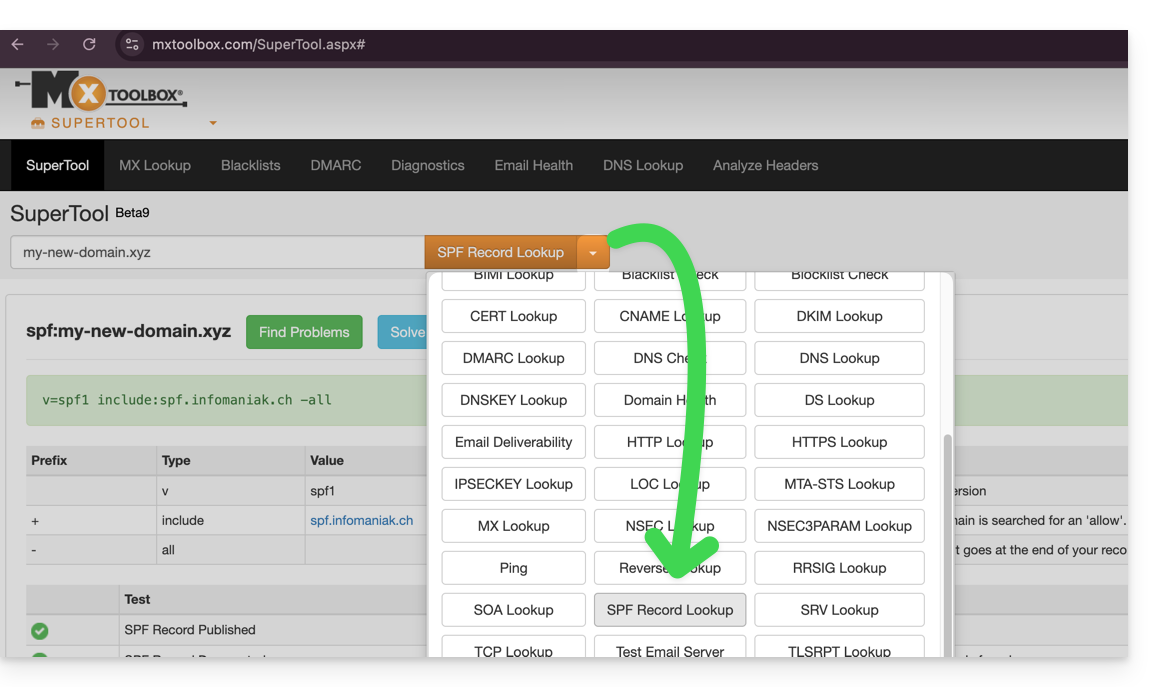
    If you encounter any issues, it is recommended to analyze your domain name on MxToolbox to check if your SPF contains syntax errors, too many inclusions, or any other issues that could lead to an error:

    … or directly at the address https://mxtoolbox.com/spf.aspx.


    Link to this FAQ:
    Has this FAQ been helpful?
    Thank you for your feedback. Improve this FAQ?
    Please do not ask any questions through this form, it is only used to improve our FAQ.
    Please use our contact form for any question.
    Your message has been sent. Thank you for suggesting an improvement to this FAQ.
    Display all FAQs for this product
    logo infomaniak
    Prices do not include VAT
    facebook
    twitter
    linkedin
    instagram

    Infomaniak

    About Infomaniak The team Infomaniak is recruiting Press space Infomaniak blog All certificates Products and offers Clients' opinions

    Support

    Assistance 7/7 FAQ and guides Premium Support Sales contact API REST Report abuse WHOIS Public Cloud status Service status

    Partnerships

    Become a reseller Affiliate programme Directory of partners Requests for quotes Infomaniak Academy

    Ecology

    Green hosting Certificates & awards

    Follow our development

    The email entered is invalid
    earth icon
    • EN
      • EN
      • DE
      • ES
      • FR
      • IT
    Β©2026 Infomaniak - Legal documents - Legal notice - Data Protection - Privacy Policy - Site map - Manage your cookies
    bcorp-logo
    icann-logo
    swiss
    new-iso
    swiss-hosting
    logo infomaniak
    Prices do not include VAT

    Infomaniak

    About Infomaniak The team Infomaniak is recruiting Press and media Infomaniak blog All certificates Products and offers Clients' opinions

    Support

    Assistance 7/7 FAQ and guides Premium Support offer Sales contact API REST Report abuse WHOIS Public Cloud status Service status

    Partnerships

    Become a reseller Affiliate programme Directory of partners Requests for quotes Infomaniak Academy

    Ecology

    Green hosting Certificates & awards

    Follow our development

    The email entered is invalid
    bcorp-logo
    icann-logo
    swiss
    new-iso
    swiss-hosting

    facebook
    twitter
    linkedin
    instagram
    Β©2026 Infomaniak
    Contracts - Legal notice - Data Protection - Privacy Policy - Site map - Manage your cookies

    Managers

    earth icon
    • EN
      • EN
      • DE
      • ES
      • FR
      • IT
    Your browser is outdated, security and browsability are no longer guaranteed. We recommend that you update it as soon as possible by clicking here.