Knowledge base
1000 FAQs, 500 tutorials and instructional videos. Here, there are only solutions!
Access phpMyAdmin
Update 10/26/2026
This guide explains how to access phpMyAdmin with a Web Hosting plan.
Introduction
- phpMyAdmin is an open-source administration tool designed to manage your MySQL and MariaDB databases via an intuitive web interface.
- It allows you to perform complex operations such as executing SQL queries, creating tables, or importing and exporting data without having to use the command line.
- phpMyAdmin is also available among the Web Applications to install (❓: help) on your hosting.
Accessing phpMyAdmin
To access the Web Hosting section related to Databases:
- Click here to access the hosting & website management section in your Infomaniak Manager (❓: help).
- Click on the name of the relevant hosting.
- Click on the chevron to the right of Databases in the left-hand menu.
- Click on Databases in the left-hand menu.
- Click on Connect to phpMyAdmin:
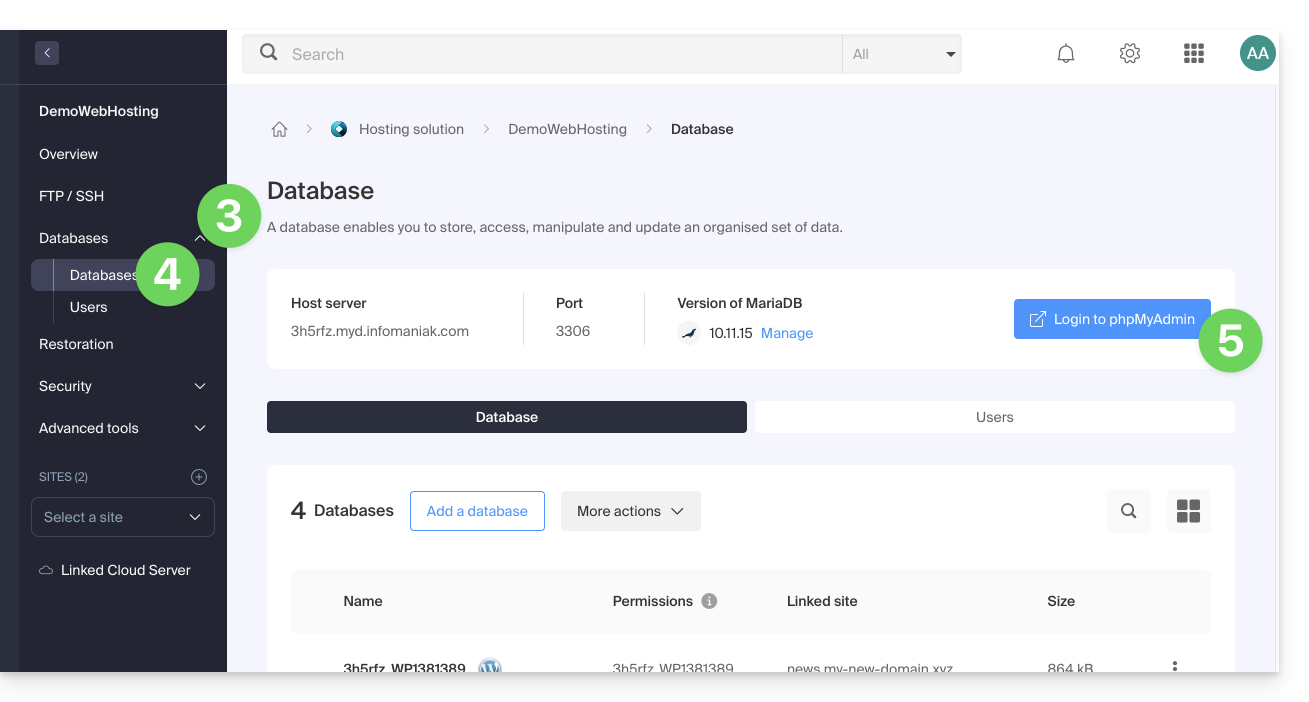
- The target server and a temporary user are automatically pre-filled.
You can also click on the action menu ⋮ located to the right of a database user: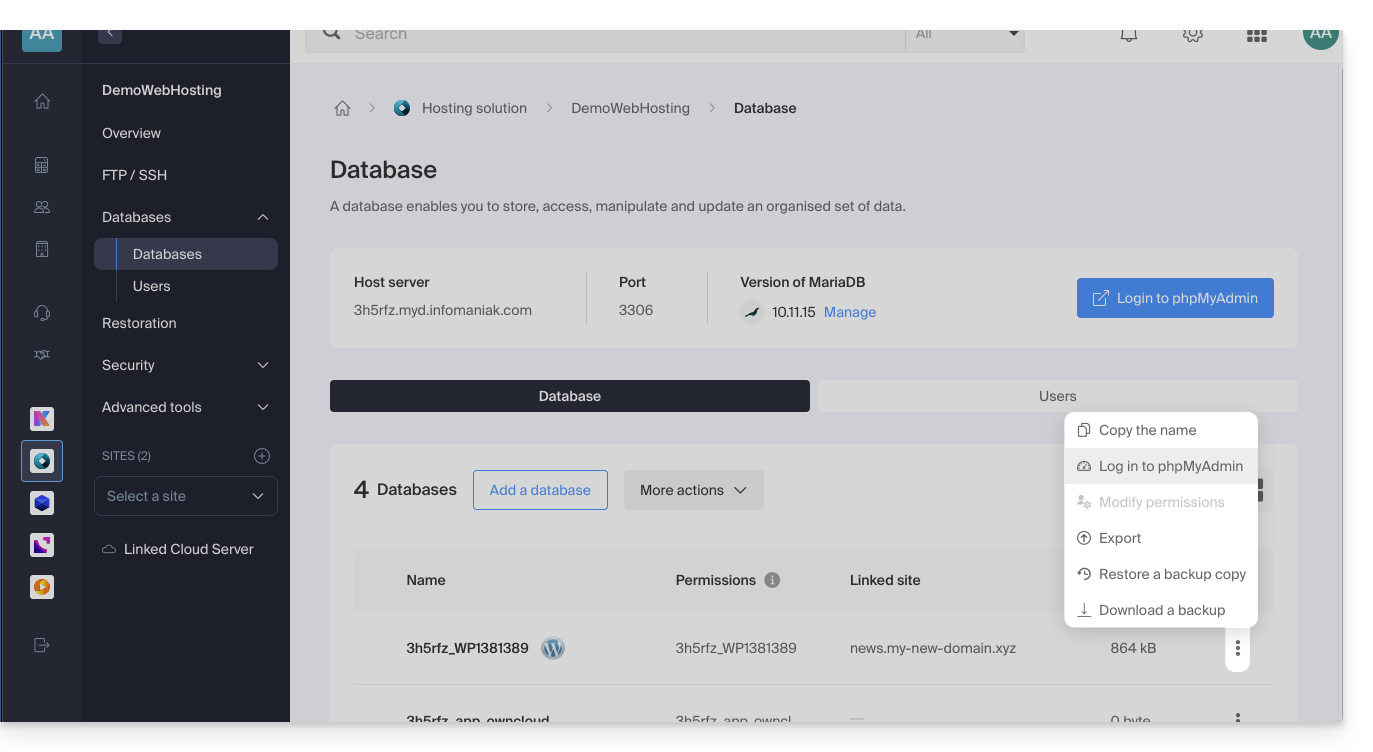
- The target server is automatically pre-filled.
- The password to enter corresponds to the database user.the one you chose when creating the MySQL user you can redefine it if you have forgotten it (❓: help).
Limitations and specific features of the shared instance
Certain phpMyAdmin storage features are disabled on shared servers for security and performance reasons:
SQL Queries
bookmarktable: disables bookmarks, i.e., the saving of SQL queries for later re-execution, possibly with variables.history: disables persistent SQL history.- History is no longer saved in the database between sessions and is limited to the current browser session.
savedsearches: disables saved searches in the "Query by example" tool.
Relationships and structure
relation: disables internal relationships between tables.- This is the basis for many functions: clickable links between foreign keys, drop-down lists of related values during data entry, relationships in the Designer and schemas, and export of relationships.
- True InnoDB foreign keys are still managed by MySQL, but "internal" relationships (useful for MyISAM) are no longer possible.
table_info: disables the display column, i.e., the descriptive column (e.g., a name) shown in place of or as a tooltip for a foreign key.column_info: disables column comments stored by phpMyAdmin, MIME types, and transformations (displaying a column as an image, link, formatted date, etc., as well as transformations on input).central_columns: disables the central columns, a list of column definitions that can be reused within a database to maintain consistent structures.
Schemas and Designer
table_coordsandpdf_pages: disable saving schema pages, including table positions.- You can no longer save relational schemas or export a schema from a saved page (PDF, SVG, etc.).
designer_coords: was used to save the position of tables in the Designer.- This parameter is obsolete in recent versions, which use
table_coordsandpdf_pagesinstead.
- This parameter is obsolete in recent versions, which use
designer_settings: disables the saving of Designer settings: right-angle links, grid or magnet, menu state, etc.
Preferences and interface
userconfig: disables the storage of user preferences in the database.- Settings made in "Settings" are no longer saved on the server.
- They can only be stored in the browser's local storage, so they will be lost if you switch devices or browsers.
table_uiprefs: disables the saving of table display settings: selected sorting, column order, hidden columns.recent: disables the persistent list of recently accessed tables.favorite: disables favorite tables (the star in the navigation panel).navigationhiding: disables the ability to hide items (databases, tables, views, etc.) in the navigation tree.
User Management
usersandusergroups: disables user groups, which allow you to restrict the tabs or menus of phpMyAdmin that are visible to each user.- The MySQL permissions themselves (accounts, privileges) are not affected.
Monitoring and export
tracking: disables change tracking.- This function logs changes to a table's structure (DDL) and data (DML), with versions and reports.
export_templates: disables export templates, i.e., saving a set of export options for later reuse.
Import
ldi_local_option: when importing a CSV file using the LOAD DATA method, phpMyAdmin does not use the LOCAL keyword by default.- The file must then be directly readable by the MySQL server, instead of being sent by the client.
- This is the default value, and it is rather prudent from a security point of view, because
LOAD DATA LOCAL INFILEis a known source of risks.
Link to this FAQ: https://faq.infomaniak.com/2179
Has this FAQ been helpful?