Knowledge base
1000 FAQs, 500 tutorials and instructional videos. Here, there are only solutions!
Delete one or more email addresses
Update 09/28/2026
This guide explains how to delete an email address from the Infomaniak Mail Service.
Delete one or more email addresses
Prerequisites
- You must have a Mail Service on your Infomaniak Manager (❓: help).
- Be an Administrator or Legal Representative within the Organization (❓: help).
Removing an email address or terminating a user account is done via the Mail Service dashboard. This action disconnects related services and requires careful consideration regarding the preservation of existing data. To remove an email address (its content will be permanently deleted):
- Click here to access the management of your Mail Service on the Infomaniak Manager (❓: help).
- Click directly on the name assigned to the Mail Service in question.
Once you are on the email address list page: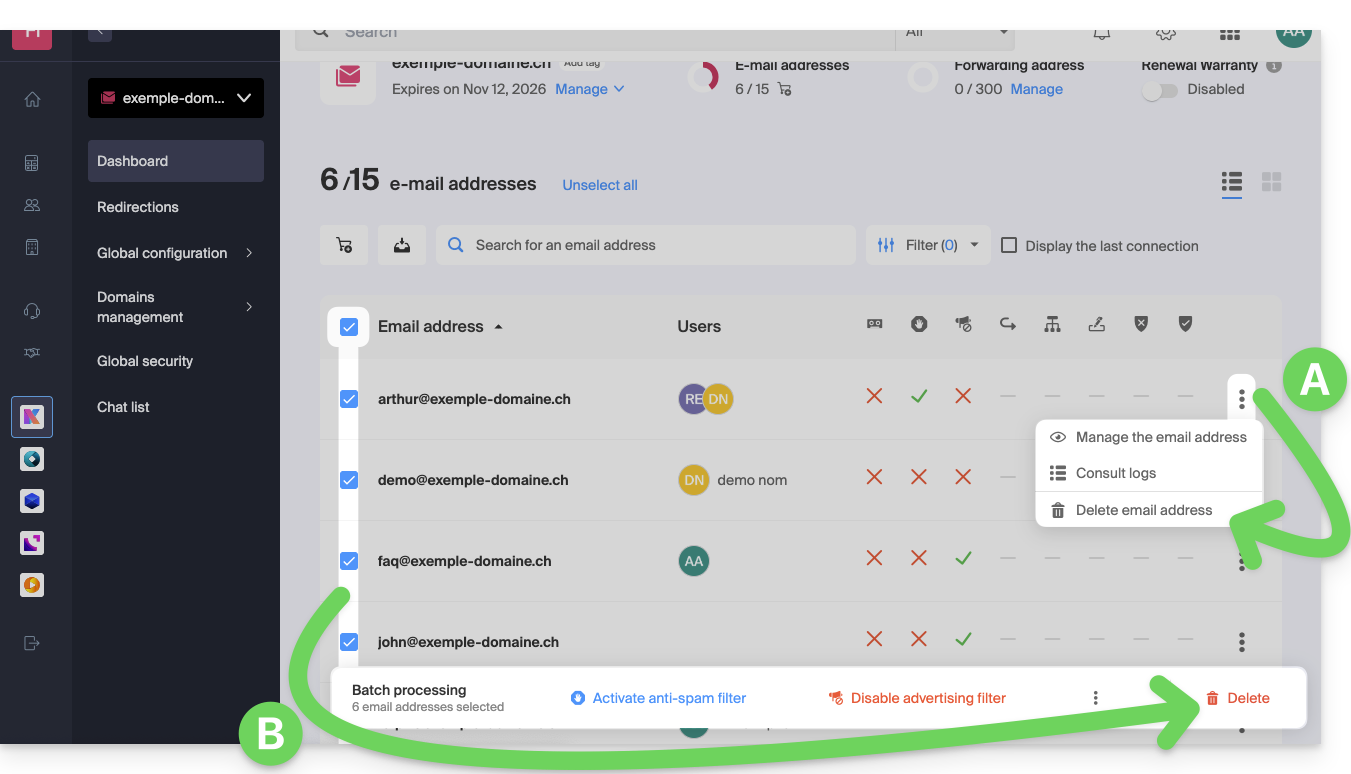
A. Delete one address at a time
- Click on the action menu ⋮ located to the right of the item in question.
- Choose to delete the email address.
B. Delete multiple addresses at once
- Select the addresses to delete by checking the boxes to the left of each line.
- Click Delete at the bottom of the screen.
Link to this FAQ: https://faq.infomaniak.com/2066
Has this FAQ been helpful?