Knowledge base
1000 FAQs, 500 tutorials and instructional videos. Here, there are only solutions!
Add a zone delegation for a subdomain
This guide explains how to set up a zone delegation for a subdomain.
Prerequisites
- Have a domain name with Infomaniak or at least a DNS zone.
- Understand:
- the operation of a domain and a DNS zone before modifying the latter.
- that the DNS zone presented here is valid and used only if the server names are those of Infomaniak.
- that any DNS addition/modification can take up to 48 hours to propagate.
Set up a zone delegation
To do this:
- Click here to access the management of your product on the Infomaniak Manager (need help?).
- Click directly on the name assigned to the product concerned.
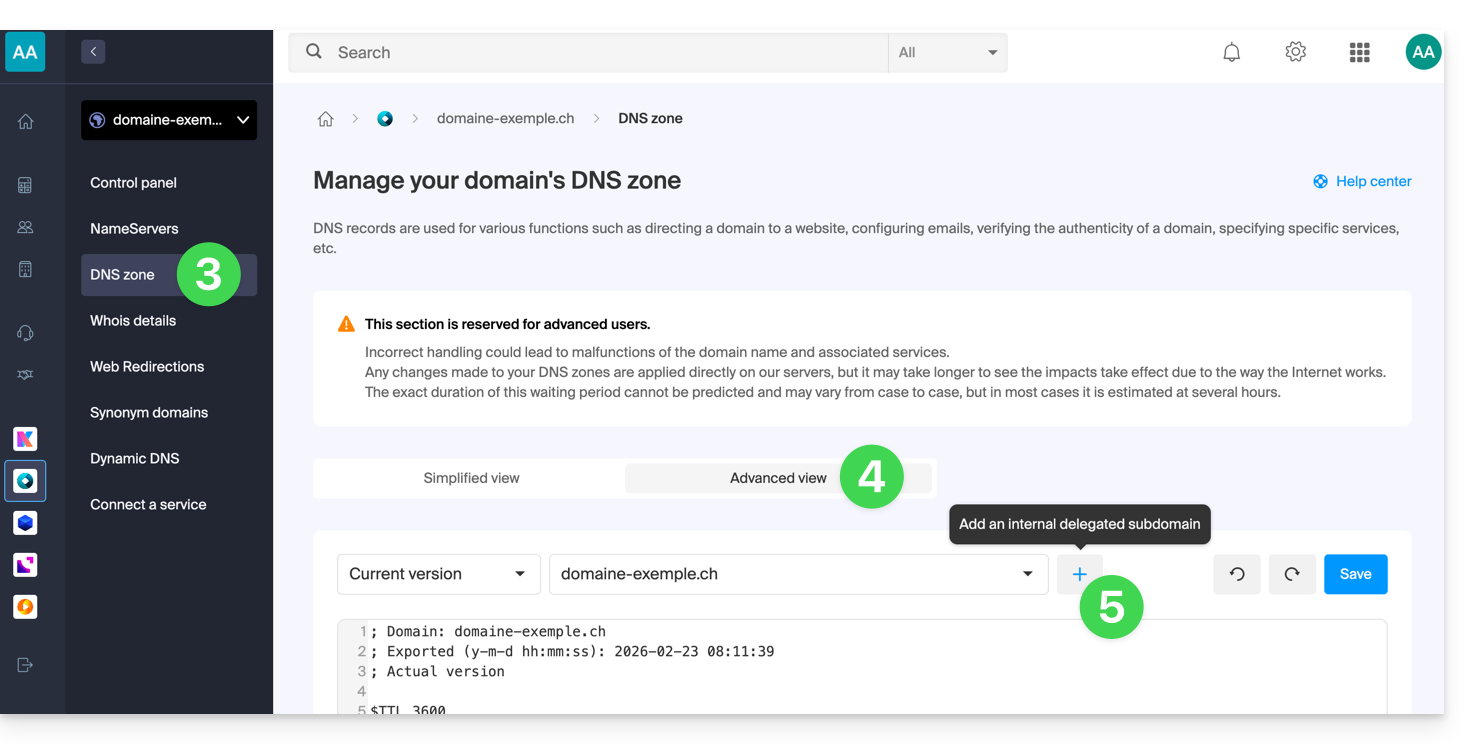
- Click on DNS zone in the left sidebar.
- Click on the Advanced view tab.
- Click on the + button:
- Enter the desired subdomain (for example
testto gettest.domain.xyz) - It is now possible to edit the DNS zone of the delegated subdomain.
Link to this FAQ: https://faq.infomaniak.com/2050
Has this FAQ been helpful?