Knowledge base
1000 FAQs, 500 tutorials and instructional videos. Here, there are only solutions!
Discover Manager, the Infomaniak administration interface
This guide explains how the Infomaniak services administration interface, called Manager, works. https://manager.infomaniak.com.
Introduction
- The Manager is Infomaniak's interface that allows you to manage your various Infomaniak products, such as domain names and hosting, as well as the administrative section, billing, etc.
Ordering a product = creating an account
If you do not yet have any products with Infomaniak, you will be prompted to create an account (with a login ID) during the ordering process, and an Organization is automatically created at this time.
For an individual, the name of the Organization will generally consist of their first and last name, while for a company, it will generally be its name or company name.
Once the Organization has been created by this first user, it is possible…
1. Other users will be able to…
- … all rights and therefore be an administrator of the Organization
- … limited rights (access to specific products)
- … with or without billing rights
2. Other Organizations may…
- … contain other products unrelated to the other Organizations
- … have their own users who will not have access to other Organizations
The concept of Organization is particularly interesting for people who need manage multiple products for different clientsswitch from one account (Organization) to another
Navigating and accessing your products
There are several ways to access your products, for example, the list of your hosting accounts (where your websites are located), once you are logged in.
Can't find your products?
If you are on an interface where your hosting products are not displayed, you are probably on kSuite; click on the icon in the top right corner of the interface to switch between the kSuite apps (Mail, for example) and the Manager:
If you still can't find them, check the currently displayed organization…
Can't find your address in the webmail app?
Check the currently displayed Organization because the associated email addresses are displayed by Organization. You may need to switch to another Organization to find the email address you want to view.
Navigating within the Infomaniak Manager
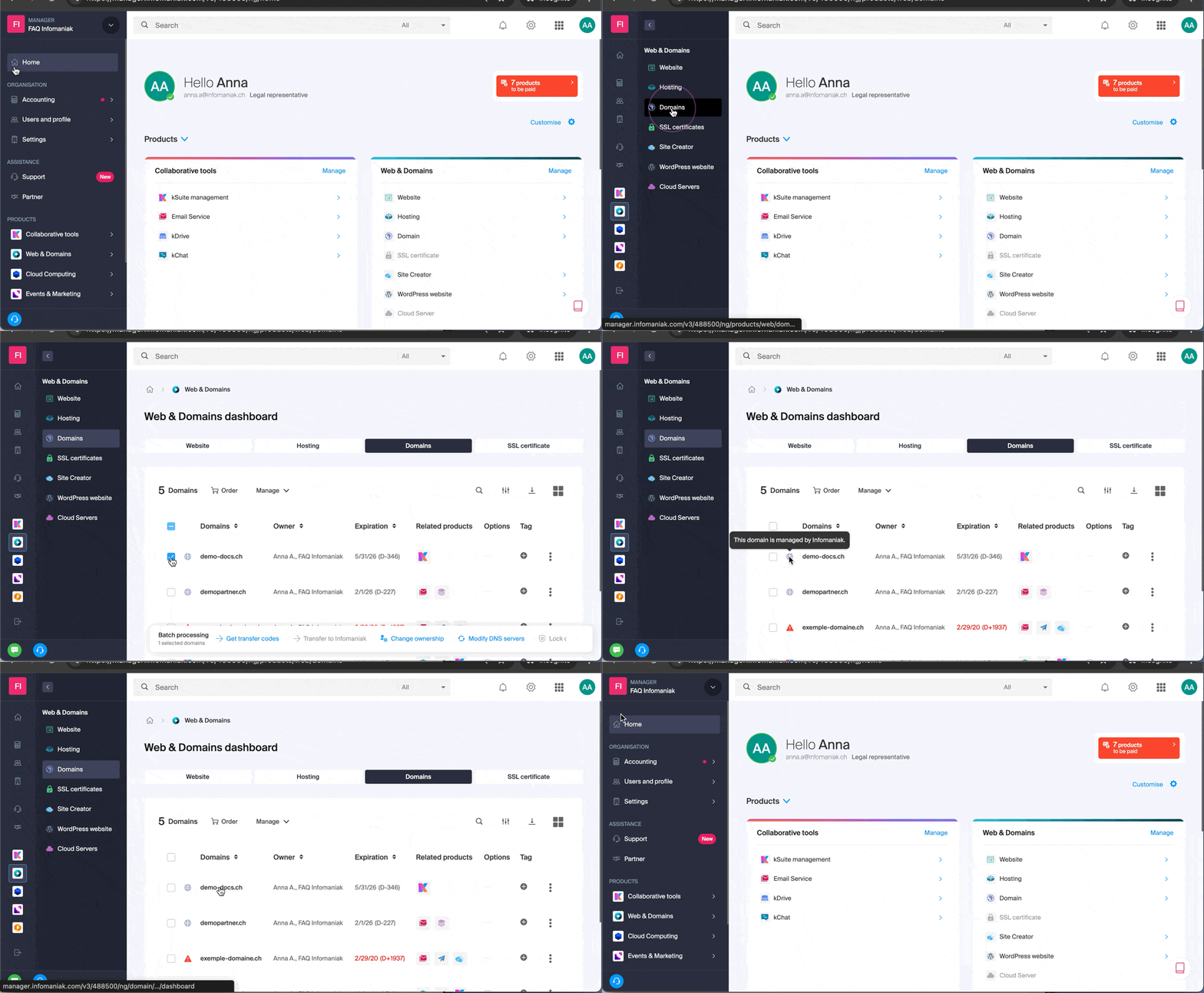
You can navigate using the menu on the left, by clicking on Web & Domain and then on Hosting:
You can also click in the center of the home page on Hosting (under Web & Domain):
There is another way to do this in the FAQs: simply click on the link (example) provided in the guide to go directly to the relevant product type.
All you need to do is click on the name assigned to your product (for example, domain.xyz when you reach the page for managing your domain names).
Display the online tutorial
Click on the icon in the bottom right corner to access the visual guide that introduces you to the main sections of the Manager:
Troubleshooting issues in the Manager
Unable to log in?
Please refer to this other guide.
Is the product you are looking for grayed out or invisible?
You are probably not in the correct Organization or user account if your usual products are not visible. Check and change the Organization (if your user account allows it) or re-login to a different user account.
Does a single click not load the desired page?
Do not click in the selection boxes for products, as nothing will happen (except for selecting them for a possible batch operation), but click directly on the name assigned to the product:
Is the desired operation not possible or displayed in gray?
Your user may not have sufficient permissions within the Organization, or may no longer have them. Try to find out more with this other guide (or this one if it concerns actions related to email).
Link to this FAQ: https://faq.infomaniak.com/1990
Has this FAQ been helpful?