Knowledge base
1000 FAQs, 500 tutorials and instructional videos. Here, there are only solutions!
Show Streaming Radio logs
This guide concerns the listening data for Infomaniak Streaming Radio, which can be exported using the FTP protocol. These logs (which are also used to generate listening statistics (❓: help) after being “cleaned” or “processed”) are then automatically transferred via FTP for subsequent processing.
Introduction
- Your radio logs will be provided in the form of a compressed file
xyz.mp3-20140805.log.gz(the log date is inYYYYMMDDformat). - Each log starts at 04:00 Swiss time and ends at 03:59:59 the following day.
- The log is in the following format:
ip user-identifier authuser [date-time] "request" status bytes "referer" "useragent" listening-time:81.56.215.98 - - [09/Apr/2019:08:23:18 +0200] "GET /toto.mp3 HTTP/1.1" 200 1211297 "-" "Mozilla/5.0 (X11; U; Linux i686; en-US; rv:1.9.0.8) Gecko/2019032711 Ubuntu/8.10 (intrepid) Firefox/3.0.8" 69- It may happen that the log line is malformed, for example, due to a referer that is too long; this behavior of Icecast cannot be changed.
- The addresses in the 84.16.67.128/25 range should be ignored because these are the streaming servers.
- From the settings page in the Manager, you can request logs for past days.
- You can also directly export them to ACPM (❓: help) or Mediapulse (❓: help).
Enable sending logs via FTP
To do this:
- Click here to access the management of your product in the Infomaniak Manager (need help?).
- Click directly on the name assigned to the product in question.
- Click on the name of the audio stream in question.
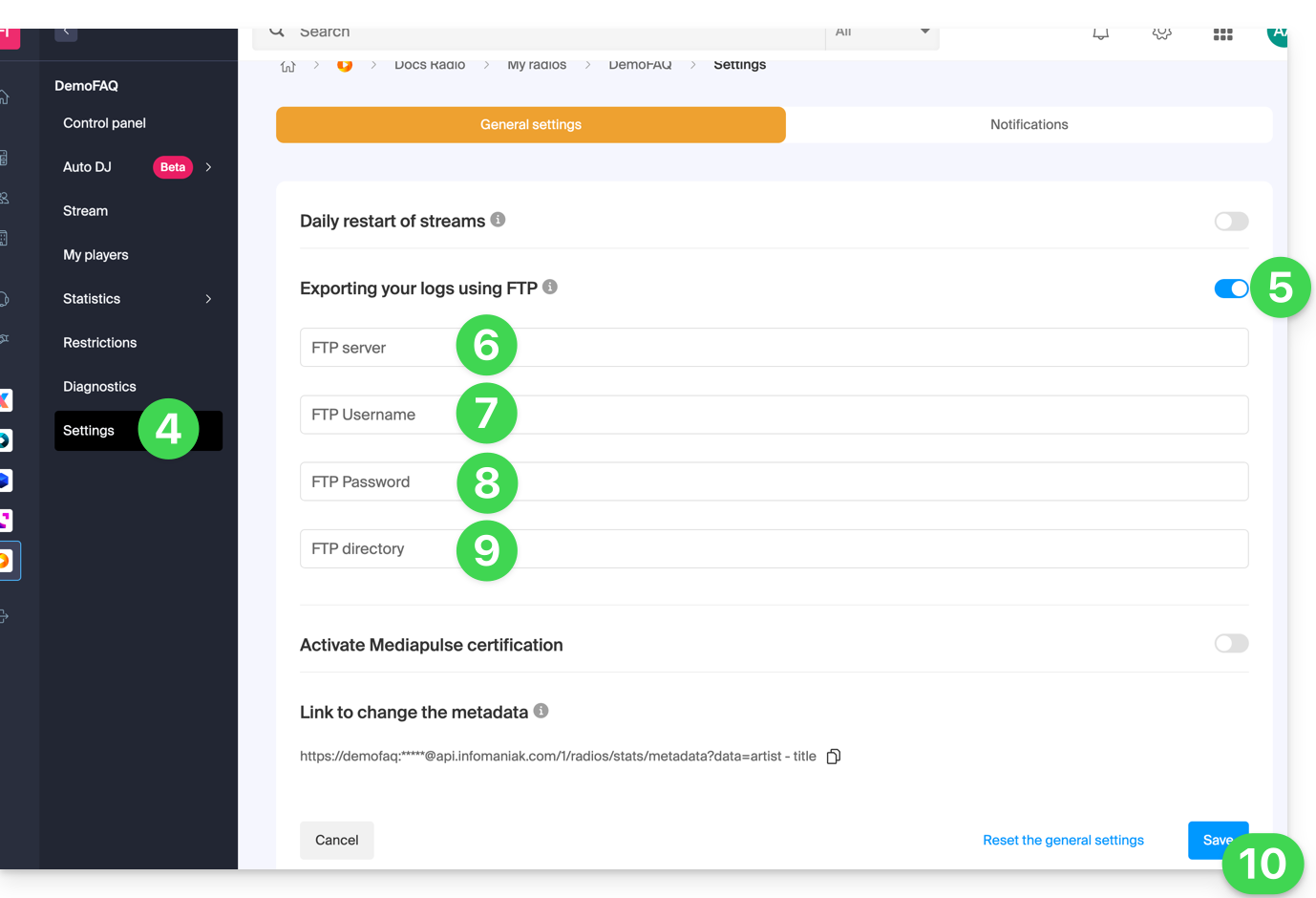
- Click on Settings in the left-hand menu.
- Enable log export via FTP using the toggle switch.
- Enter a hostname: the address of the FTP server.
- Enter a username: the name of the FTP account.
- Enter a password: the password for the FTP account.
- Enter the directory on the server where the logs will be stored.
- Click the Save button at the bottom of the page:
To retrieve your logs, use only the standard FTP protocol in Passive mode. The service is not compatible with SFTP, FTPS, or SSH keys. The system provides 3 connection attempts in case of interruption.
Processing the logs
The best approach is to use a regular expression like the one below:
"/^(\S+)\s(.+)\s(\S+)?\s\[((\d\d)\/([a-zA-Z]{3,3})\/(\d\d\d\d)\:(\d\d)\:(\d\d)\:(\d\d)\s\+\d\d\d\d)\]\s"GET\s\/([\-a-z0-9]{1,40}(\.)?(mp3|aac|ogg){0,1})(.*)?"\s(\d{3,3})\s(\d+)\s"(.+)"\s"(.+)"\s(\d+)$/i";This syntax is for the PHP function preg_match and will need to be adapted if other functions/languages are used.
The preg_match function returns an array with the following significant positions:
| 1 | ip |
| 4 | date - full time |
| 5 | day |
| 6 | month |
| 7 | year |
| 8 | hour |
| 9 | min |
| 10 | seconds |
| 11 | mount point |
| 15 | result (HTTP code) |
| 16 | length in bytes |
| 18 | user agent |
| 19 | listening duration (seconds) |
Link to this FAQ: https://faq.infomaniak.com/1954
Has this FAQ been helpful?