Knowledge base
1000 FAQs, 500 tutorials and instructional videos. Here, there are only solutions!
Show web access and error logs
Update 10/13/2026
This guide explains how to view and download Apache logs for Web Hosting, which are useful for analyzing PHP errors or diagnosing certain application behaviors.
Introduction
- Access and error logs are kept for at least 7 days.
- Once the retention period has elapsed, older entries cannot be restored, even upon request.
- You can also find these files directly on the server via SSH/FTP in the
ik-logsfolder at the root of your hosting.
Accessing access and error logs
To view these logs:
- Click here to access the hosting & website management section in your Infomaniak Manager (❓: help).
- Click on the name of the website in question.
- Click on Advanced in the left sidebar.
- Click on Logs in the left sidebar.
- Click on Errors or Access to view the error log or access log.
- Select a period if necessary.
- Click on the icon to view the details.
- Click on Send by email to immediately receive all entries by email at your user address.
- Click to export the data in
.logformat: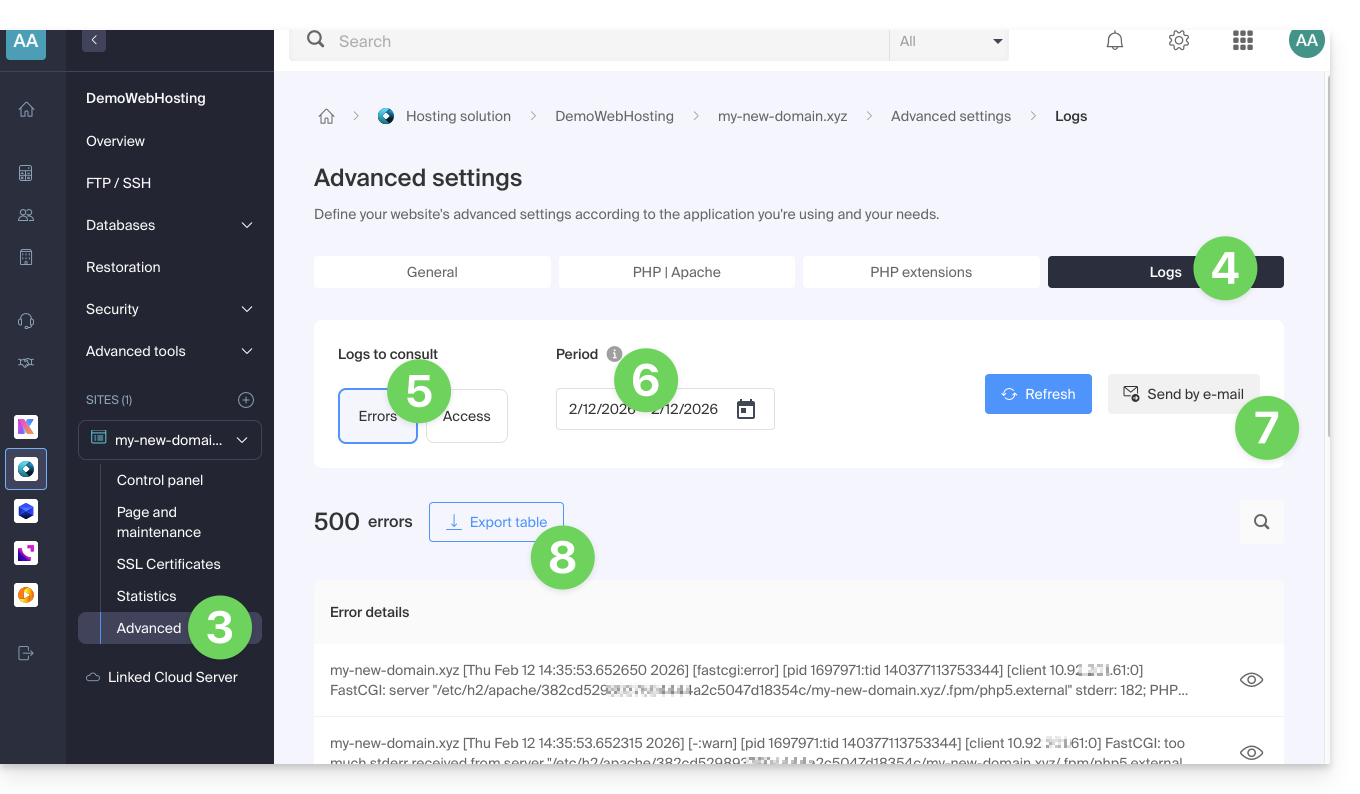
Identify the most active IP addresses in the access logs
To do this, connect to the server via SSH (need help?).
The command to execute via SSH is as follows:
cat ik-logs/access.log | awk '{ print $2}' | sort -n | uniq -c | sort -n | tail -n 20Link to this FAQ: https://faq.infomaniak.com/1926
Has this FAQ been helpful?